
1. Introduction
Thank you for choosing the Thitronik 214/192 WiPro III safe.lock Alarm System. This advanced security system is designed to provide reliable protection for your vehicle. Please read this manual carefully before installation and operation to ensure proper use and maximum security.
2. Safety Information
- Professional Installation Recommended: For optimal performance and to avoid damage to your vehicle's electrical system, professional installation by a qualified technician is highly recommended.
- Power Disconnection: Always disconnect the vehicle's battery before performing any installation or maintenance to prevent electrical shock or damage.
- Wiring: Ensure all wiring is correctly connected and insulated to prevent short circuits. Refer to your vehicle's wiring diagrams if necessary.
- Environmental Conditions: Do not expose the alarm system to extreme temperatures, moisture, or direct sunlight for prolonged periods.
- Tampering: Do not attempt to open or modify the alarm unit. This will void the warranty and may cause malfunction.
3. Product Overview
The Thitronik 214/192 WiPro III safe.lock is a sophisticated alarm system designed for vehicle security. It features a robust main unit and integrates with various sensors to detect unauthorized entry or movement.
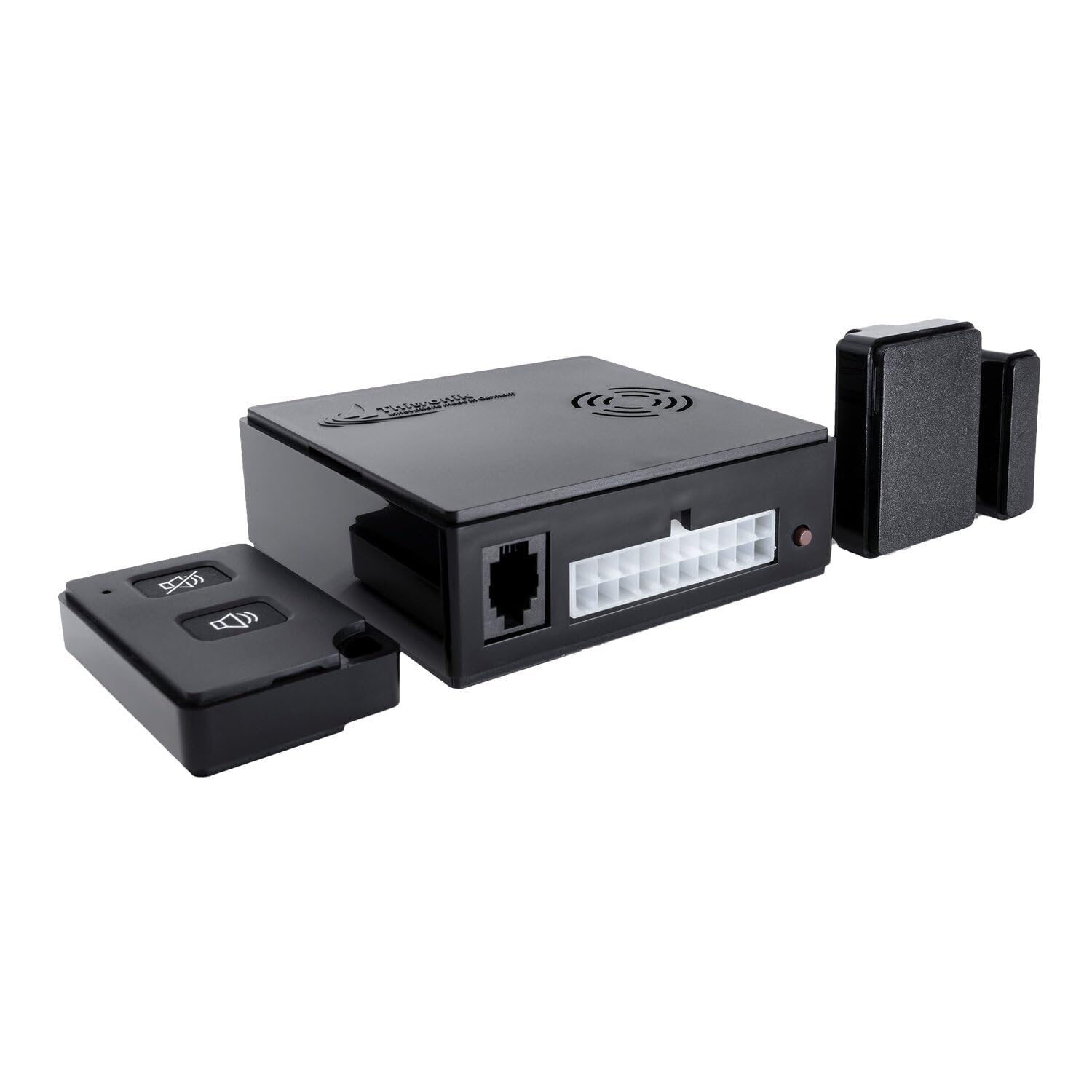
Figure 3.1: Front view of the Thitronik 214/192 WiPro III safe.lock main unit. This image displays the compact design of the alarm system, highlighting its primary casing and potential sensor areas.

Figure 3.2: Side view of the Thitronik 214/192 WiPro III safe.lock unit. This perspective shows the profile and mounting points, indicating its suitability for discreet installation within a vehicle.
4. Setup and Installation
The Thitronik 214/192 WiPro III safe.lock is designed for integration into your vehicle's electrical system. Due to the complexity of vehicle wiring and security systems, professional installation is strongly advised.
4.1. Power Connection
The alarm system typically draws power directly from the vehicle's 12V electrical system. Ensure that the power connections are made to a constant 12V supply and a switched 12V supply (ignition) as per the detailed wiring diagram provided with the product packaging. Incorrect wiring can lead to system malfunction or damage to the vehicle.
4.2. Mounting the Main Unit
Mount the main alarm unit in a secure, hidden location within the vehicle, away from direct moisture and extreme temperatures. Ensure that the unit is firmly fixed to prevent dislodgement during vehicle movement. Use the provided mounting hardware (screws or adhesive pads, depending on the specific kit) to secure the unit.
4.3. Sensor Installation
Connect any additional sensors (e.g., door contacts, motion sensors, tilt sensors) according to the specific instructions provided with those accessories. Ensure all sensor cables are routed safely and securely, avoiding interference with moving parts or other electrical components.
5. Operating Instructions
Once installed, the Thitronik 214/192 WiPro III safe.lock system is operated primarily via your vehicle's remote control or an optional dedicated remote control.
5.1. Arming the System
To arm the alarm system, ensure all doors, windows, and compartments are closed. Press the lock button on your vehicle's remote control or the dedicated arming button on the alarm's remote. The system will typically respond with a single flash of the indicator lights and a short beep to confirm arming. A delay period may follow before the system is fully active.
5.2. Disarming the System
To disarm the alarm system, press the unlock button on your vehicle's remote control or the dedicated disarming button on the alarm's remote. The system will typically respond with two flashes of the indicator lights and two short beeps to confirm disarming.
5.3. Alarm Trigger
If the alarm is triggered (e.g., by unauthorized entry, motion detection), the siren will sound, and the vehicle's indicator lights will flash. To silence and disarm the alarm, follow the disarming procedure described above.
5.4. Panic Function (if available)
Some systems include a panic function. Refer to your specific remote control's instructions for activating this feature, which typically triggers the alarm immediately.
6. Maintenance
- Regular Checks: Periodically check the alarm system's functionality by arming and disarming it. Ensure all sensors are working correctly.
- Cleaning: Keep the main unit and sensors clean and free from dust and debris. Use a soft, dry cloth for cleaning. Do not use harsh chemicals or abrasive cleaners.
- Wiring Inspection: Occasionally inspect visible wiring for any signs of wear, damage, or loose connections.
- Software Updates: Check the Thitronik website or consult your installer for any available software updates for your system.
7. Troubleshooting
| Problem | Possible Cause | Solution |
|---|---|---|
| System does not arm/disarm | Remote control battery low; out of range; door/hood/trunk open; system fault. | Replace remote battery; move closer to vehicle; ensure all entry points are closed; consult installer. |
| False alarms | Sensor sensitivity too high; faulty sensor; environmental factors (e.g., strong winds, vibrations). | Adjust sensor sensitivity (if adjustable); inspect sensors for damage; consult installer. |
| Siren does not sound | Siren disconnected or faulty; power issue. | Check siren connections; verify power supply; consult installer. |
| Indicator lights not flashing | Wiring issue; system fault. | Check wiring to vehicle lights; consult installer. |
If you encounter persistent issues not covered here, please contact your professional installer or Thitronik customer support.
8. Specifications
- Brand: Thitronik
- Model: 214/192
- Model Name: Safe.Lock
- Part Number: 214/192
- Special Features: Alarm system
- Included Components: Safe.Lock (main unit)
- Number of Items: 1
- Batteries Included: No
- Batteries Required: No (Vehicle powered)
- Material Type: Alloy steel
- Item Model Number: 214/192
- Product Dimensions: 32 x 10 x 20 cm
- Item Weight: 350 g
- First Available Date: January 15, 2020
9. Warranty and Support
For warranty information, please refer to the documentation included with your purchase or visit the official Thitronik website. Keep your proof of purchase for warranty claims.
For technical support, installation assistance, or service inquiries, please contact your authorized Thitronik dealer or the manufacturer's customer service department. Contact details can typically be found on the product packaging or the official Thitronik website.


