
1. Introduction
This manual provides essential information for the safe and effective installation, operation, and maintenance of the Aexit TD-1510 DIN Rail Barrier Terminal Block. This device is designed for secure electrical connections in industrial and commercial applications, facilitating organized wiring within control panels and enclosures.
2. Product Features
- Type: TD-1510 Barrier Terminal Block
- Rated Value: 660V, 15A
- Poles: 10 Positions (Dual Row)
- Mounting: DIN Rail Mount
- Connector Type: Screw terminals for secure wire connections
- Construction: Insulated design with plastic outer casing and plated metal screw connectors
- Dimensions: Approximately 11cm x 2.7cm x 3cm (L*W*H) / 4.3" x 1.1" x 1.2"
3. Safety Information
Always adhere to local electrical codes and safety regulations when installing or working with electrical components. Failure to do so may result in personal injury or equipment damage.
- Ensure power is disconnected before installation, wiring, or maintenance.
- Only qualified personnel should perform electrical work.
- Verify voltage and current ratings of connected circuits do not exceed the terminal block's specifications (660V, 15A).
- Use appropriate personal protective equipment (PPE), such as insulated gloves and safety glasses.
- Prevent short circuits by ensuring proper insulation and secure connections.
4. Setup and Installation
The Aexit TD-1510 terminal block is designed for easy mounting on standard DIN rails.
- Mounting: Securely attach the terminal block to a compatible DIN rail within your electrical enclosure. Ensure the mounting screws are tightened to prevent movement.
- Wiring:
- Prepare wire ends by stripping insulation to the appropriate length for the screw terminals.
- Insert the stripped wire into the desired terminal opening.
- Tighten the screw connector firmly to ensure a secure electrical and mechanical connection. Avoid over-tightening, which can damage the wire or terminal.
- Verify that no stray wire strands are exposed, which could lead to short circuits.
- Insulation: The terminal block features individual insulation between each pair of terminals. Ensure all connections are properly seated and covered by the clear protective cover (if applicable) to maintain insulation integrity.

Figure 1: Front view of the Aexit TD-1510 terminal block, showing the 10 dual-row screw terminals and the clear protective cover.

Figure 2: Top view of the Aexit TD-1510 terminal block, illustrating its attachment to a standard DIN rail.
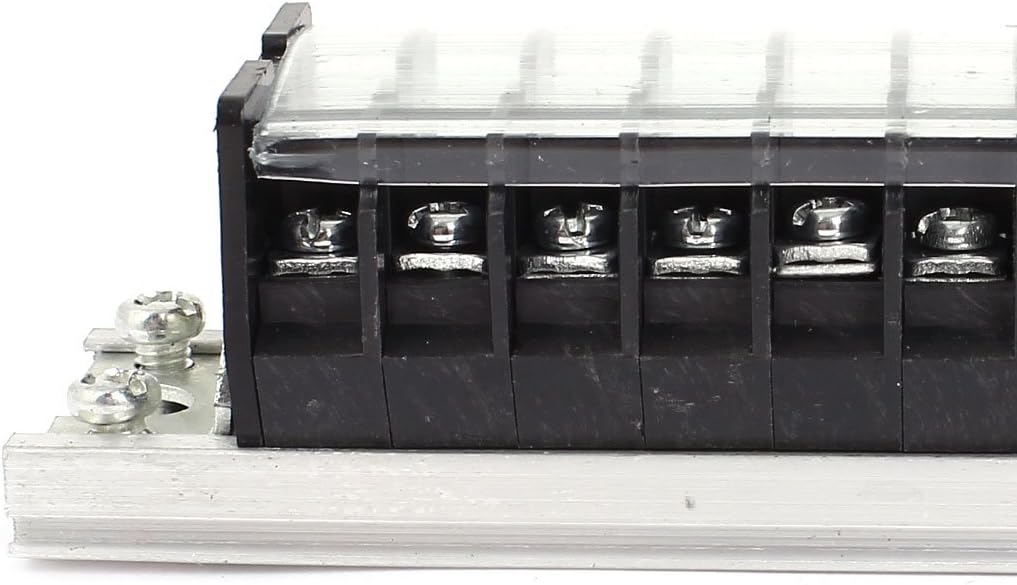
Figure 3: Close-up view of the screw terminals, highlighting the secure connection points for wiring.
5. Operation
The Aexit TD-1510 terminal block functions as a passive electrical connection point. Once properly installed and wired, it provides a secure and organized method for distributing electrical power or signals within a circuit. There are no active operational controls on the terminal block itself.
6. Maintenance
Regular inspection and maintenance can help ensure the longevity and reliability of the terminal block.
- Periodic Inspection: Visually inspect the terminal block and connections at regular intervals for any signs of damage, corrosion, or loose wires.
- Tightness Check: Periodically re-check the tightness of all screw connections, especially after initial installation and during routine maintenance. Vibrations or thermal cycling can sometimes cause screws to loosen.
- Cleaning: If necessary, gently clean the terminal block with a dry, non-conductive cloth to remove dust or debris. Ensure power is off before cleaning.
- Environmental Conditions: Ensure the operating environment remains within suitable temperature and humidity ranges to prevent material degradation.
7. Troubleshooting
Most issues related to terminal blocks stem from improper installation or wiring.
- No Continuity/Intermittent Connection:
- Check for loose screw connections.
- Ensure wires are properly stripped and fully inserted into the terminals.
- Inspect wires for damage or breaks.
- Verify that the correct terminals are being used for the circuit.
- Overheating/Discoloration:
- Indicates excessive current or loose connections. Immediately disconnect power.
- Verify that the circuit's current does not exceed the 15A rating of the terminal block.
- Re-tighten all connections.
- Physical Damage:
- If the plastic housing or metal parts are cracked or deformed, the terminal block should be replaced immediately to ensure safety and proper function.
8. Specifications
| Attribute | Value |
|---|---|
| Product Name | Barrier Terminal Block |
| Type | TD-1510 |
| Rated Voltage | 660V |
| Rated Current | 15A |
| Poles | 10P (Dual Row) |
| Mounting Type | DIN Rail Mount |
| Connector Type | Screw |
| Material | Metal, Plastic (Silver-plated connectors) |
| Size (L*W*H) | 11cm x 2.7cm x 3cm / 4.3" x 1.1" x 1.2" |
| Color | Black, Silver Tone, Clear |
| Weight | 65g |
9. Warranty and Support
For warranty information, technical support, or service inquiries regarding the Aexit TD-1510 DIN Rail Barrier Terminal Block, please refer to the documentation provided at the point of purchase or contact the seller directly. Specific warranty terms and support channels may vary depending on your region and retailer.