
Baseus B11
Contents
Baseus B11 Licolor Magnet Bluetooth Earphone
Model: B11 | Brand: Baseus
Introduction
The Baseus B11 Licolor Magnet Bluetooth Earphone is a wireless headset designed for stable and cable-free audio experience. It features a magnetic fixed design for convenient wear and storage, high-fidelity sound, and intuitive line-in controls for managing music and calls. Its ergonomic design ensures a comfortable and secure fit for extended use.
Key Features
- Magnetic Fixed Design: Aluminum alloy shell with strong magnetic absorption for easy wear and secure neck fixation when not in use.
- Anti-slip Wearing: Ergonomic oblique in-ear-monitor design ensures a comfortable and stable fit, suitable for long-term use without discomfort.
- HiFi Sound Quality: Built-in high-rate decoding chips deliver high-fidelity audio, providing a rich and immersive listening experience.
- Durable TPE Cable: The soft, anti-winding TPE cable with reinforced joints ensures durability and flexibility.
- Simple On-Cord Control: Intuitive buttons allow for easy operation, including switching songs, adjusting volume, and answering calls.
Package Contents
- 1 x Baseus B11 Licolor Magnet Bluetooth Earphone with Line-in Control
- 3 pairs of Earmuffs (various sizes)
- 2 x Ear-hooks
- 1 x Charging Cable
- 1 x User Manual
Product Overview



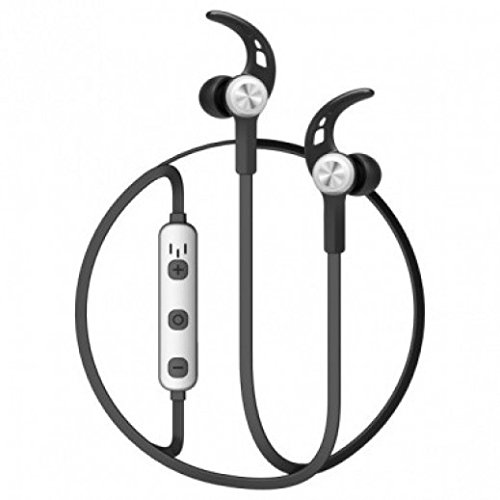
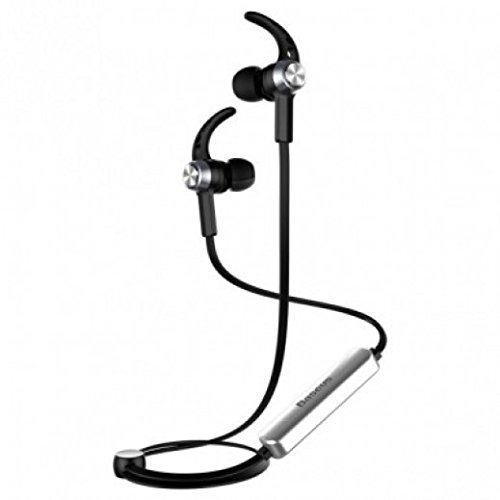

Setup
Charging the Earphones
- Connect the provided charging cable to the charging port on the earphone's control module.
- Connect the other end of the charging cable to a USB power source (e.g., computer USB port, USB wall adapter).
- The indicator light will show the charging status. A full charge takes approximately 1.5 hours.
- Once fully charged, disconnect the charging cable.
Pairing with a Device
- Ensure the earphones are fully charged and turned off.
- Press and hold the multi-function button on the control module until the indicator light flashes red and blue alternately, indicating pairing mode.
- On your Bluetooth-enabled device (smartphone, tablet, etc.), go to the Bluetooth settings and turn Bluetooth on.
- Search for available devices. You should see "Baseus B11" or a similar name in the list.
- Select "Baseus B11" to connect. Once connected, the indicator light will turn solid blue or stop flashing.
- If prompted for a password, enter "0000".
Operating Instructions
Basic Controls (In-line Control Module)
- Power On/Off: Press and hold the multi-function button.
- Play/Pause: Press the multi-function button once.
- Volume Up: Press the "+" button.
- Volume Down: Press the "-" button.
- Next Song: Press and hold the "+" button.
- Previous Song: Press and hold the "-" button.
- Answer/End Call: Press the multi-function button once during an incoming call.
- Reject Call: Press and hold the multi-function button during an incoming call.
- Redial Last Number: Double-press the multi-function button.
Wearing the Earphones
- Select the appropriate size of earmuffs and ear-hooks for a comfortable and secure fit.
- Insert the earbuds into your ears, ensuring the ear-hooks are positioned correctly over your outer ear for stability.
- The magnetic design allows the earbuds to snap together around your neck when not in use, preventing them from falling off.
Maintenance
- Cleaning: Regularly clean the earbuds and ear-hooks with a soft, dry cloth. Do not use harsh chemicals or abrasive materials.
- Storage: When not in use, store the earphones in a cool, dry place, away from direct sunlight and extreme temperatures. The magnetic design helps keep them tangle-free.
- Battery Care: To prolong battery life, avoid fully discharging the earphones frequently. Charge them regularly, even if not in constant use.
- Water Exposure: These earphones are not waterproof. Avoid exposure to water, rain, or excessive moisture.
Troubleshooting
- Earphones do not power on:
- Ensure the earphones are fully charged. Connect them to a power source and try again after a few minutes.
- Cannot pair with a device:
-
- Make sure the earphones are in pairing mode (indicator light flashing red and blue).
- Ensure Bluetooth is enabled on your device and it is within 10 meters of the earphones.
- Turn off Bluetooth on your device, then turn it back on.
- Forget or remove "Baseus B11" from your device's Bluetooth list and try pairing again.
- Restart both the earphones and your device.
- No sound or low volume:
-
- Check the volume levels on both the earphones and your connected device.
- Ensure the earphones are properly connected to your device.
- Try playing audio from a different application or source.
- Clean any debris from the earbud nozzles.
- Connection is unstable or frequently disconnects:
-
- Ensure there are no obstacles between the earphones and your device.
- Move closer to your device (within 10 meters).
- Avoid environments with strong Wi-Fi or other wireless interference.
- Disconnect and reconnect the earphones to your device.
Specifications
| Brand | Baseus |
| Model | B11 |
| Material | ABS + Aluminum alloy + TPE |
| Wireless Connection | Bluetooth V4.1 |
| Communication Distance | 10m |
| Battery Capacity | 60mAh |
| Working Time | 5-7 hours |
| Charging Time | 1.5 hours |
| Standby Time | 180 hours |
| Frequency Response | 20Hz-20KHz |
| Control Method | In-line Button Control |
| Ear Placement | In Ear |
| Special Features | Magnetic fixed design, Ear-hooks, Built-in Microphone |
| Cable Feature | Tangle-free |
| Item Weight | 170 g |
| Package Dimensions | 17.9 x 11.7 x 4.3 cm |
| Compatibility | Bluetooth-enabled smartphones and tablets (e.g., iPhone, iPad, Samsung, Sony, Huawei) |
Warranty and Support
For warranty information and customer support, please refer to the documentation provided with your purchase or visit the official Baseus website. Keep your proof of purchase for any warranty claims.
For further assistance, you may contact Baseus customer service through their official channels.
Ask a question about this manual
Ask about setup, troubleshooting, compatibility, parts, safety, or missing instructions. Manuals+ will review the question and use this page’s manual context to help answer it.