
DELTA EP92546
Delta EP92546 Solenoid Assembly Instruction Manual
Model: EP92546 | Brand: DELTA
Introduction
This manual provides detailed instructions for the installation, operation, and maintenance of the Delta EP92546 Solenoid Assembly. This component is designed to restore or enhance the functionality of compatible Delta faucets, particularly those with touch or hands-free features. Please read this manual thoroughly before beginning any installation or maintenance procedures to ensure proper function and safety.
Safety Information
- Always turn off the water supply to the faucet before beginning any work.
- Disconnect power to the faucet (if applicable, remove batteries or unplug AC adapter) before installation or maintenance.
- Wear appropriate personal protective equipment, such as safety glasses and gloves.
- Ensure all connections are secure to prevent leaks.
- If you are unsure about any step, consult a qualified plumber or contact Delta customer support.
Package Contents
Verify that all components are present before proceeding with installation:
- Delta EP92546 Solenoid Assembly
- Battery Pack (if included with your specific kit)
- Mounting Clip/Hardware (if applicable)
- Instruction Sheet (this document)
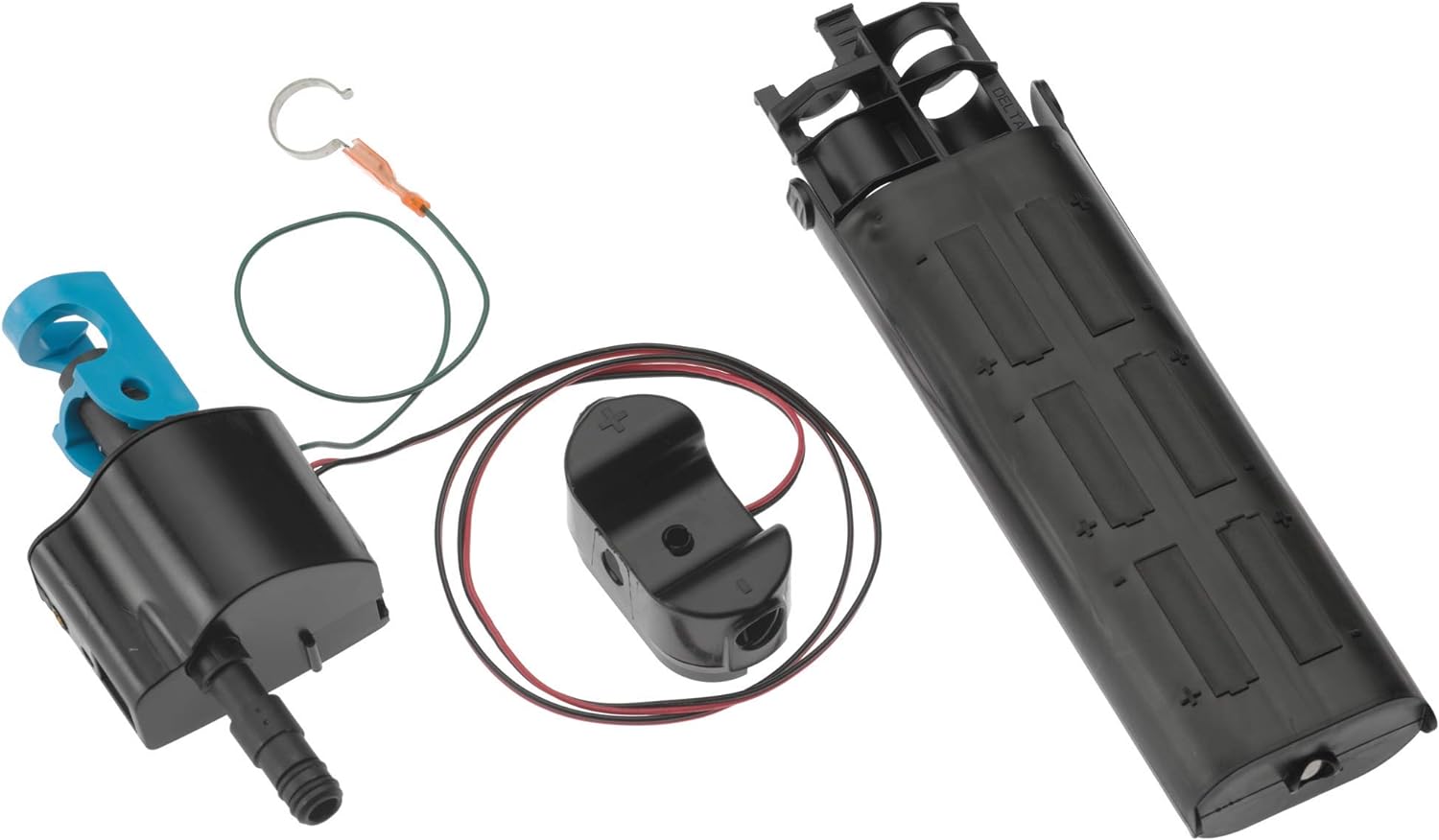
Figure 1: Components of the Delta EP92546 Solenoid Assembly. This image displays the main solenoid unit, the battery pack designed to hold multiple AA batteries, and the associated wiring and connectors required for installation into a compatible Delta faucet system.
Setup and Installation
Follow these steps carefully to install the solenoid assembly:
- Prepare the Faucet: Turn off the hot and cold water supply valves located under the sink. Open the faucet handle to relieve any remaining water pressure.
- Disconnect Power: If your faucet uses batteries, remove the battery pack. If it uses an AC adapter, unplug it from the outlet.
- Locate Existing Solenoid: The solenoid assembly is typically located under the sink, connected to the faucet's water lines and electronic components. It may be secured with a mounting clip or bracket.
- Remove Old Solenoid: Disconnect the water lines from the old solenoid. Be prepared for a small amount of residual water. Disconnect any electrical connectors. Carefully remove the old solenoid from its mounting.
- Install New Solenoid: Position the new EP92546 Solenoid Assembly in the same location as the old one. Secure it using the existing mounting hardware or any new hardware provided.
- Connect Water Lines: Connect the hot and cold water supply lines to the corresponding inlets on the new solenoid. Ensure connections are hand-tightened, then use a wrench for a final quarter-turn, being careful not to overtighten.
- Connect Electrical Components: Connect the electrical wires from the faucet to the new solenoid assembly. Ensure all connections are firm and correctly seated. If using a battery pack, insert fresh batteries (typically 6 AA batteries, not included) into the battery pack and connect it to the solenoid. If using an AC adapter, plug it into the solenoid and then into a power outlet.
- Test for Leaks and Functionality: Slowly turn on the hot and cold water supply valves. Check all connections for leaks. Once water supply is restored, test the faucet's operation, including any touch or hands-free features, to ensure the solenoid is functioning correctly.
Operation
The Delta EP92546 Solenoid Assembly is an integral part of your faucet's electronic control system. When activated by the faucet's sensor (e.g., touch, motion), the solenoid opens or closes to control the flow of water. It works in conjunction with the faucet's main valve to regulate water temperature and flow rate. Proper installation ensures seamless operation of your faucet's advanced features.
Maintenance
To ensure the longevity and optimal performance of your solenoid assembly and faucet:
- Battery Replacement: If your faucet is battery-powered, replace batteries annually or when the faucet's response becomes sluggish. Use high-quality alkaline batteries.
- Check Connections: Periodically inspect water and electrical connections for any signs of leaks or corrosion.
- Clean Filters: Some solenoid assemblies may have small filters or screens at the inlet. If water flow is reduced, turn off water supply, disconnect the solenoid, and clean any accessible filters.
- Avoid Harsh Chemicals: Do not use abrasive cleaners or chemicals near the solenoid or faucet components, as they can damage finishes or internal parts.
Troubleshooting
| Problem | Possible Cause | Solution |
|---|---|---|
| No water flow or intermittent flow. | Low or dead batteries; loose electrical connection; clogged filter; solenoid malfunction. | Replace batteries; check all electrical connections; clean solenoid filters; if problem persists, solenoid may need replacement. |
| Faucet constantly runs or drips. | Solenoid stuck open; debris in solenoid; faulty sensor. | Turn off water supply, disconnect power, and check for debris in the solenoid. If the issue continues, the solenoid may be faulty. |
| Touch/sensor feature not responding. | Low batteries; loose electrical connection; sensor issue. | Replace batteries; ensure all electrical connections to the solenoid and sensor are secure. |
For issues not listed here, or if troubleshooting steps do not resolve the problem, please contact Delta customer support.
Specifications
- Model Number: EP92546
- Brand: DELTA
- Item Weight: 12 ounces
- Product Dimensions: 8.94 x 6.3 x 4.45 inches
- Color: No Finish (refers to the solenoid's housing, not a decorative finish)
- Number of Pieces: 1 (Solenoid Assembly)
- Usage: Inside
- Batteries Required: No (for the solenoid unit itself, but compatible faucets typically require batteries for operation of the electronic features)
- UPC: 034449876292
Warranty Information
The Delta EP92546 Solenoid Assembly is a replacement part. While many Delta faucet components carry a limited lifetime warranty, specific electronic parts like solenoids may have different warranty terms. Please refer to the official Delta Faucet warranty policy document or contact Delta customer service for precise warranty details applicable to this solenoid assembly. Keep your proof of purchase for warranty claims.
For more information, you may visit the official Delta Faucet website or consult the warranty section of your faucet's original user manual.
Customer Support
If you require further assistance, have questions about installation, or need to troubleshoot an issue, please contact Delta Faucet customer support:
- Phone: 1-800-345-3358 (as seen in promotional material, verify current number on official website)
- Website: www.deltafaucet.com
- Online Resources: Check the Delta Faucet website for FAQs, additional manuals, and support videos.
Related documentsEP92546


Ask a question about this manual
Ask about setup, troubleshooting, compatibility, parts, safety, or missing instructions. Manuals+ will review the question and use this page’s manual context to help answer it.