
1. Introduction
This manual provides essential information for the safe and efficient operation of your Thomson TH753033 Radio Alarm Clock. Please read this manual thoroughly before using the device and retain it for future reference.
2. Safety Instructions
- Do not expose the device to rain or moisture to prevent fire or electric shock.
- Ensure proper ventilation. Do not block any ventilation openings.
- Place the device on a stable, flat surface.
- Avoid placing the device near heat sources such as radiators, heat registers, stoves, or other apparatus (including amplifiers) that produce heat.
- Only use attachments/accessories specified by the manufacturer.
- Unplug the device during lightning storms or when unused for long periods.
- Refer all servicing to qualified service personnel. Servicing is required when the apparatus has been damaged in any way, such as power-supply cord or plug is damaged, liquid has been spilled or objects have fallen into the apparatus, the apparatus has been exposed to rain or moisture, does not operate normally, or has been dropped.
3. Package Contents
Please check that the following items are included in your package:
- Thomson TH753033 Radio Alarm Clock
- Power Adapter
- User Manual (this document)
4. Product Overview
The Thomson TH753033 is a versatile radio alarm clock featuring a PLL FM tuner, dual alarm functionality, and a unique projection system. It is designed for ease of use and clear display.

Figure 1: Front and side view of the Thomson Radio Alarm Clock. The display shows 'FM 105.5', 'SLEEP', and two alarm times, '7:15' and '8:30'. A red projection light is visible on the right side, indicating the projection feature.
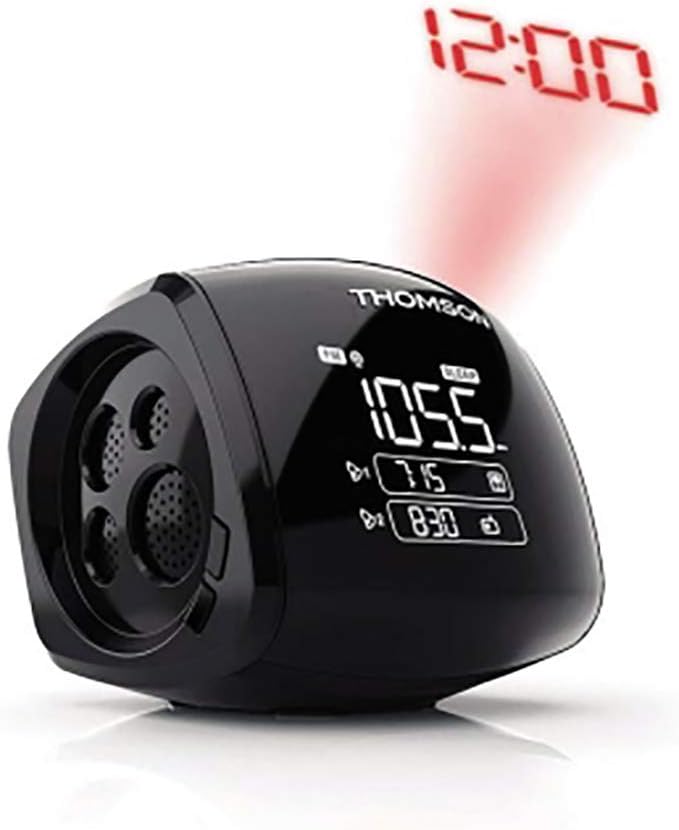
Figure 2: Side view of the Thomson Radio Alarm Clock demonstrating the time projection feature. The time '12:00' is projected in red onto a surface. The speaker grille is visible on the left side of the device.
Key Features:
- PLL FM Tuner for stable radio reception.
- Dual Alarm system with wake-up options (buzzer, radio, 4 nature sounds).
- Dual projection system, 180° orientable and reversible, for projecting time onto a wall or ceiling.
- Sleep and Snooze functions.
- White LCD display for clear time and frequency indication.
- Automatic time setting (via USB).
- Internal memory for alarm backup.
5. Setup
5.1 Power Connection
- Connect the provided power adapter to the DC input jack on the back of the alarm clock.
- Plug the power adapter into a standard wall outlet.
- The display will light up, indicating the device is powered on.
5.2 Automatic Time Setting
The device features an automatic time setting function. If connected via USB, the time may synchronize automatically. Refer to the specific instructions in the full manual for details on how this feature operates with your model.
6. Operating Instructions
6.1 Setting the Time
- Press and hold the TIME SET button (location may vary, typically on the top or back).
- While holding, use the HOUR and MINUTE buttons to adjust the time.
- Release the TIME SET button to confirm.
6.2 Setting Alarms (Alarm 1 and Alarm 2)
Your alarm clock has two independent alarms.
- Press and hold the ALARM 1 or ALARM 2 button.
- Use the HOUR and MINUTE buttons to set the desired alarm time.
- Press the ALARM 1 or ALARM 2 button again to select the wake-up source: Buzzer, Radio, or one of the 4 Nature Sounds.
- Release the button to confirm. An alarm icon will appear on the display.
- To deactivate an alarm, press the corresponding ALARM button until the alarm icon disappears.
6.3 Radio Operation
- Press the RADIO ON/OFF button to turn on the FM radio.
- Use the TUNE + or TUNE - buttons to manually adjust the frequency.
- Press and hold TUNE + or TUNE - for automatic station scanning.
- Adjust the volume using the VOLUME + or VOLUME - buttons.
- To turn off the radio, press the RADIO ON/OFF button again.
6.4 Projection Feature
The alarm clock can project the time onto a wall or ceiling.
- Locate the PROJECTOR button and the rotatable projection lens on the side of the device.
- Press the PROJECTOR button to turn the projection on or off.
- Rotate the projection lens (180° orientable) to adjust the angle of the projected time.
- If available, use the focus wheel near the lens to sharpen the projected image.
6.5 Sleep and Snooze Functions
- Snooze: When an alarm sounds, press the SNOOZE button (usually a large button on top) to temporarily silence the alarm for a few minutes. The alarm will sound again after the snooze period.
- Sleep: To fall asleep to the radio, press the SLEEP button. Repeated presses will cycle through different sleep timer durations (e.g., 90, 60, 30, 15 minutes, OFF). The radio will automatically turn off after the selected duration.
7. Maintenance
- Cleaning: Disconnect the power before cleaning. Use a soft, dry cloth to clean the exterior of the device. Do not use abrasive cleaners or solvents.
- Storage: If not using the device for an extended period, unplug it and store it in a cool, dry place.
8. Troubleshooting
| Problem | Possible Cause | Solution |
|---|---|---|
| Device does not power on. | Power adapter not connected or faulty. | Ensure the power adapter is securely connected to the device and a working power outlet. |
| No sound from radio/alarm. | Volume is too low or muted. | Increase the volume. Check if the alarm source is correctly set. |
| Radio reception is poor. | Antenna not extended or poor signal area. | Extend the FM wire antenna fully. Reposition the device for better reception. |
| Alarm does not sound. | Alarm is not activated or set incorrectly. | Ensure the alarm is set and the alarm icon is visible on the display. Verify the alarm time and source. |
| Projected time is blurry. | Projection focus needs adjustment. | Adjust the focus wheel near the projection lens until the image is clear. |
9. Specifications
| Feature | Detail |
|---|---|
| Brand | THOMSON |
| Model Number | TH753033 |
| Color | Black (Note: Product specifications list 'White' for the model, but the product title and images indicate 'Black' for this specific variant.) |
| Dimensions (L x W x H) | 52.07 x 40.64 x 38.1 cm |
| Weight | 810 grams |
| Material | Plastic |
| Tuner Type | PLL FM |
| Alarm Type | Dual Alarm (Buzzer, Radio, 4 Nature Sounds) |
| Display Type | Digital LCD (White) |
| Special Features | Projection (180° orientable/reversible), Sleep Function, Snooze Function, Automatic Time Setting (via USB), Internal Memory Alarm Backup |
| Power Source | Electric |
| Batteries Included | No |
| Mounting Type | Table Mount |
| International Article Code (EAN) | 03760102753033 |
10. Warranty and Support
This Thomson TH753033 Radio Alarm Clock comes with a 1-year warranty from the date of purchase. Please retain your proof of purchase for warranty claims.
For technical support or warranty service, please contact your retailer or the official Thomson customer service in your region. Contact information can typically be found on the manufacturer's website or product packaging.


