
Introduction
This manual provides detailed instructions for the proper use, setup, maintenance, and care of your Bushnell Engage 3-9x50mm Non-Illuminated Riflescope. Please read this manual thoroughly before using your riflescope to ensure optimal performance and longevity.
Product Overview
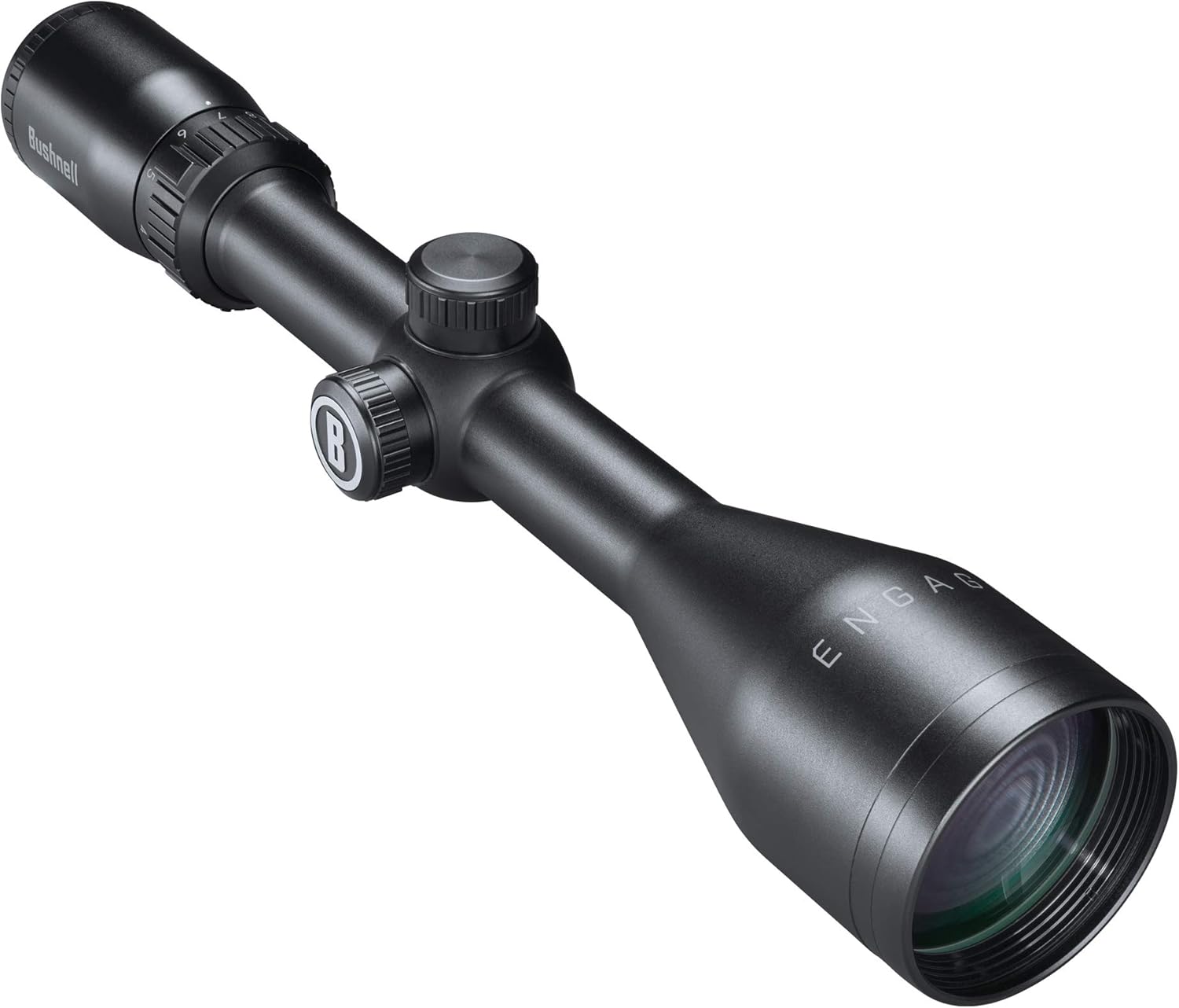
The Bushnell Engage riflescope is designed for precision and reliability. Key features include:
- Deploy MOA Reticle: Features 1-MOA windage and elevation hashmarks for accurate targeting.
- Toolless Locking Turret (TLT): Allows for easy and precise adjustments with Toolless ZERO reset.
- Fully-Multi Coated Optics and Ultra-Wide Band Coating: Delivers enhanced brightness and clarity.
- Waterproof and Fogproof Construction: Ensures reliable performance in various environmental conditions.
- EXO Barrier Protection: An exterior lens coating that repels water, oil, fog, dust, and debris.


Setup
Mounting the Riflescope
The Bushnell Engage Riflescope is compatible with integral mount or dovetail mount systems. Ensure the mounting rings are securely fastened to your rifle and the riflescope is positioned to achieve proper eye relief. Refer to your rifle's manual for specific mounting instructions.
Focusing the Eyepiece
To achieve a sharp reticle image, hold the riflescope towards a clear background (like the sky) and rotate the fast focus eyepiece until the reticle appears crisp and clear to your eye. Avoid looking at a target during this adjustment.
Operating Instructions
Adjusting Magnification
The riflescope features a 3-9x magnification range. Rotate the magnification ring, located near the eyepiece, to adjust the power setting. The integrated throw lever assists in quick magnification changes.
Windage and Elevation Adjustments
The riflescope is equipped with Toolless Locking Turrets (TLT) for windage and elevation adjustments. To make an adjustment, pull up on the turret cap to unlock it. Rotate the turret to the desired setting; each click represents a specific change in point of impact (refer to specifications for click value). Push the turret cap down to lock it in place. The TLT also allows for Toolless ZERO reset after zeroing your rifle.
Using the Deploy MOA Reticle
The Deploy MOA reticle provides 1-MOA hashmarks for both windage and elevation. These markings can be used for holdovers, wind compensation, and ranging, depending on your specific shooting application and ballistic data.
Maintenance
Cleaning the Lenses
The lenses are fully multi-coated and feature an Ultra-Wide Band Coating for optimal light transmission. To clean, first use a soft brush or compressed air to remove any loose dust or debris. Then, use a clean microfiber cloth specifically designed for optics, along with a lens cleaning solution, to gently wipe the lenses. Avoid using harsh chemicals or abrasive materials.
EXO Barrier Protection
The EXO Barrier exterior lens coating actively repels water, oil, fog, dust, and debris, reducing the need for frequent cleaning and maintaining clear vision in adverse conditions. While this coating is highly effective, follow the general lens cleaning guidelines when necessary.

Storage
When not in use, store the riflescope in a dry, cool place, preferably in its original packaging or a protective case. Ensure lens caps are in place to protect the optics from dust and scratches.
Troubleshooting
- Blurry Image: Ensure the eyepiece is correctly focused for your vision. Check that the objective lens is clean and free from obstructions. Adjust the magnification ring to see if clarity improves at different power settings.
- Reticle Not Clear: Re-adjust the fast focus eyepiece. If the reticle appears dim, ensure there are no obstructions on the eyepiece or objective lens.
- Point of Impact Shifts: Verify that the riflescope is securely mounted to the rifle. Check that the mounting rings are tightened to the manufacturer's specifications. Ensure the windage and elevation turrets are locked after adjustment.
- Fogging Inside Lenses: The riflescope is fogproof. If internal fogging occurs, it may indicate a seal compromise. Contact customer support for assistance.
Specifications
| Feature | Specification |
|---|---|
| Brand | Bushnell |
| Model Name | Engage 3-9x50mm, Matte Black |
| Magnification | 3-9x |
| Objective Lens Diameter | 50 mm |
| Reticle Type | Deploy MOA |
| Style | Non-Illuminated |
| Color | Black |
| Item Weight | 1.2 Pounds (0.54 kg) |
| Product Dimensions | 13"L x 13"W x 13"H (Overall package dimensions: 18.03 x 4.72 x 3.62 inches) |
| Field Of View | 13 Feet |
| Mounting Type | Integral Mount or Dovetail Mount |
| UPC | 029757000552 |
| Part Number | REN3950DW |

Warranty
The Bushnell Engage Riflescope is engineered for durability and is backed by the Bushnell Ironclad Warranty. This manufacturer warranty covers defects in materials and workmanship. For specific details regarding coverage, duration, and how to make a claim, please refer to the official Bushnell website or the warranty card included with your product.
Support
For further assistance, technical support, or service inquiries, please visit the official Bushnell website or contact their customer service department. Contact information can typically be found on the Bushnell website or in the product packaging.
Bushnell Website: www.bushnell.com