
Krack KB-10XP
Krack KB-10XP Bass Restorer User Manual
Model: KB-10XP | Brand: Krack
Product Overview
The Krack KB-10XP is a high-performance digital bass reconstruction processor designed to enhance the low-frequency output of your audio system. It delivers a maximum peak output of 13.5V, ensuring significant power for improved bass response. With a wide frequency response range of 10Hz to 20kHz and an accuracy of +/- 1 dB, it provides precise and balanced sound reproduction across the entire audio spectrum. The unit features LED indicators for visual feedback on its operation and boasts a compact size of 20.3 x 14 x 3 cm, making it easy to install in various vehicle or sound system setups.
Key Features
- Digital Bass Reconstruction: Advanced processing for enhanced low-frequency output.
- High Output Voltage: Provides a maximum peak output of 13.5V for powerful bass.
- Wide Frequency Response: 10Hz to 20kHz with +/- 1 dB accuracy for balanced sound.
- LED Indicators: Visual feedback on operational status.
- Compact Design: Dimensions of 20.3 x 14 x 3 cm for flexible installation.
- Wired Power Source: Reliable power delivery for consistent performance.
Package Contents
Upon opening the package, please verify that all the following items are included:
- Krack KB-10XP Bass Restorer Unit
- Remote Level Control Knob
- Wiring Harness (Power/Ground/Remote)
- User Manual (this document)
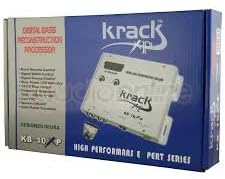
Image: The retail packaging for the Krack KB-10XP Bass Restorer, showing the unit and remote control on the box.
Setup and Installation
Safety Precautions
- Disconnect the vehicle's negative battery terminal before starting any wiring.
- Ensure all wiring is properly insulated to prevent short circuits.
- Mount the unit securely in a dry, well-ventilated area away from excessive heat or moisture.
- Use appropriate gauge wiring for power and ground connections.
Wiring Connections
- Power (B+): Connect the +12V terminal to a constant +12V power source from the vehicle's battery, fused appropriately (e.g., 1A fuse).
- Ground (GND): Connect the GND terminal to a solid chassis ground point in the vehicle. Ensure a clean, paint-free metal surface for optimal connection.
- Remote (REM): Connect the REM terminal to the remote turn-on output of your head unit or amplifier. This will turn the KB-10XP on and off with your audio system.
- Input (RCA): Connect the RCA input jacks from your head unit's pre-amp output or a line output converter.
- Output (RCA): Connect the RCA output jacks to the input of your amplifier(s).
- Remote Level Control: Connect the remote level control knob to the dedicated port on the KB-10XP unit using the provided cable. This allows for convenient bass level adjustment from the driver's seat.

Image: Rear view of the Krack KB-10XP unit, highlighting the RCA input/output jacks and the power/ground/remote terminal block.

Image: Top-down view of the Krack KB-10XP Bass Restorer unit, showing the main controls and the included remote level control.
Operating Instructions
Initial Power-Up
Once all connections are secure, reconnect the vehicle's negative battery terminal. Turn on your head unit. The KB-10XP should power on automatically via the remote turn-on wire, indicated by its power LED.
Adjusting Controls
- Bass Level (Remote Knob): Use the remote level control knob to adjust the overall bass enhancement level. Turn clockwise to increase bass, counter-clockwise to decrease.
- Sweep Control: This knob allows you to select the center frequency of the bass enhancement. Adjust it to target the specific low frequencies you wish to boost.
- Wide Control: This knob controls the Q factor or bandwidth of the bass enhancement. A higher setting will affect a wider range of frequencies around the sweep point, while a lower setting will provide a more focused boost.
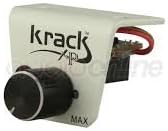
Image: Close-up of the remote level control knob for the Krack KB-10XP, used to adjust bass intensity.
LED Indicators
The KB-10XP features LED indicators that provide visual feedback on its operational status. Refer to the unit's faceplate for specific LED functions (e.g., Power, Clip, Bass Max).
Maintenance
- Cleaning: Use a soft, dry cloth to wipe down the unit. Do not use harsh chemicals or abrasive cleaners.
- Environment: Ensure the unit remains in a dry environment, free from excessive dust or extreme temperatures.
- Connections: Periodically check all wiring connections to ensure they are secure and free from corrosion.
Troubleshooting
| Problem | Possible Cause | Solution |
|---|---|---|
| No Power / Unit Not Turning On |
|
|
| No Bass Enhancement |
|
|
| Distorted Sound |
|
|
Technical Specifications
| Feature | Specification |
|---|---|
| Model Name | KB-10XP |
| Manufacturer | Krack |
| Maximum Output Voltage | 13.5V (Peak) |
| Frequency Response | 10Hz - 20kHz (+/- 1 dB) |
| Dimensions (L x W x H) | 20.3 x 14 x 3 cm (8 x 5.5 x 1.2 inches) |
| Weight | 890 g (1.96 lbs) |
| Power Source | Wired Electrical |
| Amplifier Type | Solid State |
| Compatible Devices | Audio Systems (listed as Guitar in source, but more broadly applicable for a bass restorer) |
| Color | White |
Warranty Information
Krack products are manufactured to the highest quality standards. This product is covered by a limited warranty against defects in materials and workmanship for a period specified by your retailer or regional distributor from the original date of purchase. Please retain your proof of purchase for warranty claims.
The warranty does not cover damage caused by improper installation, accident, misuse, abuse, neglect, unauthorized modification, or normal wear and tear. For specific warranty terms and conditions, please refer to the documentation provided at the time of purchase or contact your authorized Krack dealer.
Customer Support
If you encounter any issues or have questions regarding your Krack KB-10XP Bass Restorer that are not covered in this manual, please contact your authorized Krack dealer or the customer support team. When contacting support, please have your product model number (KB-10XP) and purchase information ready.
For the most up-to-date support information, visit the official Krack website or consult your local distributor.
Ask a question about this manual
Ask about setup, troubleshooting, compatibility, parts, safety, or missing instructions. Manuals+ will review the question and use this page’s manual context to help answer it.