
Introduction
This manual provides essential information for the safe and efficient use of your RCA RTRU5527 55-inch 4K UHD Roku Smart LED HDTV. This television offers a brilliant 2160P 4K Ultra High-Definition picture, providing four times the pixels of a Full HD display for an enhanced viewing experience. Enjoy natural and lifelike images with a wide spectrum of colors. The TV features a 16:9 aspect ratio, a built-in digital tuner, and multiple HDMI ports for connecting various devices. Please read this manual thoroughly before operating your television and retain it for future reference.
Safety Information
Always follow basic safety precautions when using this product to reduce the risk of fire, electric shock, and injury. Keep the television away from moisture and heat sources. Ensure proper ventilation to prevent overheating. Do not block ventilation openings. Use only the power cord supplied with the unit. Do not attempt to service this product yourself; refer all servicing to qualified service personnel. Keep batteries out of reach of children.
What's in the Box
Upon unpacking, ensure all items listed below are present and undamaged:
- RCA RTRU5527 55-inch 4K UHD Roku Smart LED HDTV
- Remote Control with AAA alkaline batteries
- Power Cord
- TV Stands (2)
- Screws for TV Stands
- Quick Start Guide / Instruction Manual

Image: Included accessories, including the remote control, power cord, and documentation.
Setup
1. Unpacking
Carefully remove the television from its packaging. It is recommended to have two people for this process due to the size and weight of the unit. Place the TV screen-down on a soft, clean surface to prevent scratches.
2. Attaching the TV Stands
If you plan to place the TV on a stand, attach the two included stands to the bottom of the television using the provided screws. Ensure the stands are securely fastened.

Image: The two TV stands, ready for attachment to the television base.
3. Wall Mounting (Optional)
The RCA RTRU5527 is VESA mount compatible (400 x 400 mm). If wall mounting, ensure you use a compatible wall mount kit (sold separately) and follow the instructions provided with the mount. Always consult a professional for wall mounting to ensure safety and proper installation.
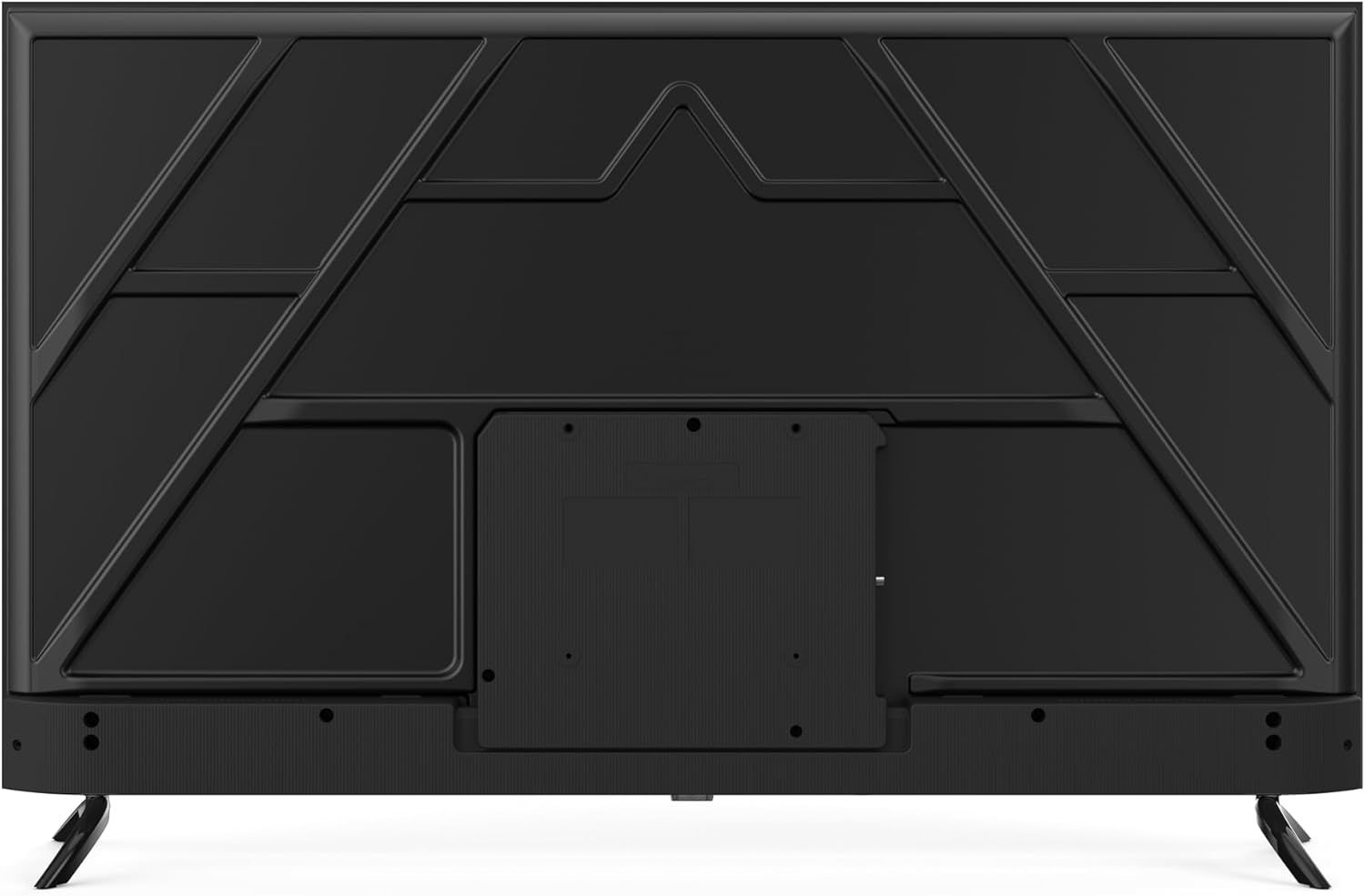
Image: The back of the television, highlighting the VESA mounting screw holes for wall installation.
4. Connecting Power
Plug the power cord into the TV's power input, then into a standard electrical outlet (110 VAC 60 Hz). The TV will enter standby mode.
5. Initial Setup and Roku Activation
Press the power button on the remote control to turn on the TV. Follow the on-screen instructions to select your language, connect to your Wi-Fi network, and activate your Roku account. An active internet connection is required for Roku features.
Video: An official RCA video introducing the features and user interface of RCA Roku TVs, demonstrating the ease of navigation and access to streaming content.
Operating
1. Power On/Off
Press the Power button on the remote control to turn the TV on or off.
2. Roku Interface Navigation
The Roku Home screen provides access to all your streaming channels, inputs, and settings. Use the directional pad (Up, Down, Left, Right) and OK button on your remote to navigate. The Home button returns you to the main screen.

Image: The main screen of the RCA Roku TV, showing the intuitive interface with popular streaming applications.
3. Input Selection
To switch between connected devices (e.g., gaming console, Blu-ray player) or the built-in digital tuner, navigate to the desired input icon on the Roku Home screen and press OK. The TV features 4 HDMI ports and 1 VGA input.
4. Streaming Content
Select any streaming channel icon from the Home screen to launch the application. You can add more channels from the Streaming Store. Many popular apps like Netflix, Hulu, and Prime Video are readily available.
Features
- 4K UHD Resolution: Experience stunning clarity and detail with 2160p Ultra High-Definition picture quality.
- Roku Smart TV: Access thousands of streaming channels and apps directly from your TV's intuitive interface.
- Multiple HDMI Ports: Connect up to four HD devices simultaneously for versatile entertainment options.
- Built-in Digital Tuner: Watch over-the-air programming without an external set-top box.
- Wide Viewing Angle: Enjoy a clear picture from almost anywhere in the room with a 178-degree viewing angle.
- Headphone Jack: Supports private listening, ideal for not disturbing others.
- Slim Design: A sleek and modern profile that complements any living space.
Connections
The RCA RTRU5527 offers a variety of ports for connecting external devices:
- HDMI (x4): High-Definition Multimedia Interface for connecting Blu-ray players, gaming consoles, streaming devices, etc.
- USB (x2): Universal Serial Bus ports for media playback from USB drives.
- VGA (x1): Video Graphics Array input for connecting older computers or monitors.
- Audio Input (RCA): Analog audio input for legacy devices.
- Wi-Fi: Built-in wireless technology for internet connectivity.
- Bluetooth 5.0: For connecting compatible wireless accessories.

Image: A detailed side view of the television, illustrating the arrangement of HDMI, USB, and other connectivity ports.
Maintenance
1. Cleaning the Screen
Gently wipe the screen with a soft, lint-free cloth. For stubborn marks, lightly dampen the cloth with water or a specialized screen cleaner. Avoid using harsh chemicals or abrasive materials.
2. Cleaning the Exterior
Wipe the TV's exterior with a soft, dry cloth. Do not use liquid cleaners directly on the TV.
3. Software Updates
Your Roku TV will automatically check for and install software updates when connected to the internet. Ensure your TV remains connected to Wi-Fi for optimal performance and access to the latest features.
Troubleshooting
If you encounter issues with your RCA Roku TV, refer to the following common solutions:
| Problem | Solution |
|---|---|
| No Power | Check if the power cord is securely plugged into both the TV and the electrical outlet. Try a different outlet. |
| No Picture/Sound | Ensure the correct input source is selected. Check all cable connections (HDMI, etc.). Restart the TV by unplugging it for 30 seconds. |
| Remote Not Responding | Replace the AAA batteries in the remote control. Ensure there are no obstructions between the remote and the TV. |
| Network Connection Issues | Verify your Wi-Fi router is working. Restart your router and the TV. Re-enter your Wi-Fi password in the TV's network settings. |
| Poor Picture Quality | Check the resolution of the content being played. Adjust picture settings (brightness, contrast, color) in the TV's menu. Ensure cables are securely connected. |
Specifications
| Feature | Specification |
|---|---|
| Model Name | RTRU5527 |
| Screen Size | 55 Inches |
| Resolution | 4K UHD (2160p) |
| Display Technology | LED |
| Refresh Rate | 60 Hz |
| Operating System | Roku OS |
| Total HDMI Ports | 4 |
| Total USB Ports | 2 |
| VGA Inputs | 1 |
| Connectivity Technology | HDMI, Wi-Fi, Bluetooth 5.0 |
| Viewing Angle | 178 Degrees |
| VESA Mount Standard | 400 x 400 mm |
| Product Dimensions (D x W x H) | 10"D x 48"W x 30"H |
| Item Weight | 14.1 Kilograms |
| Color | Black |

Image: Visual representation of the television's dimensions.
Warranty and Support
This RCA Roku TV comes with a 1-year limited warranty from the date of purchase. The warranty covers manufacturing defects under normal use. For warranty claims or technical support, please refer to the contact information provided in your product packaging or visit the official RCA support website. Keep your proof of purchase for warranty validation.


