
1. Introduction
Thank you for purchasing the Perel LED Headlamp EHL21. This manual provides essential information for the safe and efficient operation, maintenance, and troubleshooting of your new headlamp. Please read these instructions carefully before first use and retain them for future reference.
2. Important Safety Instructions
- Do not look directly into the LED light. The intense light can cause temporary vision impairment or eye damage.
- Keep the headlamp away from water and moisture unless explicitly stated as waterproof.
- Do not attempt to disassemble or modify the headlamp. This will void the warranty and may cause damage or injury.
- Keep out of reach of children.
- Use only the provided or recommended charging cable.
- Dispose of batteries according to local regulations.
3. Package Contents
Please check the package for the following items:
- 1 x Perel LED Headlamp EHL21
- 1 x Micro USB Charging Cable
- 1 x Built-in Lithium-ion Battery
4. Product Overview
The Perel LED Headlamp EHL21 is a lightweight and versatile lighting solution designed for various activities. It features multiple lighting modes, a motion sensor for hands-free operation, and a rechargeable battery.
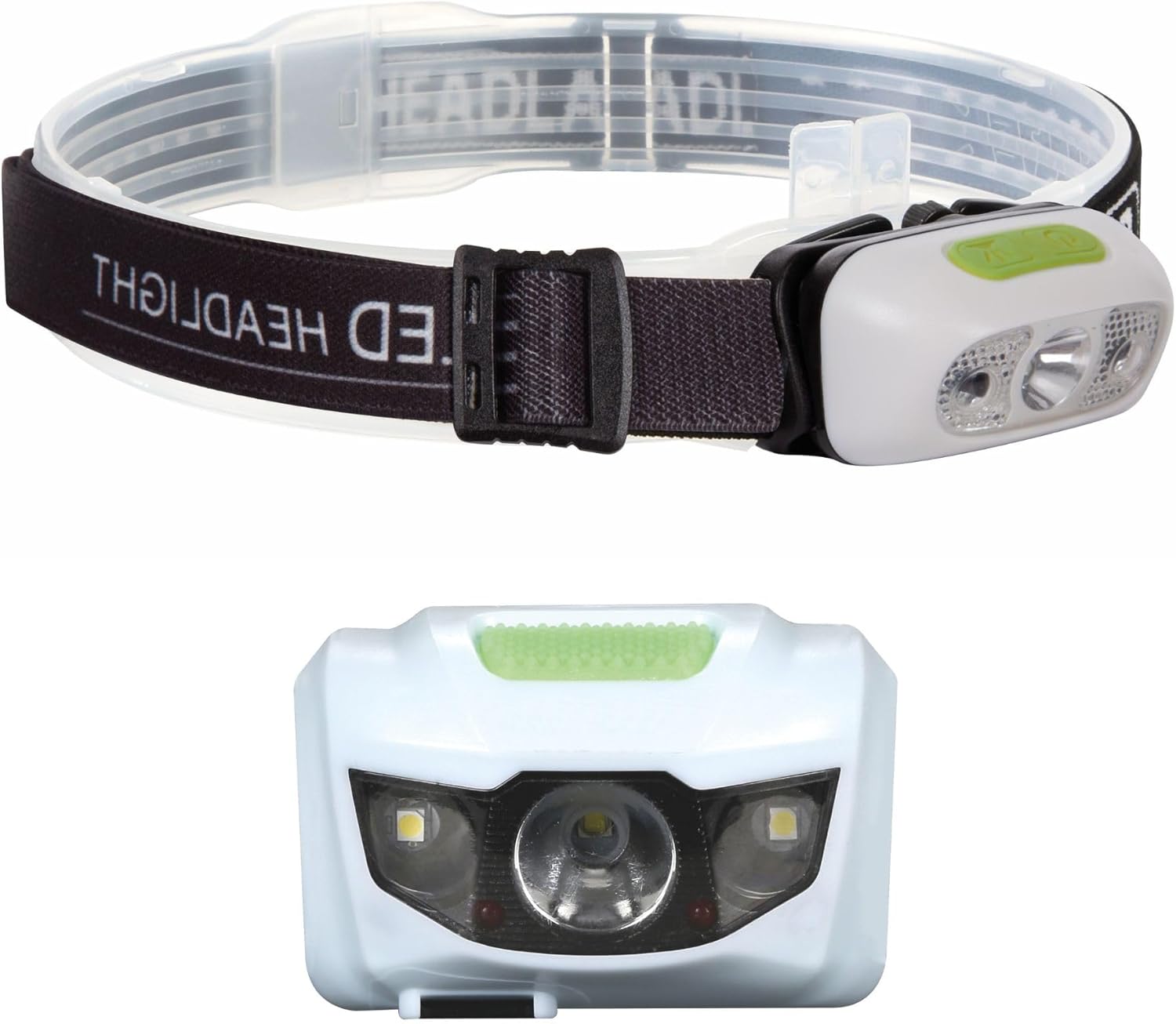
Image 1: Perel LED Headlamp with adjustable strap and front view of the light unit.

Image 2: Close-up of the Perel LED Headlamp showing the micro USB charging port and cable.
5. Setup
Before first use, please follow these steps:
- Initial Charge: Fully charge the headlamp using the provided Micro USB cable. Refer to Section 6 for detailed charging instructions.
- Adjust Headband: Place the headlamp on your head and adjust the elastic strap for a comfortable and secure fit. The strap should be snug but not too tight.
6. Operating Instructions
The headlamp features a power button and a motion sensor for convenient operation.
Power Button Operation:
- Press once: Turns on the headlamp in 100% brightness mode.
- Press twice: Switches to 50% brightness mode.
- Press three times: Switches to 25% brightness mode.
- Press four times: Activates SOS flashing mode.
- Press five times: Turns off the headlamp.
- Long press (2 seconds) from any mode: Turns off the headlamp directly.
Motion Sensor Function:
The headlamp is equipped with a motion sensor for hands-free control. To activate the sensor:
- Turn on the headlamp using the power button to your desired brightness mode.
- Press the dedicated sensor button (usually indicated by a wave icon). The sensor indicator light will illuminate.
- Once activated, you can turn the headlamp on or off by waving your hand in front of the sensor.
- To deactivate the sensor, press the sensor button again.

Image 3: Illustration of the four lighting modes: 100%, 50%, 25%, and SOS.

Image 4: The headlamp is suitable for various activities such as cycling, camping, hiking, and jogging.
7. Charging the Headlamp
The Perel LED Headlamp EHL21 is equipped with a built-in rechargeable Lithium-ion battery.
- Locate the Micro USB charging port on the side of the headlamp (refer to Image 2).
- Connect the small end of the Micro USB cable to the headlamp's charging port.
- Connect the larger USB end of the cable to a standard USB power source (e.g., computer USB port, USB wall adapter, power bank).
- A charging indicator light will show the charging status. Typically, a red light indicates charging, and a green or blue light indicates a full charge.
- Once fully charged, disconnect the charging cable. Do not overcharge the battery.
8. Care and Maintenance
- Cleaning: Wipe the headlamp with a soft, damp cloth. Do not use abrasive cleaners or solvents.
- Storage: Store the headlamp in a cool, dry place when not in use. If storing for extended periods, charge the battery every 3-6 months to maintain its lifespan.
- Battery Care: Avoid fully discharging the battery frequently. Recharge before the battery is completely depleted.
9. Troubleshooting
| Problem | Possible Cause | Solution |
|---|---|---|
| Headlamp does not turn on. | Battery is depleted. | Charge the headlamp fully. |
| Light is dim. | Low battery. | Recharge the headlamp. |
| Motion sensor not responding. | Sensor not activated or obstructed. | Ensure the sensor button is pressed and there are no obstructions in front of the sensor. |
| Headlamp not charging. | Faulty cable or power source. | Try a different Micro USB cable or USB power source. Ensure connections are secure. |
10. Technical Specifications
| Feature | Specification |
|---|---|
| Model | EHL21 |
| Manufacturer | Velleman (Perel) |
| Dimensions (L x W x H) | 0.1 x 0.1 x 0.1 cm (Product); 30 x 60 x 35 cm (Packaging) |
| Weight | 73 grams |
| Battery Type | 1 x Lithium-ion (included) |
| Power Source | Battery Powered |
| Bulb Type | LED |
| Special Features | Rechargeable, On/Off Sensor |
| Material | Aluminum Alloy |
| Color | White |
11. Warranty and Support
Perel products are designed for reliability and performance. This product comes with a standard manufacturer's warranty against defects in materials and workmanship. For specific warranty details, please refer to the warranty card included with your purchase or visit the official Perel website.
If you encounter any issues or have questions regarding your Perel LED Headlamp EHL21, please contact Perel customer support through their official channels. Please have your model number (EHL21) and proof of purchase ready when contacting support.