
Sun2Solar 150-240
Contents
Sun2Solar Solar Cover Reel System User Manual
Model: 150-240
Introduction
The Sun2Solar Solar Cover Reel System is designed to simplify the process of removing and storing your solar pool cover. This system allows for easy, one-person operation, making it convenient to manage your pool cover before and after swimming. It is constructed from lightweight, non-corrosive plastic and sturdy aluminum tubing, suitable for round or oval above-ground pools up to 21 feet wide.
Important Safety Information
Please read and understand all safety instructions before installation and use. Failure to follow these instructions may result in injury or property damage.
- Ensure proper installation, use, maintenance, and storage of the pool cover to prevent drowning hazards, entrapment, or suffocation.
- Handle the cover material with care.
- Secure the cover in place when not in use.
- Protect the system from extreme weather or prolonged direct sunlight exposure when not in use to extend its lifespan.
Package Contents
Verify that all components are present before beginning assembly:
- Solar Cover Reel System components (Wheel Handles, Hubs, Supports, Bases)
- 5 Aluminum Telescopic Poles (up to 3" diameter)
- All necessary attachment hardware (straps, fasteners)
- Note: Solar cover is NOT included.

Setup and Assembly
Follow these steps to assemble your Sun2Solar Solar Cover Reel System. It is recommended to have a second person assist with certain steps.
- Unpack Components: Carefully remove all parts from the packaging and verify against the package contents list.
- Assemble Poles: Connect the 5 aluminum telescopic poles to achieve the desired width for your pool (up to 21 feet). Ensure all connections are secure.
- Attach Hubs and Wheel Handles: Slide the hubs onto the ends of the assembled poles. Then, attach the wheel handles to the hubs, ensuring they are firmly in place.
- Install Supports and Bases: Secure the supports to the bases. These will form the upright stands for the reel.
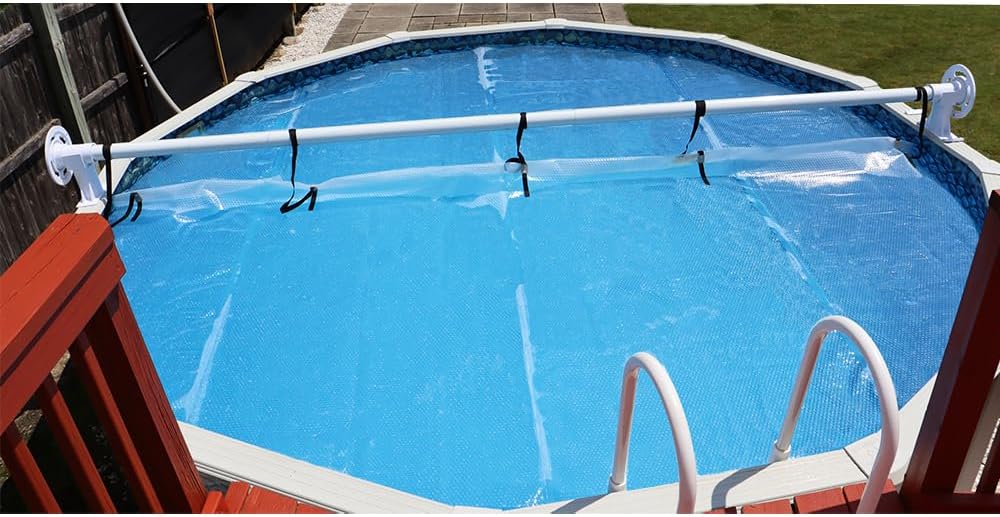
- Mount the Reel: Place the assembled reel (poles with hubs and handles) onto the supports. The lift-and-swing design allows for easy placement and removal.
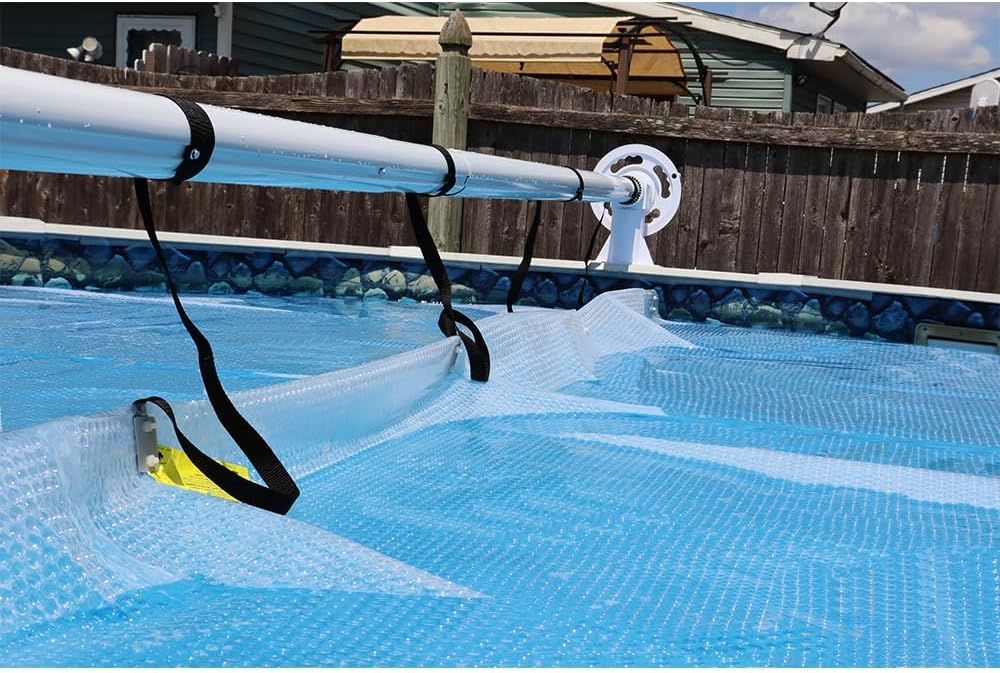
- Attach Solar Cover: Secure your solar cover to the reel using the provided attachment hardware (straps). Distribute the straps evenly along the length of the reel for balanced operation.


Operating Instructions
Using your solar cover reel system is designed for ease and efficiency.
- Prepare the Cover: If your solar cover is wider than the reel, fold the ends of the cover to match the length of the solar cover reel pole. This ensures smooth reeling.
- Reel In the Cover: Rotate the steering-wheel styled handle to begin reeling in your solar cover. The cover will wrap around the aluminum poles.
- Fully Reel: Continue rotating the handle until the solar cover is fully reeled onto the system.
- Remove from Pool (Optional): For swimming, you can remove one end of your solar cover reel from its support post and pivot it out of the way. Alternatively, with assistance, you can completely remove the reel and place it on ground level for storage.


Maintenance
Proper maintenance will ensure the longevity and optimal performance of your solar cover reel system.
- Cleaning: Periodically wipe down the aluminum poles and plastic components with a damp cloth to remove dirt and debris. Avoid abrasive cleaners.
- Lubrication: If the reeling mechanism feels stiff, apply a silicone-based lubricant to the moving parts of the wheel handles and hubs.
- Storage: During off-season or extended periods of non-use, it is recommended to remove the reel system from the pool area and store it in a dry, shaded location to protect it from harsh weather conditions and UV degradation.
- Strap Inspection: Regularly inspect the attachment straps for wear and tear. Replace any damaged straps to ensure secure attachment of the solar cover.
Troubleshooting
| Problem | Possible Cause | Solution |
|---|---|---|
| Reel is difficult to turn. | Lack of lubrication; debris in mechanism; solar cover too heavy or misaligned. | Apply silicone lubricant to moving parts. Clean any debris. Ensure solar cover is properly aligned and not exceeding recommended thickness (up to 12 mil). |
| Reel sags in the middle. | Excessive weight of solar cover; improper pole assembly; pool width exceeds reel capacity. | Ensure solar cover is within recommended thickness. Verify poles are fully extended and securely connected. If pool is wider than 21 ft, consider a larger reel system or fold cover ends more significantly. |
| Solar cover not reeling evenly. | Uneven strap distribution; cover not folded correctly; reel not level. | Adjust straps to ensure even tension. Fold cover edges uniformly. Ensure reel supports are on a level surface. |
| Poles are difficult to connect during assembly. | Tight fit; manufacturing tolerance. | Apply a small amount of lubricant (e.g., silicone spray) to the pole ends. Gently tap with a rubber mallet if necessary, ensuring not to damage the material. |
Specifications
- Model Number: 150-240
- Material: Aluminum tubing, non-corrosive plastic components
- Color: White
- Compatibility: Round or Oval Above-Ground Pools up to 21 feet wide
- Solar Cover Thickness: Designed for solar covers up to 12 mil thick (or up to 1200 series)
- Operation: Easy 1-person operation with steering wheel styled handle
- Design: Lift-and-swing design for easy removal
Warranty Information
The Sun2Solar Solar Cover Reel System comes with a 3-year limited warranty. This warranty covers defects in materials and workmanship under normal use. Please retain your proof of purchase for warranty claims. For detailed warranty terms and conditions, please contact Sun2Solar customer support.
Customer Support
For further assistance, questions, or to purchase replacement parts, please visit the official Sun2Solar store or contact their customer service department.
Sun2Solar Official Store: Visit Store
Ask a question about this manual
Ask about setup, troubleshooting, compatibility, parts, safety, or missing instructions. Manuals+ will review the question and use this page’s manual context to help answer it.