Introduction
Thank you for choosing the USHA Quanta 50QW1 Window Cooler. This manual provides essential information for the safe and efficient operation, maintenance, and troubleshooting of your new appliance. Please read this manual thoroughly before use and retain it for future reference.
Safety Guidelines
- Always ensure the cooler is placed on a stable, level surface.
- Do not operate the cooler with a damaged power cord or plug.
- Keep children and pets away from the cooler during operation.
- Unplug the cooler from the power outlet before cleaning or performing any maintenance.
- Do not immerse the cooler or its electrical components in water.
- Ensure proper ventilation around the cooler.
Product Overview
The USHA Quanta 50QW1 is a compact window cooler designed for efficient cooling in small to medium-sized rooms. It features a modern design and utilizes a 3-side honeycomb pad for effective cooling.
Components and Controls
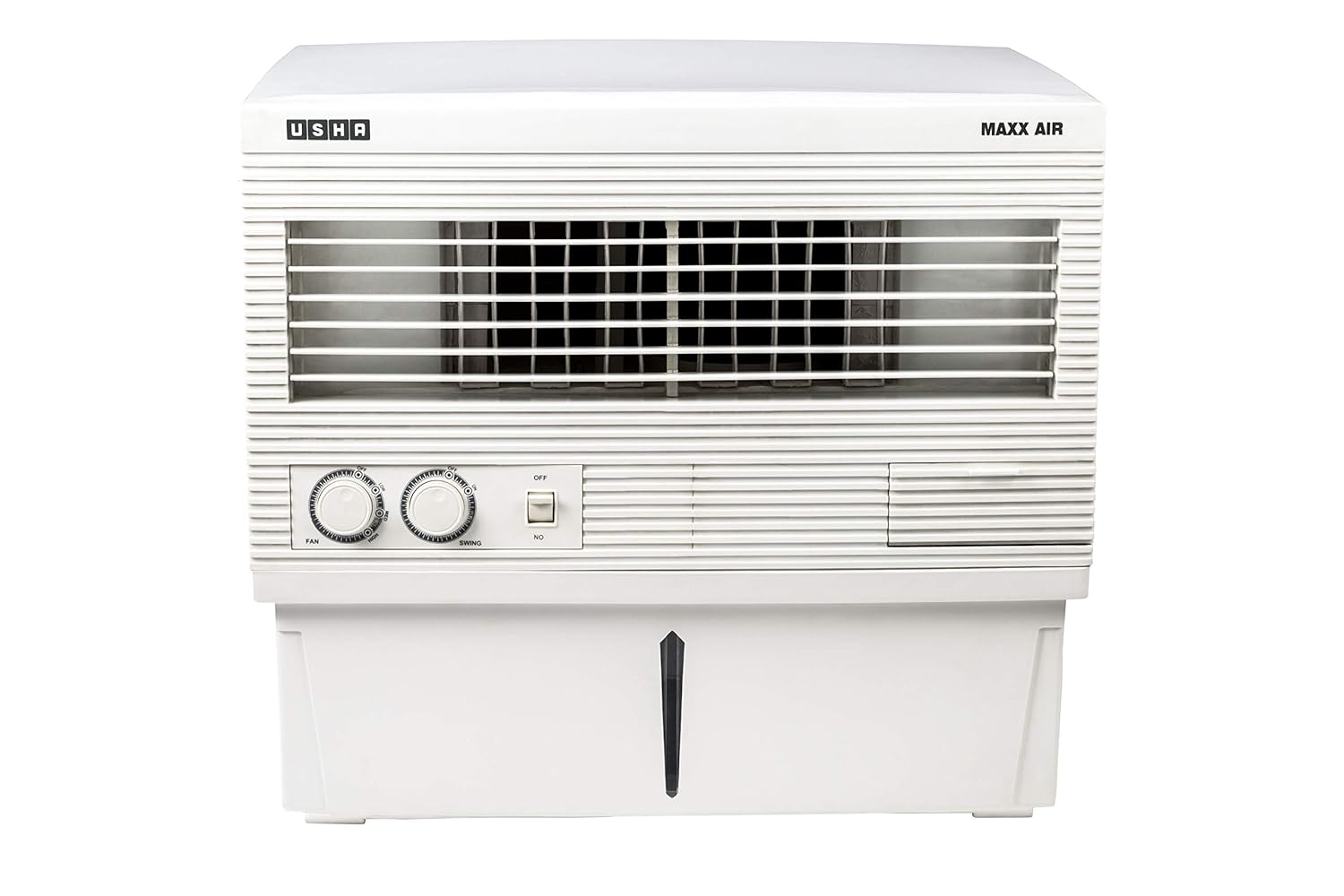
Figure 1: Front view of the USHA Quanta 50QW1 Window Cooler, showing the control knobs for fan speed and swing, and the water level indicator.

Figure 2: Side view of the USHA Quanta 50QW1 Window Cooler, highlighting the honeycomb cooling pads on the side panel.

Figure 3: Angled view of the USHA Quanta 50QW1 Window Cooler, providing a comprehensive look at its compact design and air vents.
- Fan Speed Knob: Adjusts the fan speed from low to high.
- Swing Knob: Activates or deactivates the motorized vertical louvers for air oscillation.
- Power Button: Turns the unit ON or OFF.
- Water Level Indicator: Shows the current water level in the reservoir.
- Rotatable Front Water Inlet: For convenient manual water filling.
- Honeycomb Pads: Located on three sides for enhanced cooling efficiency.
Setup
Unpacking and Placement
- Carefully remove the cooler from its packaging.
- Check for any damage during transit. If damaged, do not operate and contact customer support.
- Place the cooler on a stable, level surface, preferably near a window for optimal air circulation.
- Ensure there is adequate space around the cooler for proper airflow.
- Attach the included castor wheels if desired, following the instructions provided in the separate assembly guide (if applicable).
Initial Water Filling
- Ensure the cooler is unplugged from the power outlet.
- Locate the rotatable front water inlet.
- Slowly pour clean, fresh water into the inlet until the water level indicator shows "MAX". The reservoir capacity is 50 liters.
- Do not overfill the water tank.
Operating Instructions
Powering On/Off
- Plug the power cord into a suitable electrical outlet.
- Press the Power Button to turn the cooler ON.
- To turn OFF, press the Power Button again.
Adjusting Fan Speed
- Rotate the Fan Speed Knob clockwise to increase the fan speed.
- Rotate the Fan Speed Knob counter-clockwise to decrease the fan speed.
- The cooler offers multiple fan speed settings for customized comfort.
Activating Swing Function
- Rotate the Swing Knob to activate the motorized vertical louvers. This will distribute cool air across a wider area.
- Rotate the Swing Knob again to stop the oscillation.
Water Refilling
- Monitor the water level indicator regularly.
- When the water level is low, refill the tank through the rotatable front water inlet.
- The cooler also features an auto tank fill function for convenience, if connected to a continuous water supply (refer to installation guide for details on this feature).
Note: This cooler is designed to work efficiently even on an inverter, providing cooling during power outages.
Maintenance
Regular maintenance ensures optimal performance and extends the lifespan of your USHA Quanta 50QW1 Window Cooler.
Cleaning the Water Tank
- Before cleaning, always unplug the cooler from the power outlet.
- Drain any remaining water from the tank.
- Wipe the inside of the water tank with a soft cloth and mild detergent.
- Rinse thoroughly with clean water to remove any soap residue.
- Allow the tank to air dry completely before refilling.
- Clean the water tank at least once a week, or more frequently in areas with hard water.
Cleaning Honeycomb Pads
- Carefully remove the honeycomb pads from their compartments.
- Rinse the pads under running water to remove dust and mineral deposits.
- For stubborn dirt, gently brush the pads with a soft brush.
- Do not use harsh chemicals or abrasive cleaners on the pads.
- Allow the pads to dry completely before reinserting them into the cooler.
- Clean the pads monthly, or as needed based on usage and air quality.
Exterior Cleaning
- Wipe the exterior surfaces of the cooler with a soft, damp cloth.
- Do not use abrasive cleaners or solvents.
- Ensure no water enters the electrical components.
Troubleshooting
Before contacting customer service, please refer to the following common issues and their solutions.
| Problem | Possible Cause | Solution |
|---|---|---|
| Cooler does not turn on. | No power supply. Power button not pressed. |
Check if the power cord is securely plugged into a working outlet. Press the Power Button firmly. |
| No cooling effect. | Water tank is empty. Honeycomb pads are dry or clogged. Pump malfunction. |
Refill the water tank. Clean or replace honeycomb pads. Contact customer support. |
| Weak airflow. | Fan speed set too low. Air inlet/outlet blocked. |
Increase fan speed using the knob. Ensure no obstructions around the cooler. |
| Unpleasant odor. | Stagnant water in tank. Dirty honeycomb pads. |
Drain and clean the water tank thoroughly. Clean the honeycomb pads. |
| Excessive noise. | Unit not level. Fan obstruction. Motor issue. |
Ensure the cooler is on a flat, stable surface. Check for any foreign objects near the fan blades. Contact customer support. |
If the problem persists after trying these solutions, please contact USHA customer support.
Specifications
| Feature | Detail |
|---|---|
| Brand | USHA |
| Model Name | Quanta |
| Item Model Number | 4659105050N |
| Mounting Type | Freestanding |
| Special Features | Auto Restart, Compact, Works on Inverter, Thermal Overheat Protection (TOP) on motor, Auto Tank Fill, Motorized Vertical Louvers |
| Colour | White |
| Controls Type | Button (Knobs) |
| Reservoir Capacity | 50 litres |
| Recommended Uses | Residential cooling in small to medium-sized rooms, commercial cooling in small to medium-sized spaces |
| Included Components | Product, Manual, Castor Wheels |
| Manufacturer | Usha International Ltd. |
| Item Weight | 7 kg |
| Item Dimensions (LxWxH) | 67.5 x 55 x 55.5 Centimeters |
| Cooling Medium | 3-side Honeycomb Pads |
Warranty and Support
Warranty Information
The USHA Quanta 50QW1 Window Cooler comes with a 1-year warranty provided by the manufacturer from the date of purchase. Please retain your purchase receipt as proof of purchase for warranty claims.
Customer Support
For any queries, technical assistance, or warranty claims, please contact USHA customer support. Refer to the contact information provided on the product packaging or the official USHA website.
You can visit the official USHA Store for more information: USHA Store on Amazon.in


