
1. Product Overview
The Aexit TB1512 Fork Type Terminal Block is designed for secure and reliable electrical wire connections. This pre-insulated terminal facilitates easy and safe wiring, enhancing the integrity of electrical circuits. It is commonly utilized across various applications including machinery, electric power systems, railway infrastructure, shipbuilding, aviation, home appliances, computers, and other automated equipment.
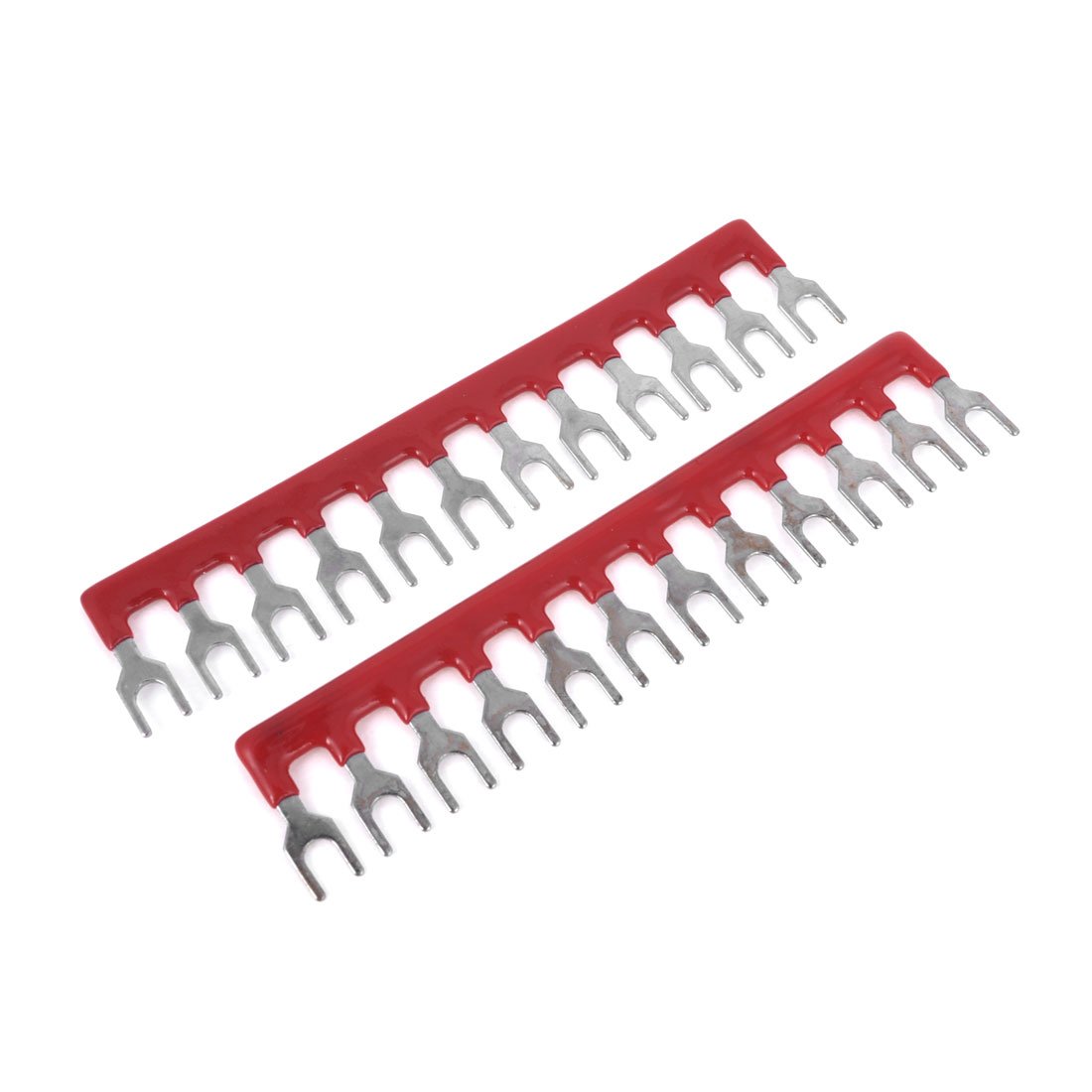
Figure 1: Aexit TB1512 Fork Type Terminal Block. This image displays the red plastic insulation and the silver-toned metal fork terminals, highlighting its 12 positions for wire connections.
2. Safety Information
WARNING: Always disconnect power before installing, servicing, or removing this terminal block to prevent electric shock or equipment damage. Installation should be performed by qualified personnel in accordance with all local and national electrical codes.
- Ensure the terminal block's voltage and current ratings (400V, 10A) are suitable for your application.
- Do not exceed the specified voltage or current ratings.
- Verify all connections are secure to prevent loose contacts, which can cause overheating or arcing.
- Wear appropriate personal protective equipment (PPE), such as insulated gloves and safety glasses, when working with electrical systems.
- Keep the product dry and away from moisture.
3. Package Contents
The package includes the following items:
- 2 x Aexit TB1512 Fork Type Terminal Strip Blocks
4. Specifications
| Feature | Specification |
|---|---|
| Product Name | Terminal Strip |
| Model | TB1512 |
| Rated Voltage | 400V |
| Rated Current | 10A |
| Positions | 12 |
| Design | Fork Type |
| Material | PVC (Red), Metal (Silver Tone) |
| Inside Width | 3.8mm / 0.15" |
| Outside Width | 6.3mm / 0.24" |
| Pin Pitch | 2.7mm / 0.1" |
| Fork Total Width | 103mm / 4.1" |
| Sleeve Total Width | 98mm / 3.8" |
| Total Height | 21mm / 0.8" |
| Weight (per piece) | 16g |
5. Setup and Installation
Follow these steps for proper installation of the terminal block:
- Power Disconnection: Before beginning any work, ensure that the power supply to the circuit is completely disconnected and locked out to prevent accidental re-energization.
- Wire Preparation: Strip the insulation from the ends of the electrical wires to be connected, exposing an appropriate length of conductor. Ensure the stripped length is sufficient to make full contact with the terminal without excess bare wire exposed.
- Terminal Connection: Insert the stripped wire end into the fork terminal. The fork design allows for easy insertion under a screw or into a clamp-type connector.
- Secure Connection: Tighten the screw or clamp mechanism firmly to secure the wire within the terminal. Ensure there is no loose movement of the wire. A secure connection is crucial for electrical safety and performance.
- Repeat: Connect all necessary wires to the respective positions on the terminal block.
- Verification: After all connections are made, visually inspect each terminal to confirm proper wire insertion and tightness. Gently tug on each wire to ensure it is securely fastened.
- Power Restoration: Once all connections are verified and the installation area is clear, restore power to the circuit.
6. Operating Instructions
The Aexit TB1512 Fork Type Terminal Block functions as a passive electrical connector. Once properly installed and connected to the electrical circuit, it facilitates the distribution or termination of electrical current. No active operation is required beyond ensuring secure and correct wiring.
- Ensure the connected circuit operates within the terminal block's rated voltage and current limits (400V, 10A).
- Regularly inspect connections for any signs of loosening or corrosion, especially in environments subject to vibration or temperature fluctuations.
7. Maintenance
The Aexit TB1512 Terminal Block requires minimal maintenance. Regular inspections are recommended to ensure continued safe and reliable operation.
- Visual Inspection: Periodically check the terminal block for any signs of physical damage, discoloration (indicating overheating), or corrosion.
- Connection Tightness: With power disconnected, verify the tightness of all screw connections. Loose connections can lead to increased resistance, heat buildup, and potential failure.
- Cleaning: If necessary, gently clean the exterior of the terminal block with a dry, non-abrasive cloth. Do not use liquid cleaners or solvents.
- Environmental Conditions: Ensure the operating environment remains within suitable conditions (e.g., temperature, humidity) to prevent degradation of materials.
8. Troubleshooting
If you encounter issues with your electrical connections, consider the following troubleshooting steps:
- No Power/Intermittent Power:
- Ensure power supply to the circuit is active.
- Check all wire connections at the terminal block for tightness. Loose connections are a common cause of intermittent power.
- Inspect wires for damage or breaks.
- Overheating:
- Immediately disconnect power if the terminal block or connected wires feel excessively hot or show signs of melting/discoloration.
- Verify that the current flowing through the terminal block does not exceed its 10A rating.
- Ensure all connections are tight and free from corrosion, as high resistance can cause heat.
- Physical Damage:
- If the terminal block is physically damaged (cracked, broken insulation), it must be replaced immediately to ensure safety.
If problems persist after following these steps, consult a qualified electrician.
9. Warranty and Support
Specific warranty information for the Aexit TB1512 Fork Type Terminal Block is not provided in the product details. For warranty claims or technical support, please refer to the retailer or manufacturer's official website where the product was purchased, or contact Aexit customer service directly if contact information is available on the product packaging.