
Introduction
This user manual provides comprehensive instructions for the installation, operation, and maintenance of your Alpine iLX-F903D 9-inch Digital Media Station. The iLX-F903D is designed to integrate advanced car media features, including Apple CarPlay, Android Auto, DAB+ digital radio, USB video playback, and Bluetooth connectivity, into vehicles with a 1DIN installation space. Please read this manual thoroughly before using the product to ensure correct operation and to prevent damage.
Safety Information
To ensure safe operation and prevent injury or damage, observe the following precautions:
- Professional Installation: Due to the complexity of car audio systems, it is highly recommended that installation be performed by a qualified professional.
- Power Supply: Connect the unit only to a 12V DC power supply with a negative ground.
- Wiring: Ensure all wiring connections are secure and properly insulated to prevent short circuits. Refer to the wiring diagram provided with the product.
- Driving Safety: Do not operate the unit in a way that distracts you from driving. Always prioritize road safety.
- Volume Levels: Keep the volume at a level that allows you to hear outside traffic and emergency signals.
- Environmental Conditions: Avoid exposing the unit to extreme temperatures, direct sunlight for prolonged periods, or excessive moisture.
Setup
Installation
The Alpine iLX-F903D is designed for installation in a standard 1DIN chassis space. The super-slim display then hovers over your dashboard, offering a large screen experience without requiring a double-DIN slot.
Wiring Connections: Carefully connect all power, ground, speaker, and accessory wires according to the included wiring diagram. Ensure proper connection of the antenna for DAB+ radio and any external devices.

Figure 1: Rear view of the Alpine iLX-F903D showing the various input and output connections for power, speakers, and accessories.
Initial Power-On
After installation, turn on your vehicle's ignition. The unit should power on automatically. Follow any on-screen prompts for initial setup, such as language selection and time zone settings.
Operating Instructions
Touchscreen Interface
The iLX-F903D features a responsive 9-inch high-resolution touchscreen. Navigate through menus, select functions, and control media playback by touching the corresponding icons or areas on the display.

Figure 2: The 9-inch display showcasing a navigation application interface, listing nearby coffee shops.
Apple CarPlay and Android Auto
Connect your compatible iPhone or Android smartphone via USB to access Apple CarPlay or Android Auto. These platforms allow you to use selected smartphone apps (navigation, music, messaging) directly on the unit's display, controlled by touch or voice commands.

Figure 3: The unit's display showing a voice assistant prompt, indicating readiness for voice commands, a key feature of Apple CarPlay and Android Auto.
DAB+ Digital Radio
The built-in DAB+ tuner provides access to digital radio broadcasts with enhanced sound quality and additional information. Select the DAB+ source and tune into available stations.

Figure 4: The Alpine iLX-F903D unit integrated into a vehicle's dashboard, displaying information from a DAB+ radio station.
Bluetooth Connectivity
Pair your smartphone via Bluetooth for hands-free calling and audio streaming. Access your phone's contacts and music library directly from the unit.
USB Video Playback
Connect a USB device containing compatible video files for playback on the 9-inch display. Ensure the vehicle is stationary and the parking brake is engaged for video playback functionality.
Display Adjustments
The unit's display offers flexibility for optimal viewing angles and positioning.
- Tilt Adjustment: The display can be tilted from +45° to -20° to reduce glare and improve visibility.

Figure 5: Illustration of the display's adjustable tilt range, allowing for optimal viewing angles.
- Height and Depth Adjustment: The display can also be adjusted vertically by +/- 3 cm and horizontally by 20 mm to suit different dashboard configurations.
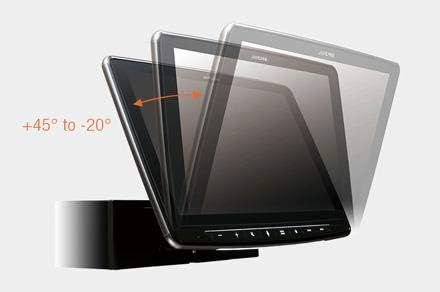
Figure 6: Diagram illustrating the vertical and horizontal adjustment capabilities of the display for custom fitment.
Maintenance
Regular maintenance ensures the longevity and optimal performance of your Digital Media Station.
- Cleaning the Display: Use a soft, lint-free cloth to gently wipe the touchscreen. For stubborn smudges, slightly dampen the cloth with water or a screen-safe cleaner. Avoid abrasive materials or harsh chemicals.
- Software Updates: Periodically check the Alpine official website for firmware updates. Keeping your unit's software up-to-date can improve performance, add new features, and fix bugs. Follow the instructions provided with the update carefully.
- General Care: Ensure the unit is not exposed to extreme heat or cold. Keep vents clear of obstructions to prevent overheating.
Troubleshooting
If you encounter issues with your Alpine iLX-F903D, refer to the following common problems and solutions:
| Problem | Possible Cause | Solution |
|---|---|---|
| No Power | Blown fuse, incorrect wiring, vehicle ignition off. | Check vehicle fuses and the unit's fuse. Verify power and ground connections. Ensure ignition is on. |
| No Audio Output | Speaker wires disconnected, volume too low, mute activated, incorrect source selected. | Check speaker connections. Increase volume. Deactivate mute. Select the correct audio source. |
| Bluetooth Connection Issues | Device not paired, Bluetooth off on phone/unit, interference. | Ensure Bluetooth is enabled on both devices. Re-pair the device. Move closer to the unit. |
| Apple CarPlay/Android Auto Not Launching | Incorrect USB cable, phone not compatible, software issue. | Use a high-quality, certified USB cable. Ensure your phone's OS is up-to-date. Restart phone and unit. |
| DAB+ Radio Reception Poor | Antenna not properly connected, weak signal area. | Check DAB+ antenna connection. Try scanning for stations in a different location. |
If the problem persists after attempting these solutions, please contact Alpine customer support or your authorized dealer.
Specifications
Key technical specifications for the Alpine iLX-F903D Digital Media Station:
| Feature | Specification |
|---|---|
| Brand | Alpine |
| Model | ILX-F903D |
| Display Size | 9 Inches |
| Display Type | LED Touchscreen |
| Display Resolution | 1280x720 |
| Connectivity Technology | Bluetooth, USB |
| Compatible Devices | Smartphone, Speaker |
| Special Features | DAB+, Spotify, Touchscreen, Apple CarPlay, Android Auto |
| Tuner Technology | DAB |
| Output Wattage | 50 Watts |
| Audio Output Type | Speakers |
| Audio Output Mode | Stereo |
| Speaker Surround Sound Channel Configuration | 3.1 |
| Pre-Outs | 3 (4V, Front/Rear/Subwoofer) |
| Product Dimensions | 16 x 17.8 x 5 cm |
| Item Weight | 2.5 kg |
Warranty and Support
For detailed warranty information, please refer to the warranty card included with your product or visit the official Alpine website. For technical support, service, or further assistance, please contact your authorized Alpine dealer or Alpine customer service directly. Keep your purchase receipt as proof of purchase for warranty claims.


