
1. Safety Information
WARNING: CHOKING HAZARD – Small parts. Not for children under 3 years. This product is recommended for ages 4-8 years.
Always supervise children during play. Ensure all parts are securely connected before use.
2. Product Overview
The Hot Wheels Super Spin Dealership is an interactive playset designed for Hot Wheels City adventures. It features a multi-level dealership tower capable of storing and displaying multiple Hot Wheels vehicles, a launcher for dynamic entry, and an exit ramp for continuous play. This playset can connect with other Hot Wheels City sets to expand your track system.
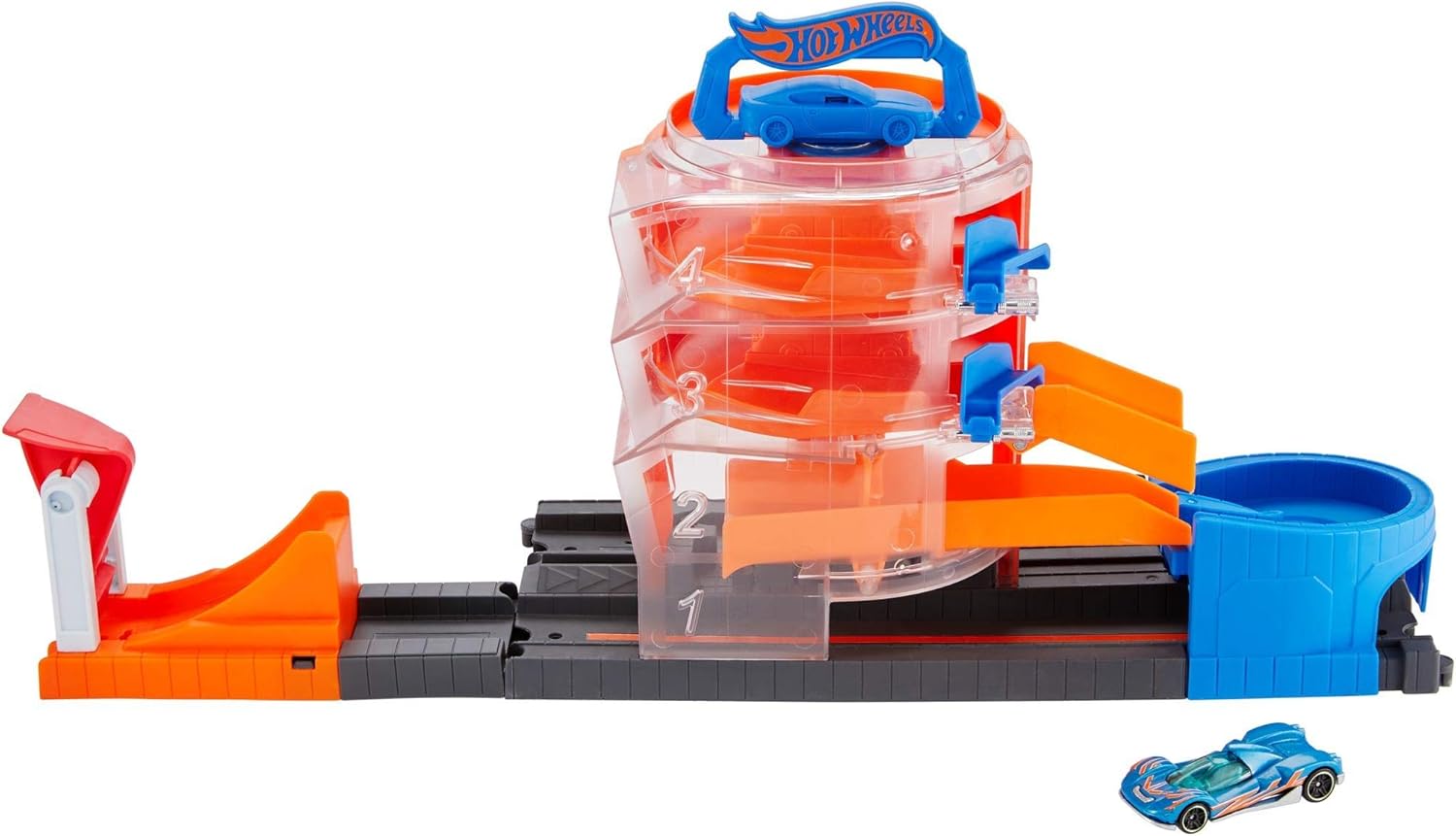
Image 2.1: The Hot Wheels Super Spin Dealership Playset, fully assembled and ready for play.
3. Package Contents
Verify that all components are present before beginning assembly:
- Super Spin Dealership Playset components
- One (1) Hot Wheels vehicle
- Instruction sheet
4. Setup and Assembly
Assembly of the Super Spin Dealership is straightforward and requires minimal effort.
- Unpack Components: Carefully remove all playset components from the packaging.
- Attach Launcher: Locate the launcher piece. Align it with the designated connection point on the main track section and firmly snap it into place.
- Connect Track Sections: Ensure all track sections are securely connected to form the complete playset layout. The new Hot Wheels connection system allows for easy attachment to other compatible Hot Wheels City sets.

Image 4.1: A child demonstrating the placement of a car on the launcher, illustrating the initial setup for play.
5. Operating Instructions
Follow these steps to operate your Hot Wheels Super Spin Dealership:
- Load Cars into Dealership:
- Place a Hot Wheels car onto the launcher.
- Adjust the launcher's height to aim for one of the four levels within the dealership tower.
- Press the launch button to propel the car into the desired level of the dealership. The dealership tower can hold up to 8 cars.
- Spin the Dealership Tower:
- Use the handle located at the top of the dealership tower to rotate it. This allows you to display different cars or select a car for exit.
- Launch Cars Out of Dealership:
- Rotate the dealership tower until the desired car is aligned with the exit ramp.
- Open the hatch to release the car, allowing it to stunt its way down the ramp and onto the track.
- Connecting to Other Sets: The Super Spin Dealership features a new connection system, allowing it to easily link with other Hot Wheels City playsets and track pieces for expanded play scenarios.

Image 5.1: A Hot Wheels car being launched into one of the dealership's levels.

Image 5.2: A child rotating the dealership tower to select or display cars.

Image 5.3: A Hot Wheels car stunting out of the dealership tower.
6. Maintenance
To ensure the longevity and proper function of your playset:
- Cleaning: Wipe the playset with a soft, damp cloth. Do not immerse in water. Avoid harsh chemicals or abrasive cleaners.
- Storage: Store the playset in a cool, dry place away from direct sunlight when not in use.
- Inspection: Periodically check for any loose or damaged parts. Discontinue use if any damage is found and contact customer support.
7. Troubleshooting
If you encounter issues with your Super Spin Dealership, consider the following:
- Car Not Launching Properly:
- Ensure the car is correctly positioned on the launcher.
- Verify the launcher mechanism is fully pulled back before pressing the button.
- Check for any obstructions in the launch path.
- Cars Getting Stuck in Dealership:
- Ensure the dealership tower is rotated correctly for the car to exit freely.
- Confirm the exit hatch is fully open.
- Only use standard Hot Wheels 1:64 scale vehicles for optimal performance.
- Playset Connections Loose: Re-check all connection points between track sections and playset components to ensure they are securely snapped together.
8. Specifications
| Model Number | GBF95 |
| Brand | Hot Wheels |
| Manufacturer | Mattel |
| Product Dimensions | 5.75 x 13 x 11.5 inches |
| Item Weight | 3.52 ounces |
| Recommended Age | 4 - 8 years |
| Release Date | April 10, 2019 |
9. Warranty and Support
For warranty information or product support, please refer to the manufacturer's official website or contact their customer service department. Keep your proof of purchase for any warranty claims.
Manufacturer: Mattel
Website: www.mattel.com
