
1. Important Safety Instructions
Please read all instructions carefully before using your Fakir Apollo BL 150 vacuum cleaner. Retain this manual for future reference.
- Always unplug the vacuum cleaner from the power outlet before cleaning, maintenance, or when not in use.
- Do not use the appliance to vacuum liquids, hot ashes, burning cigarettes, sharp objects, or flammable/explosive materials.
- This appliance is not intended for use by persons (including children) with reduced physical, sensory, or mental capabilities, or lack of experience and knowledge, unless they have been given supervision or instruction concerning use of the appliance by a person responsible for their safety.
- Keep the vacuum cleaner and its cord away from heat, direct sunlight, humidity, sharp edges, and other hazards.
- Do not operate the vacuum cleaner with a damaged power cord or plug. If the cord is damaged, it must be replaced by the manufacturer, its service agent, or similarly qualified persons to avoid a hazard.
- Ensure all filters are correctly installed before operating the vacuum cleaner.
- Use only original Fakir accessories and spare parts.
2. Product Overview
The Fakir Apollo BL 150 is a bagless cyclonic vacuum cleaner designed for efficient cleaning of various surfaces. It features a high-performance motor and an advanced filtration system.
Main Unit

Image: Fakir Apollo BL 150 vacuum cleaner, showing the main unit with hose connection and dust container.
Key Features

Image: Diagram illustrating key features of the Apollo BL 150, including a high-performance motor for optimal suction, bagless design for quick emptying, and hygienic EPA 10 filter.
- High-Performance Motor: Equipped with an 800W motor for powerful and efficient cleaning.
- Fakir Central System with Cyclone Power: Separates dust and dirt effectively, maintaining maximum suction power even when the dust bin is full.
- Hygienic EPA 10 Filter: Filters dust, dander, fibers, and pet hair from the exhaust air, making it suitable for allergy sufferers.
- Bagless Design: Eliminates the need for vacuum bags, offering cost savings and environmental benefits.
- Adjustable Suction Power: Allows you to modify suction strength according to your cleaning needs.
Included Accessories
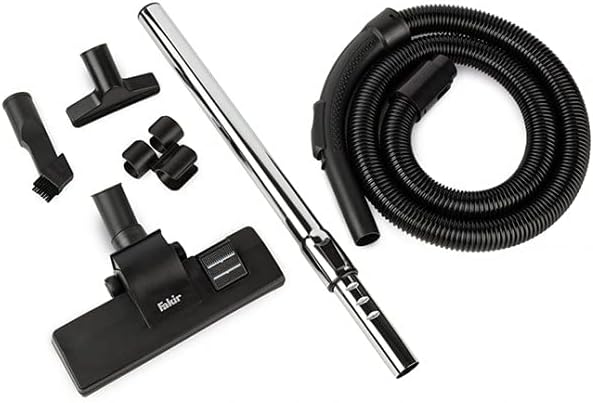
Image: Various accessories for the Fakir Apollo BL 150, including the flexible hose, telescopic tube, and different nozzles.
- Flexible Hose
- Stainless Steel Telescopic Tube
- Floor Nozzle
- 2-in-1 Combination Nozzle (Crevice Tool / Upholstery Brush)
- Upholstery Nozzle
- Accessory Holder
3. Setup and Assembly
Follow these steps to assemble your vacuum cleaner before first use:
- Attach the Flexible Hose: Insert the flexible hose connector into the suction inlet on the main unit until it clicks securely into place.
- Connect the Telescopic Tube: Attach the stainless steel telescopic tube to the handle of the flexible hose. Ensure it is firmly connected.
- Select and Attach Nozzle: Choose the appropriate nozzle for your cleaning task (e.g., floor nozzle, 2-in-1 combination nozzle, or upholstery nozzle) and attach it to the end of the telescopic tube.
4. Operating Instructions
Power On/Off
- Insert the power plug into a suitable wall socket.
- Press the power button (usually marked with I/O) located on the main unit to turn the vacuum cleaner ON or OFF.
Adjusting Suction Power
- The Fakir Apollo BL 150 offers adjustable suction power. Use the control dial or buttons on the unit to select one of the 3 available speed settings.
- Adjust the suction power according to the surface you are cleaning: lower power for delicate fabrics, higher power for carpets and heavily soiled areas.
Using Different Nozzles
- Floor Nozzle: Use for general cleaning of hard floors and carpets. Some floor nozzles have a switch to extend or retract brushes for different floor types.
- 2-in-1 Combination Nozzle: This versatile tool can be used as a crevice tool for narrow gaps, corners, and edges, or with the brush extended for dusting surfaces like shelves, keyboards, or blinds.
- Upholstery Nozzle: Ideal for cleaning upholstered furniture, curtains, car seats, and other textile surfaces.
5. Maintenance and Cleaning
Regular maintenance ensures optimal performance and extends the lifespan of your vacuum cleaner.
Emptying the Dust Container
- Ensure the vacuum cleaner is unplugged from the power outlet.
- Locate the dust container release button or lever on the main unit and press/pull it to detach the dust container.
- Hold the dust container over a waste bin. Open the bottom lid or release mechanism to empty the collected dirt and dust.
- Close the dust container lid securely and reattach the container to the main unit until it clicks into place.
Cleaning the Filters
The EPA 10 filter and foam filter should be cleaned regularly to maintain suction power and air quality.
- With the vacuum cleaner unplugged and the dust container removed, carefully take out the EPA 10 filter and the foam filter (refer to your product's specific diagrams for exact locations).
- Gently tap the filters over a waste bin to remove loose dust and debris.
- The foam filter can be rinsed under running water. Ensure it is completely dry before reinserting it into the vacuum cleaner. Do not wash the EPA 10 filter unless explicitly stated in the product's specific instructions.
- Allow all washable parts to air dry completely for at least 24 hours before reassembly. Reinsert the dry filters into their correct positions.
General Cleaning
- Wipe the exterior of the vacuum cleaner with a soft, damp cloth. Do not use abrasive cleaners or solvents.
- Check the hose and nozzles periodically for blockages and remove any obstructions.
6. Troubleshooting
If you encounter problems with your vacuum cleaner, refer to the table below for common issues and solutions.
| Problem | Possible Cause | Solution |
|---|---|---|
| Vacuum cleaner does not turn on. | No power supply. | Check if the power cord is securely plugged into the outlet. Test the outlet with another appliance. Check the circuit breaker. |
| Low suction power. | Dust container is full. | Empty the dust container. |
| Low suction power. | Filters are dirty or clogged. | Clean or replace the EPA 10 and foam filters as described in Section 5. |
| Low suction power. | Hose or nozzle is blocked. | Turn off and unplug the vacuum. Inspect the hose, telescopic tube, and nozzles for any obstructions and remove them carefully. |
| Unusual noise during operation. | Blockage in the air path or loose component. | Turn off and unplug the vacuum. Check for blockages in the hose, filters, and nozzles. Ensure all parts are correctly assembled. |
7. Specifications
| Feature | Detail |
|---|---|
| Brand | Fakir |
| Model | Apollo BL 150 |
| Power | 800 Watts |
| Dust Container Capacity | 3 Liters |
| Filter System | EPA 10 Filter, Foam Filter |
| Operating Radius | 7 meters |
| Noise Level | 77 dB |
| Dimensions (L x W x H) | 26 x 27.5 x 41 cm |
| Weight | 5.9 kg |
| Power Source | Corded Electric |
| Special Features | Bagless, Cyclonic Technology, Adjustable Suction Power, Stainless Steel Telescopic Tube |
8. Warranty and Support
Warranty information for your Fakir Apollo BL 150 vacuum cleaner is typically provided with the product at the time of purchase. Please refer to the warranty card or documentation included in the packaging for specific terms and conditions.
For technical support, service, or to inquire about spare parts, please contact Fakir customer service or visit the official Fakir website for contact details and support resources.


