
1. Important Safety Information
Please read and understand all instructions before use. Failure to follow these instructions may result in injury or damage to the product.
- Always follow the assembly instructions carefully.
- Use caution when adjusting the desk height to prevent injury.
- Ensure the desk is properly anchored to the floor to prevent tipping.
- Do not exceed the maximum weight recommendation of 330 pounds (149.6 kg) to maintain stability and safety.
- This product requires assembly. It is recommended that two people assemble the desk.
2. Product Overview
The VIVO DESK-V133E is an electric motor sit-stand height adjustable corner desk frame designed to transform your workspace into an ergonomic L-shaped workstation. This frame allows for smooth transitions between sitting and standing positions, promoting a healthier work environment.

Figure 2.1: Assembled VIVO DESK-V133E frame with a desktop, monitors, and accessories.
Key Features:
- Electric Height Adjustment: Telescopic height range from 24.4" to 50.4" (62 cm to 128 cm).
- Multi-Motor Lift System: Provides smooth, quiet transitions at 1.5" (3.8 cm) per second lift speed.
- Sturdy 3-Leg System: All-steel construction supports up to 330 lbs (149.6 kg).
- Touch Screen Control Panel: Features 3 customizable memory settings and programmable alarms.
- Cable Management: Includes a cable management rack to keep cords organized.

Figure 2.2: Visual representation of the desk's height range (24.4" to 50.4") and 330 lbs weight capacity.
3. Setup and Assembly
This section provides guidance for assembling your VIVO DESK-V133E desk frame. A desktop must be purchased separately.
Recommended Tabletop Sizes:
- Main Desk (24" Width): 46.1" to 89.7" Length
- Main Desk (30" Width): 49.1" to 92.7" Length
- Return Desk (24" Width): 23" to 59" Length
- Return Desk (30" Width): 20" to 56" Length
- Recommended desktop thickness: 3/4" (1.9 cm) or greater.
The desk frame is designed to be assembled with the main and return frames in a fixed L-shape configuration. They are not reversible.

Figure 3.1: Minimum and maximum desktop dimensions for the VIVO DESK-V133E frame.

Figure 3.2: All-steel construction of the desk frame, highlighting adjustable main and return lengths.

Figure 3.3: The desk frame ships in two separate boxes, which may arrive on different days.
Assembly Video:
Video 3.1: Official VIVO assembly video for the DESK-V133E. This video provides a visual guide to the assembly process.
For detailed step-by-step instructions, refer to the included user guide. Pay close attention to screw lengths to avoid damaging your desktop. It is recommended to plan cable management before installing the desktop.
4. Operating Instructions
The VIVO DESK-V133E features an intuitive touch screen control panel for easy height adjustment and personalized settings.

Figure 4.1: Smart touch screen control panel for the desk frame.
Control Panel Functions:
- Height Adjustment: Use the up and down arrow buttons to manually adjust the desk height.
- Memory Settings (1, 2, 3):
- Adjust the desk to your desired height.
- Press the "M" button.
- Press the desired memory button (1, 2, or 3) to save the height.
- To recall a saved height, simply press the corresponding memory button.
- Timer Reminder (T): Set a timer to remind yourself to switch between sitting and standing positions.
- Power Saving Mode: Indicated by "---" on the display. Activates after 60 seconds of inactivity. Press any button to wake the panel.
Operation Videos:
Video 4.1: Official VIVO video demonstrating the touch control pad features and operation.
Video 4.2: Official VIVO video demonstrating the electric height adjustment of the DESK-V133E.
5. Maintenance
Regular maintenance ensures the longevity and optimal performance of your desk frame.
- Cleaning: Wipe down the desk frame with a soft, damp cloth. Avoid harsh chemicals or abrasive cleaners.
- Cable Management: Periodically check and organize cables to prevent tangles and ensure smooth operation during height adjustments.
- Fasteners: Ensure all screws and fasteners remain tight. Re-tighten if necessary to maintain stability.
- Weight Distribution: Distribute weight evenly across the desktop to prevent strain on the motors and frame.
6. Troubleshooting
If you encounter issues with your desk frame, refer to the following common troubleshooting steps.
Common Issues and Solutions:
- Desk Not Adjusting / Error Code (e.g., E06):
- Check all cable connections to ensure they are secure.
- Ensure no obstacles are blocking the desk's movement path.
- Perform a reset procedure: Unplug the desk from the power outlet for 10-15 seconds, then plug it back in. Follow any specific reset instructions in the full manual if available.
- If an error code persists, contact customer support.
- Desk Wobbles at Standing Height:
- Ensure all assembly screws are securely tightened.
- Verify the desktop is properly affixed to the frame.
- Check that the floor is level and adjust the desk's leveling feet if necessary.
- Noise During Operation:
- A slight motor sound is normal during adjustment.
- If the noise is excessive or unusual, check for any obstructions or loose components.
7. Specifications
| Feature | Detail |
|---|---|
| Brand | VIVO |
| Model Number | DESK-V133E |
| Shape | L-Shape |
| Minimum Height | 24.4 inches (62 cm) |
| Maximum Height | 50.4 inches (128 cm) |
| Maximum Weight Recommendation | 330 pounds (149.6 kg) |
| Base Material | Alloy Steel |
| Lifting Mechanism | Electric Multi-Motor |
| Lift Speed | 1.5 inches (3.8 cm) per second |
| Color | Black |
| Item Weight | 61.1 pounds (27.7 kg) |
| Recommended Assembly | 2 people |
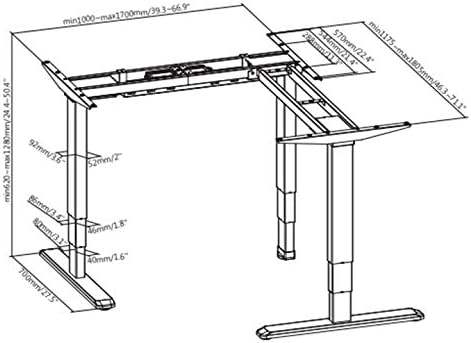
Figure 7.1: Detailed technical dimensions of the desk frame.
8. Warranty and Support
The VIVO DESK-V133E comes with a 3-year manufacturer's warranty. This warranty covers defects in materials and workmanship under normal use.
For technical assistance, troubleshooting, or warranty claims, please contact VIVO customer support. You can typically find contact information on the VIVO website or through your purchase platform.
VIVO is a US-based company providing sales and technical support. They offer a 30-day free return policy for refunds or replacements.


