
1. Introduction
The Vonyx VMM-F701 is a versatile 7-channel mixer designed for various audio applications, including live performances and studio recording. It features multiple input options, an integrated effect processor, USB playback, and +48V phantom power for condenser microphones. This manual provides essential information for the safe and effective use of your VMM-F701 mixer.
2. Safety Instructions
- Always read these instructions carefully before using the device. Keep this manual for future reference.
- Ensure the power supply matches the voltage indicated on the device.
- Do not expose the device to rain or moisture.
- Disconnect the power cord during lightning storms or when unused for long periods.
- To reduce the risk of electric shock, do not remove the cover. There are no user-serviceable parts inside. Refer all servicing to qualified service personnel.
3. Product Overview
The Vonyx VMM-F701 mixer offers a comprehensive set of features for audio mixing. It includes 5 mono microphone/line inputs (XLR/6.3mm Jack combo), 1 stereo line input (6.3mm Jack), and an integrated USB player. Each channel provides Hi, Mid, and Low equalization controls, along with FX, Pan, and AUX adjustments. The mixer also features a built-in effect processor with delay and repeat functions, +48V phantom power for condenser microphones, a balanced stereo main output, and a headphone output.
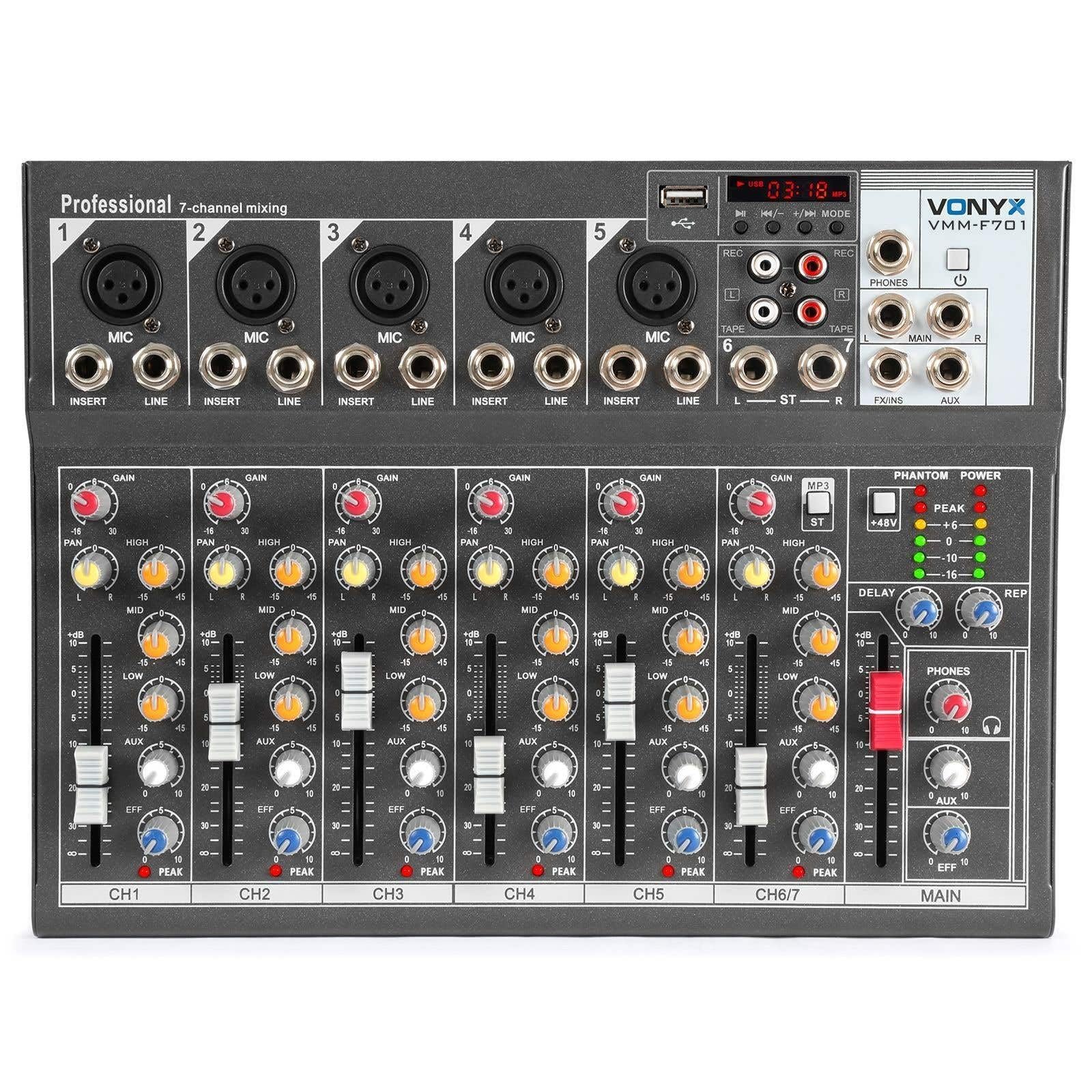
Overall view of the Vonyx VMM-F701 7-channel mixer, showcasing its compact design and control layout.

Top-down view of the Vonyx VMM-F701 mixer, highlighting the input channels, faders, and equalization knobs.

Close-up of the USB input and media player controls on the Vonyx VMM-F701 mixer, with a USB drive inserted.

Rear panel of the Vonyx VMM-F701 mixer, showing the power input and USB port for external power.
4. Setup
- Power Connection: Connect the mixer to a 230Vac/50Hz power source using the provided power cable. The mixer can also be powered via USB (5V/1A) for certain functions.
- Input Connections:
- For microphones, use XLR or 6.3mm jack cables to connect to channels 1-5. Activate +48V phantom power for condenser microphones.
- For line-level instruments or devices, use 6.3mm jack cables to connect to channels 1-5 (line inputs) or the stereo line input (channels 6/7).
- Output Connections: Connect your main speakers or amplifier to the balanced stereo main output (6.3mm Jack).
- Headphones: Connect headphones to the dedicated headphone output for monitoring.

Detailed view of the mains power input and a wiring diagram for microphone/line inputs on the Vonyx VMM-F701 mixer.
5. Operating Instructions
- Gain Control: Adjust the input sensitivity for each channel using the GAIN knob.
- Equalization (EQ): Use the HI, MID, and LOW knobs to adjust the treble, midrange, and bass frequencies for each channel.
- Pan Control: Adjust the stereo positioning of each channel using the PAN knob.
- FX Send: Use the FX knob to send a portion of the channel's signal to the internal effect processor.
- AUX Send: Use the AUX knob to send a portion of the channel's signal to an external effect unit or monitor mix (via FX Send/Return).
- Channel Faders: Adjust the volume level for each individual channel.
- Main Fader: Control the overall output volume of the mixer.
- Effect Processor: Adjust the DELAY and REP (Repeat) knobs to control the characteristics of the built-in delay effect.
- USB Player: Insert a USB drive into the USB port to play audio files. Use the media player controls (play/pause, skip, mode) to navigate and control playback.
- Phantom Power: Press the +48V PHANTOM POWER button to supply power to condenser microphones. Ensure microphones are connected before activating.
6. Maintenance
- Cleaning: Use a soft, dry cloth to clean the mixer's surface. Avoid liquid cleaners or solvents.
- Storage: Store the mixer in a cool, dry place away from direct sunlight and extreme temperatures.
- Ventilation: Ensure proper ventilation around the mixer to prevent overheating.
7. Troubleshooting
| Problem | Possible Cause | Solution |
|---|---|---|
| No sound output | Power off; cables disconnected; faders down; incorrect input selection. | Check power connection; ensure all cables are securely connected; raise channel and main faders; verify correct input source. |
| Distorted sound | Input gain too high; output level too high; faulty cable. | Reduce GAIN knob; lower main fader; try a different cable. |
| Microphone not working | Phantom power off (for condenser mics); mic not connected; faulty mic. | Activate +48V PHANTOM POWER; check mic connection; test with another microphone. |
| USB player not working | USB drive not recognized; unsupported file format. | Ensure USB drive is properly inserted; try a different USB drive; check file formats (e.g., MP3). |
8. Specifications
| Feature | Specification |
|---|---|
| Model Number | VMM-F701 |
| Number of Channels | 7 |
| Frequency Range | 20 Hz - 20 kHz |
| THD (Total Harmonic Distortion) | <0.01% |
| Signal-to-Noise Ratio | >110dB |
| Output Level | ±1V |
| Line Input Sensitivity | ±150mV |
| Microphone Input Sensitivity | ±1.5mV |
| Connection Voltage | 230Vac / 50Hz (USB 5V/1A) |
| Dimensions (L x W x H) | 230 x 312 x 45 mm (9.06 x 12.28 x 1.77 inches) |
| Weight | 2.25 kg (4.96 lbs) |
| Connectivity Technology | USB |
| Audio Input | XLR, 1/4 inch (6.3 mm) jack |
| Output Connector Type | TRS 1/4" (balanced) |
9. Warranty and Support
Warranty: This product comes with a 2-year warranty on spare parts. For warranty claims, please retain your proof of purchase.
Support: For technical assistance, troubleshooting, or service inquiries, please contact your local Vonyx dealer or visit the official Vonyx website for support resources.


