
Introduction
Thank you for purchasing the SYLVANIA SP548 Bluetooth Light-Up Speaker. This manual provides essential information for the safe and efficient operation of your device. Please read it thoroughly before use and retain it for future reference.
Safety Information
- Do not expose the speaker to extreme temperatures, direct sunlight, or high humidity.
- Avoid dropping or subjecting the speaker to strong impacts.
- Do not disassemble or attempt to repair the speaker yourself. This will void the warranty.
- Keep the speaker away from water and other liquids. This product is not waterproof.
- Use only the provided USB cable for charging.
- Dispose of batteries according to local regulations. Do not expose batteries to excessive heat.
Package Contents
Please check that all items are present:
- SYLVANIA SP548 Bluetooth Light-Up Speaker
- USB Charging Cable
- Auxiliary Audio Cable
- User Manual (this document)
Product Overview
Familiarize yourself with the speaker's components and controls.
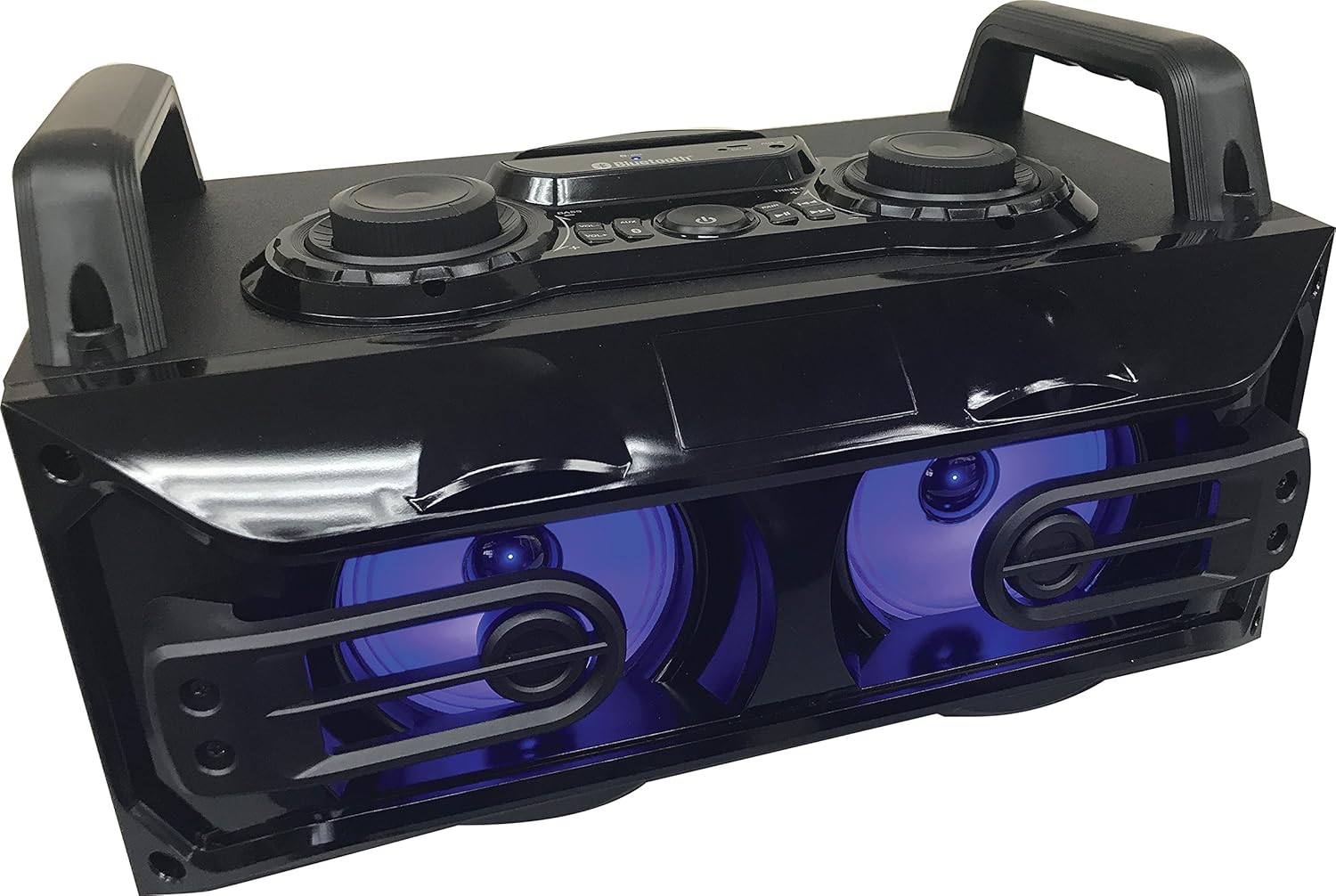
Figure 1: Angled view of the SYLVANIA SP548 speaker, highlighting the top control panel and the illuminated front speakers.

Figure 2: Front view of the SYLVANIA SP548 speaker, showing the two main speaker units with blue LED illumination.
Control Panel (Top View)
- Power Button: Turns the speaker on or off.
- Mode Button: Switches between Bluetooth and Auxiliary input modes.
- Play/Pause Button: Plays or pauses audio in Bluetooth mode.
- Previous/Next Track Buttons: Skips to the previous or next track in Bluetooth mode.
- Volume Control Knob: Adjusts the overall audio volume.
- Bass Control Knob: Adjusts the bass level.
- Treble Control Knob: Adjusts the treble level.
- LED Light Button: Controls the light-up LED feature.
Ports (Rear/Side View)
- DC Input: For connecting the USB charging cable to recharge the internal battery.
- AUX Input (3.5mm): For connecting external audio devices via the auxiliary audio cable.
- USB Output: For charging external devices (e.g., smartphones, tablets).
Setup
1. Charging the Speaker
- Connect the small end of the provided USB charging cable to the DC Input port on the speaker.
- Connect the larger end of the USB cable to a USB power adapter (not included) or a powered USB port.
- The charging indicator light will illuminate, typically red, during charging. It will turn off or change color (e.g., blue) when fully charged.
- Allow approximately 3-4 hours for a full charge.
2. Powering On/Off
- To power on, press and hold the Power Button for a few seconds until the speaker activates.
- To power off, press and hold the Power Button again for a few seconds.
Operating Instructions
1. Bluetooth Pairing
- Ensure the speaker is powered on and in Bluetooth mode. If not, press the Mode Button until the Bluetooth indicator light flashes.
- On your mobile device (smartphone, tablet, etc.), enable Bluetooth and search for available devices.
- Select "SP548" from the list of found devices.
- Once paired, the speaker will emit an audible confirmation, and the Bluetooth indicator light will stop flashing and remain solid.
- You can now play audio from your device through the speaker.
2. Auxiliary Input (AUX)
- Connect one end of the provided auxiliary audio cable to the AUX Input port on the speaker.
- Connect the other end of the auxiliary audio cable to the headphone jack or audio output of your external audio device.
- Press the Mode Button on the speaker until it switches to AUX mode.
- Play audio from your external device. Volume can be controlled via both the speaker and the external device.
3. USB Charging for External Devices
- Connect your device's USB charging cable to the USB Output port on the speaker.
- The speaker's internal battery will provide power to charge your external device.
- Note: Charging an external device will consume the speaker's battery.
4. Audio Controls
- Volume: Rotate the Volume Control Knob clockwise to increase volume, counter-clockwise to decrease.
- Bass: Rotate the Bass Control Knob to adjust the low-frequency audio output.
- Treble: Rotate the Treble Control Knob to adjust the high-frequency audio output.
5. LED Light Control
- Press the LED Light Button to cycle through different light modes or to turn the lights off.
Maintenance
Cleaning
- Ensure the speaker is powered off and disconnected from any power source before cleaning.
- Wipe the exterior surfaces with a soft, dry, lint-free cloth.
- Do not use abrasive cleaners, waxes, or solvents.
Storage
- Store the speaker in a cool, dry place away from direct sunlight and extreme temperatures.
- If storing for an extended period, charge the battery periodically (e.g., every 3 months) to maintain battery health.
Troubleshooting
| Problem | Possible Cause | Solution |
|---|---|---|
| Speaker does not power on. | Battery is depleted. | Charge the speaker using the provided USB cable. |
| Cannot pair via Bluetooth. | Speaker is not in pairing mode; Bluetooth is off on device; device is too far. | Ensure speaker is in Bluetooth mode (flashing indicator). Enable Bluetooth on your device. Move device closer to speaker (within 30 ft). |
| No sound in Bluetooth mode. | Volume is too low; device is not connected; incorrect mode. | Increase speaker and device volume. Ensure speaker is successfully paired. Verify speaker is in Bluetooth mode. |
| No sound in AUX mode. | Incorrect mode; cable not fully inserted; volume too low. | Ensure speaker is in AUX mode. Check auxiliary cable connection. Increase speaker and source device volume. |
| LED lights are not working. | Lights are turned off. | Press the LED Light Button to activate or change light modes. |
Specifications
- Model: SP548
- Brand: SYLVANIA
- Connectivity: Bluetooth, Auxiliary (3.5mm), USB
- Speaker Output Power: 6 Watts (3W x 2)
- Speaker Unit Size: 4 inches x 2
- Audio Output Mode: Stereo
- Power Source: Internal Rechargeable Battery, DC Input
- Special Features: Bass Boost, Dolby Enabled, Multi Room Audio, LED Light-Up Speakers, USB Charging Output
- Wireless Range: Up to 30 feet (Bluetooth)
- Dimensions: Approximately 41.91 x 28.7 x 25.65 cm (16.5 x 11.3 x 10.1 inches)
- Weight: Approximately 2.18 kg (4.8 lbs)
- Manufacturer: Curtis
Warranty and Support
For warranty information or technical support, please refer to the warranty card included with your purchase or contact SYLVANIA customer service. Keep your proof of purchase for warranty claims.
Manufacturer: Curtis


