
Introduction
This manual provides detailed instructions for the setup, operation, and maintenance of your Singing Machine SML625BTWD Karaoke System. This portable system allows you to play music CDs and CD+G discs, stream audio wirelessly via Bluetooth, and record your performances. Please read this manual thoroughly before using the product to ensure proper and safe operation.
Important Safety Information
- Read all instructions before operating the unit.
- Keep this manual for future reference.
- Do not block any ventilation openings.
- Do not install near any heat sources such as radiators, heat registers, stoves, or other apparatus (including amplifiers) that produce heat.
- Protect the power cord from being walked on or pinched.
- Only use attachments/accessories specified by the manufacturer.
- Unplug this apparatus during lightning storms or when unused for long periods of time.
- Refer all servicing to qualified service personnel.
Package Contents
Verify that all items listed below are included in your package:
- Singing Machine SML625BTWD Bluetooth CD+G Karaoke System
- Wired Microphone
- USB Charging Cord
- Instruction Manual (this document)
- RCA Cables (for TV connection)
Product Overview
Familiarize yourself with the various parts and controls of your karaoke system.

Figure 1: Front view of the SML625BTWD Karaoke System, highlighting the main control panel, microphone input, and LED disco lights.

Figure 2: The SML625BTWD Karaoke System showcasing its key features: CD+G playback, Bluetooth audio streaming, USB playback and recording, Line-in for external devices, LED disco light show, and the included wired microphone.

Figure 3: Rear panel of the SML625BTWD, illustrating the connections for power, audio/video output (RCA), and the TV connection for displaying lyrics.
Control Panel Features:
- Master Volume Dial: Adjusts the overall sound output level.
- CD/USB/BT Button: Selects the audio source (CD, USB, Bluetooth).
- Play/Pause Button: Starts or pauses playback.
- Skip Buttons (Forward/Backward): Navigates between tracks.
- Mic Volume Dial: Adjusts the volume of the connected microphones.
- Echo Dial: Adds an echo effect to the microphone sound.
- Balance Dial: Adjusts the balance between the vocal and music on CD+G tracks.
- AVC (Automatic Voice Control) Dial: Automatically reduces the main vocal on multiplex CD+G tracks when you sing.
- Light Button: Toggles the LED disco lights on/off.
- USB Port: For playing audio files from a USB drive or recording performances.
- Line-In Jack: Connects external audio devices.
- Microphone Jacks (MIC 1, MIC 2): Connect wired microphones.
Setup
- Power Connection: Connect the included power adapter to the DC IN jack on the back of the unit and then to a standard wall outlet.
- Microphone Connection: Insert the plug of the wired microphone into the MIC 1 or MIC 2 jack on the front of the unit.
- Connecting to a TV (Optional):
To display lyrics from CD+G discs on your television, use the included RCA cables:
- Connect the yellow plug (Video Out) from the karaoke system to the Video In jack on your TV.
- Connect the white plug (Audio Left) and red plug (Audio Right) from the karaoke system to the Audio In jacks on your TV.
Figure 4: Detailed view of the rear panel connections for TV output.
Operating Instructions
Power On/Off
Press the POWER button to turn the unit on or off.
CD+G Playback
- Open the CD compartment door located on top of the unit.
- Carefully place a CD or CD+G disc onto the spindle with the label side facing up.
- Close the CD compartment door.
- Press the CD/USB/BT button repeatedly until "CD" mode is selected.
- Press the PLAY/PAUSE button to start playback.
- Use the SKIP buttons to navigate between tracks.
- Adjust the MASTER VOLUME dial for overall sound level.
- If using a CD+G disc, lyrics will appear on the connected TV screen.
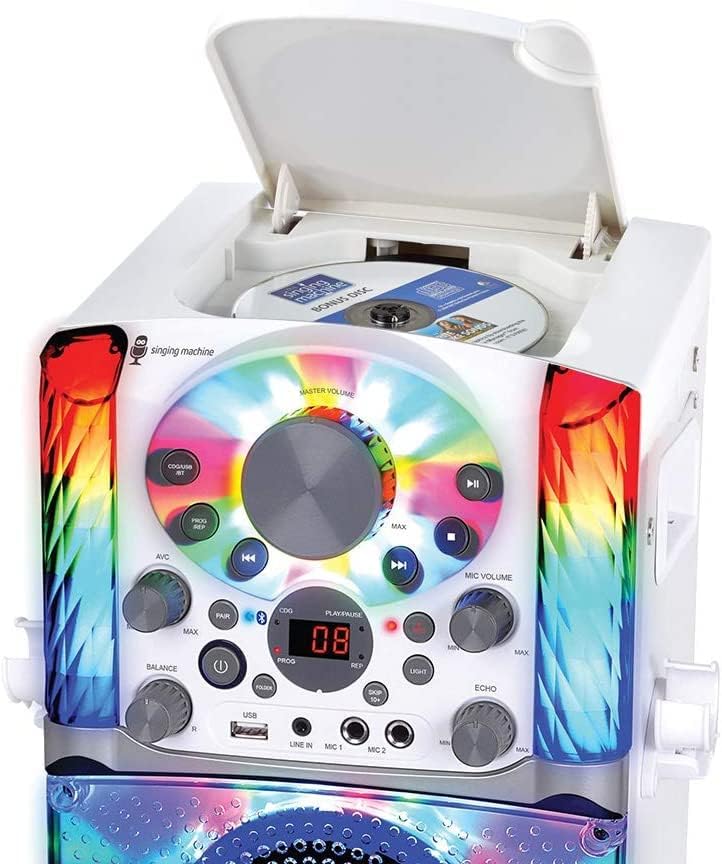
Figure 5: CD compartment for disc insertion.
Bluetooth Pairing and Streaming
- Press the CD/USB/BT button repeatedly until "BT" (Bluetooth) mode is selected. The display will show "PAIR" and the unit will emit a pairing tone.
- Enable Bluetooth on your external device (e.g., smartphone, tablet) and search for "SINGING MACHINE".
- Select "SINGING MACHINE" from the list of available devices to pair. Once paired, a confirmation tone will sound.
- You can now stream music from your Bluetooth device to the karaoke system.
USB Playback and Recording
- Playback: Insert a USB flash drive into the USB port. Press the CD/USB/BT button until "USB" mode is selected. The unit will automatically begin playing compatible audio files.
- Recording: While singing along to music (from CD, Bluetooth, or Line-In), press the REC button to start recording your performance to the connected USB drive. Press REC again to stop recording. Recorded files are saved in MP3 format.
Microphone Usage and Effects
- Adjust the MIC VOLUME dial to control the microphone's output level.
- Turn the ECHO dial to add an echo effect to your voice.
- Use the BALANCE dial to adjust the mix between the pre-recorded vocals and the music on CD+G tracks.
- The AVC (Automatic Voice Control) dial can be used to automatically reduce the main vocal track on multiplex CD+G discs when you sing into the microphone.

Figure 6: Detailed view of the control panel, highlighting microphone and effect controls.
LED Disco Lights
Press the LIGHT button on the control panel to turn the multi-colored LED lights on or off. The lights synchronize to the music.
Singing Machine Mobile Karaoke App
Enhance your karaoke experience by downloading the Singing Machine Free Mobile Karaoke App for iOS devices. This app provides access to thousands of karaoke songs on demand. Connect your device via Bluetooth to stream music through the SML625BTWD system.
Maintenance
- Cleaning: Wipe the unit with a soft, dry cloth. Do not use abrasive cleaners or solvents.
- Disc Care: Handle discs by their edges. Keep them clean and free of scratches. Store discs in their cases when not in use.
- Storage: When not in use for extended periods, store the unit in a cool, dry place away from direct sunlight and extreme temperatures.
Troubleshooting
| Problem | Possible Cause | Solution |
|---|---|---|
| No power | Power cord not connected; Power outlet not active. | Ensure power cord is securely connected. Try a different power outlet. |
| No sound from unit | Master Volume is too low; Incorrect source selected. | Increase the Master Volume. Press the CD/USB/BT button to select the correct source. |
| Microphone not working | Microphone not connected; Mic Volume is too low. | Ensure microphone is fully plugged into a MIC jack. Increase the Mic Volume dial. |
| Bluetooth pairing issues | Unit not in pairing mode; Device too far; Interference. | Ensure unit is in BT mode and "PAIR" is displayed. Move device closer. Turn off other Bluetooth devices. |
| No lyrics on TV | Incorrect TV input selected; RCA cables not connected properly; Not a CD+G disc. | Select the correct Video Input on your TV. Check RCA cable connections. Ensure you are playing a CD+G disc. |
Specifications
| Feature | Detail |
|---|---|
| Model Number | SML625BTW |
| Dimensions (L x W x H) | 8.5 x 8.5 x 12.8 inches |
| Item Weight | 6.55 pounds |
| Power Source | Battery Powered (Internal) / AC Adapter (12 Volts) |
| Output Wattage | 625 Watts (Peak) |
| Speaker Count | 1 |
| Connectivity | Bluetooth, USB, Line-In, RCA (Audio/Video Out) |
| Compatible Devices | Smartphones, Tablets, CD/CD+G Discs, USB Drives |
| Special Feature | Portable, Multi-colored LED Lights |
| Color | White |
Warranty and Support
For detailed warranty information and further technical support, please refer to the official Singing Machine website or the user manual PDF available for download.


