
1. Introduction
The LogiLink PA0168 is a lightweight battery charger designed for AA, AAA, and 9V Ni-MH/Ni-Cd rechargeable batteries. It provides a convenient method for recharging batteries for both portable and home use.
This manual provides essential information for the safe and efficient use of your LogiLink PA0168 battery charger. Please read it thoroughly before first use and retain it for future reference.
2. Safety Instructions
To prevent personal injury or property damage, always observe the following safety precautions:
- This charger is designed exclusively for Ni-MH and Ni-Cd rechargeable batteries. Do not attempt to charge alkaline, carbon-zinc, lithium, or any other battery types, as this may lead to explosion, leakage, or personal injury.
- Do not mix different battery types, brands, or capacities within the charger simultaneously.
- Ensure correct polarity (+/-) when inserting batteries into the charging slots.
- Do not disassemble, modify, or attempt to repair the charger. Refer all servicing to qualified personnel.
- Avoid exposing the charger to water, moisture, or extreme temperatures.
- Unplug the charger from the power outlet when not in use or before cleaning.
- Keep out of reach of children.
3. Product Overview
The LogiLink PA0168 charger features multiple charging slots and LED indicators for convenient battery charging.
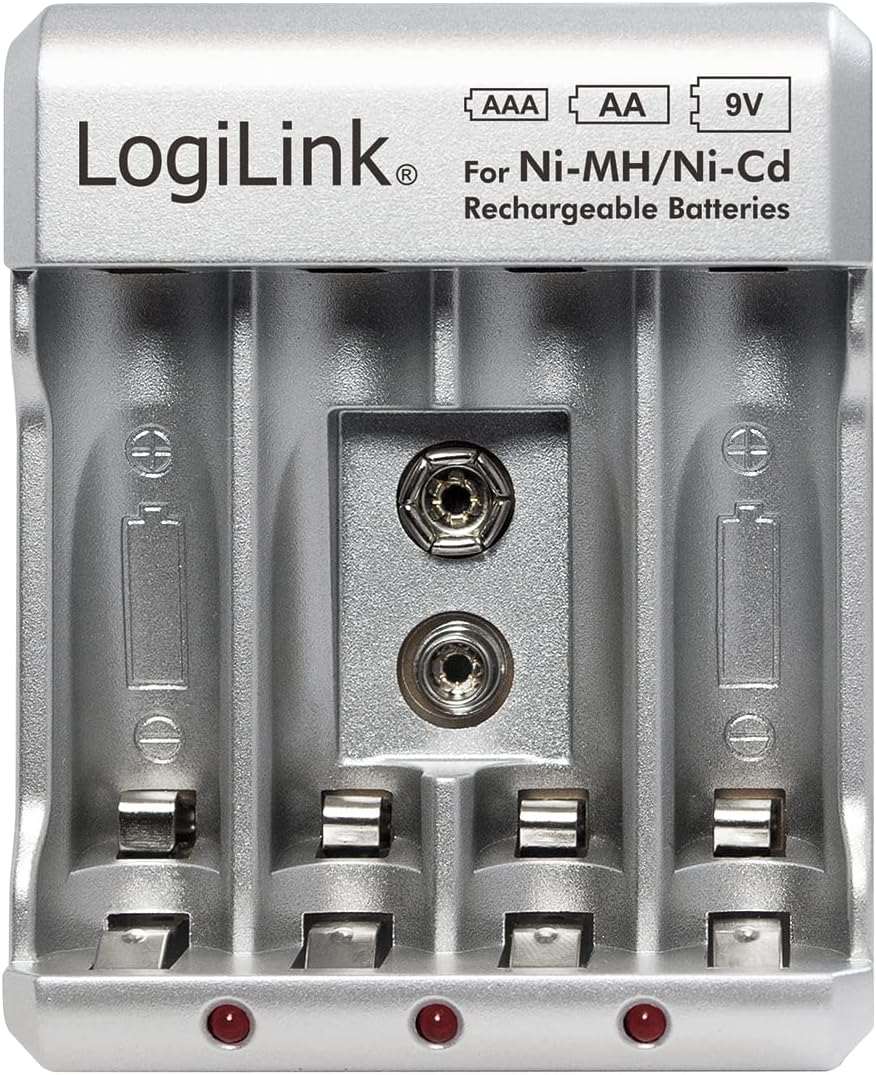
Image 1: Front view of the LogiLink PA0168 Battery Charger, showing four slots for AA/AAA batteries and one slot for a 9V battery, along with LED indicators.

Image 2: Angled view of the LogiLink PA0168 Battery Charger, highlighting the foldable AC power plug on the side.
Components:
- AA/AAA Charging Slots: Four individual slots for AA or AAA Ni-MH/Ni-Cd batteries.
- 9V Charging Slot: One dedicated slot for a 9V Ni-MH/Ni-Cd battery.
- LED Indicators: Red LEDs illuminate to indicate charging status for each pair of AA/AAA batteries and the 9V battery.
- Foldable AC Plug: Integrated plug for direct connection to a wall outlet.
4. Setup
- Unpack: Carefully remove the charger from its packaging.
- Inspect: Check the charger for any visible damage. Do not use if damaged.
- Connect to Power: Fold out the AC plug and insert the charger directly into a standard 100-240V AC wall outlet.
5. Operating Instructions
Charging AA/AAA Batteries:
- Ensure the charger is plugged into a power outlet.
- Insert 2 or 4 AA or AAA Ni-MH/Ni-Cd rechargeable batteries into the corresponding slots. Ensure correct polarity (+ and - terminals).
- The red LED indicator(s) for the respective battery pair will illuminate, indicating that charging has begun.
- Refer to the approximate charging times in the Specifications section. The LEDs will remain lit during the entire charging process.
- Once the estimated charging time has passed, remove the batteries from the charger. The charger features overcharge protection, but it is recommended to remove batteries once fully charged.

Image 3: The charger with four AA Ni-MH rechargeable batteries correctly inserted into their respective slots, showing the red LED indicators.
Charging 9V Batteries:
- Ensure the charger is plugged into a power outlet.
- Insert one 9V Ni-MH/Ni-Cd rechargeable battery into the dedicated 9V slot. Ensure correct polarity.
- The red LED indicator for the 9V slot will illuminate, indicating that charging has begun.
- Refer to the approximate charging time in the Specifications section. The LED will remain lit during the entire charging process.
- Once the estimated charging time has passed, remove the 9V battery from the charger.

Image 4: The charger with a 9V Ni-MH rechargeable battery correctly inserted into its dedicated slot, showing the red LED indicator.
6. Maintenance
- Cleaning: Disconnect the charger from the power outlet before cleaning. Use a soft, dry cloth to wipe the exterior. Do not use liquid cleaners or solvents.
- Storage: Store the charger in a cool, dry place away from direct sunlight and moisture when not in use.
7. Troubleshooting
- LEDs not illuminating:
- Ensure the charger is securely plugged into a live power outlet.
- Verify that the batteries are inserted with correct polarity.
- Check if the batteries are Ni-MH or Ni-Cd rechargeable types. The charger will not charge other battery chemistries.
- The batteries might be completely discharged or faulty. Try charging different batteries.
- Batteries not charging fully:
- Ensure the charging times specified in the manual are met.
- Old or heavily used rechargeable batteries may have reduced capacity and may not hold a full charge. Consider replacing them.
8. Specifications

Image 5: Back label of the LogiLink PA0168 Battery Charger, displaying detailed input/output specifications and safety warnings.
| Feature | Detail |
|---|---|
| Brand | LogiLink |
| Model | PA0168 |
| Manufacturer | 2direct GmbH |
| Input | 100-240 V AC, 50/60 Hz, 80 mA max |
| Output | 2.4 V DC 400 mA (AA: 200 mA x2/x4, AAA: 100 mA x2/x4), 9V: 30 mA x1 |
| Supported Battery Types | Ni-MH, Ni-Cd (AA, AAA, 9V) |
| Approximate Charging Time | AA: 16 hours, AAA: 12 hours, 9V: 9 hours |
| Special Features | Overcharge protection, LED indicators |
| Dimensions (L x W x H) | 6.4 x 8 x 7.9 cm (2.5 x 3.1 x 3.1 inches) |
| Weight | 60 g (2.1 oz) |
| Country of Origin | China |
| GTIN | 04052792047967 |
9. Warranty and Support
LogiLink products are manufactured with quality and reliability in mind. For information regarding warranty terms and conditions, please refer to the documentation provided with your purchase or contact your retailer.
For technical support or further assistance, please contact your point of purchase or visit the official LogiLink website for contact information.


