
MIABOO M20
Miaboo Portable Bluetooth Speaker User Manual
Model: M20
1. Product Overview
The Miaboo Portable Bluetooth Speaker is a versatile audio device combining a Bluetooth speaker, FM radio, and digital alarm clock in a classic wooden retro design. It supports multiple playback modes including Bluetooth, TF card, and AUX-in, offering a rich audio experience.
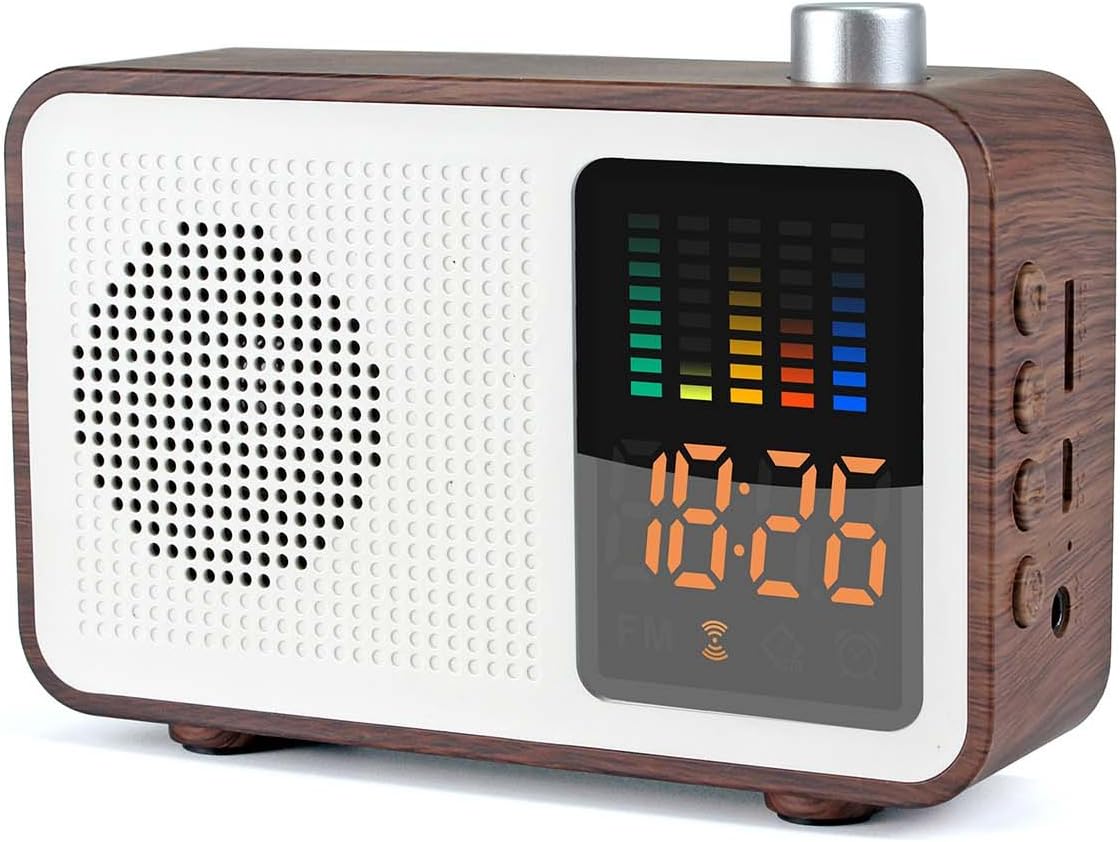
This image displays the Miaboo Portable Bluetooth Speaker, highlighting its classic walnut wood finish, white front panel with speaker grille, and the digital display showing time and an equalizer graphic. The silver control knob is visible on top.
2. Setup
2.1 Charging the Speaker
Before first use, fully charge the speaker. Connect the provided USB charging cable to the speaker's charging port and the other end to a USB power adapter (not included) or a computer's USB port. The charging indicator will illuminate during charging and turn off when fully charged. A full charge typically takes approximately 3.5 hours.
2.2 Powering On/Off
To power on the speaker, press and hold the power button (usually located on the side or top panel) until the display lights up. To power off, press and hold the power button again until the display turns off.
3. Operating Instructions
3.1 Mode Selection
The speaker supports multiple modes: Bluetooth, FM Radio, TF Card, and AUX-in. Press the 'M' (Mode) button to cycle through the available modes.
3.2 Bluetooth Pairing
- Ensure the speaker is in Bluetooth mode (indicated by a Bluetooth icon on the display).
- Enable Bluetooth on your device (smartphone, tablet, etc.).
- Search for available Bluetooth devices and select "Miaboo Speaker" (or similar name) from the list.
- Once paired, the speaker will emit a confirmation sound, and the Bluetooth icon will stabilize.
3.3 FM Radio Operation
- Switch the speaker to FM Radio mode.
- Press the Play/Pause button to initiate an automatic station scan. The speaker will scan and save available FM stations.
- Use the Previous/Next track buttons to navigate through the saved stations.
- For optimal reception, ensure the speaker is placed in an open area, away from interference.
3.4 TF Card and AUX-in Playback
Insert a TF (Micro SD) card with audio files into the designated slot for TF card playback. Connect an external audio device using a 3.5mm AUX cable to the AUX-in port for wired audio playback.

This image illustrates the various connectivity options of the Miaboo speaker. It shows the side panel with ports for a TF (Micro SD) card, a USB charging cable, and an AUX-in cable, demonstrating how external devices can be connected for audio playback or charging.
3.5 Alarm Clock Function
Refer to the specific instructions in the included quick start guide for setting the alarm time and alarm sound, as this functionality may vary. Ensure the speaker is charged daily if used as an alarm clock.
3.6 Volume Control
Rotate the large knob on the top of the speaker clockwise to increase volume and counter-clockwise to decrease volume.
3.7 Call Function
When connected via Bluetooth to a smartphone, the speaker can be used to answer or end calls. Press the Play/Pause button to answer or end a call.
4. Maintenance
4.1 Cleaning
Wipe the speaker with a soft, dry cloth. Do not use abrasive cleaners, waxes, or solvents as they may damage the finish. Avoid exposing the speaker to excessive moisture.
4.2 Storage
When not in use for extended periods, store the speaker in a cool, dry place. It is recommended to charge the battery at least once every three months to maintain its lifespan.
4.3 Battery Care
To prolong battery life, avoid fully discharging the battery frequently. Charge the speaker when the low battery indicator appears.
5. Troubleshooting
- No Power: Ensure the speaker is fully charged. Check the charging cable and power source.
- No Sound: Check the volume level on both the speaker and the connected device. Ensure the correct mode is selected (Bluetooth, AUX, TF card).
- Bluetooth Not Connecting: Ensure the speaker is in Bluetooth pairing mode. Turn off and on Bluetooth on your device. Move the speaker closer to your device. Clear previous Bluetooth connections on your device if necessary.
- Poor FM Radio Reception: Reposition the speaker to an area with better signal. Avoid placing near electronic devices that may cause interference.
- Alarm Not Working: Ensure the alarm time is set correctly and the alarm function is activated. Check battery level.
6. Specifications

This diagram provides a detailed overview of the Miaboo speaker's physical dimensions (120mm length, 84.5mm height, 33.8mm depth) and lists its technical specifications, including Bluetooth version, frequency range, output power, case material, wireless range, impedance, battery capacity, and overall dimensions.
| Feature | Specification |
|---|---|
| Model Number | M20 |
| Bluetooth Version | 4.2 |
| Frequency Response | 20Hz-20KHz |
| Output Power | 3W (as per description) / 5W (as per image) |
| Battery Capacity | 1200mAh |
| Charging Time | 3.5 hours |
| Wireless Range | Up to 10 meters (33 feet) |
| Product Dimensions | 120 x 84 x 34 mm |
| Item Weight | 186g (as per description) / 191g (as per specifications) |
| Case Material | ABS |
Note: Specifications are subject to change without prior notice.
7. Warranty and Support
7.1 Warranty Information
This product comes with a standard manufacturer's warranty. Please refer to the warranty card included in your product packaging for specific terms and conditions, including warranty period and coverage details.
7.2 Customer Support
For technical assistance, troubleshooting, or warranty claims, please contact MIABOO customer support through the contact information provided on your product packaging or the official MIABOO website. Please have your model number (M20) and purchase details ready when contacting support.
Ask a question about this manual
Ask about setup, troubleshooting, compatibility, parts, safety, or missing instructions. Manuals+ will review the question and use this page’s manual context to help answer it.