
Generac 7128
Generac GP3500iO Portable Inverter Generator User Manual
Model: 7128 | Brand: Generac
Introduction
This manual provides essential information for the safe and efficient operation, maintenance, and troubleshooting of your Generac GP3500iO Open Frame Portable Inverter Generator. Please read this manual thoroughly before operating the generator to ensure proper use and to prevent injury or damage.

Figure 1: Front view of the Generac GP3500iO Portable Inverter Generator, showcasing its control panel and robust frame.
Important Safety Information
Always follow safety precautions when operating the generator. Failure to do so can result in serious injury or death.
- Carbon Monoxide Hazard: Generators produce carbon monoxide, an odorless, colorless, and poisonous gas. Operate the generator outdoors only, far away from windows, doors, and vents. Never operate indoors or in enclosed spaces.
- Electrical Shock Hazard: Do not operate the generator in wet conditions. Ensure all connections are dry and secure. Never connect the generator directly to your home's electrical system without a transfer switch installed by a qualified electrician.
- Fire Hazard: Gasoline is highly flammable. Refuel in a well-ventilated area with the engine off and cool. Do not smoke or allow open flames near the generator. Store fuel in approved containers.
- Hot Surfaces: The generator's engine and muffler become hot during operation. Avoid contact with hot surfaces to prevent burns. Allow the generator to cool before handling or storing.
- Moving Parts: Keep hands, feet, and clothing away from moving parts.
- Proposition 65 Warning: This product can expose you to chemicals including carbon monoxide and benzene, which are known to the State of California to cause cancer and birth defects or other reproductive harm. For more information go to www.P65Warnings.ca.gov.
Key Components
Familiarize yourself with the main components of your Generac GP3500iO generator:
- Control Panel: Features the PowerDial (START/RUN/STOP), outlets, circuit breakers, and indicator lights.
- Fuel Tank: Located on top, for gasoline.
- Engine: The power source of the generator.
- Recoil Starter: Used to manually start the engine.
- Frame: Durable open frame design for protection and portability.
- USB Outlets: For charging sensitive electronic devices.

Figure 2: Side view of the Generac GP3500iO, highlighting its compact design and sturdy frame.
Setup
Before first use, or after extended storage, proper setup is crucial:
- Add Engine Oil: Locate the oil fill cap/dipstick. Using the provided oil funnel and engine oil, carefully add the correct amount of oil as specified in the owner's manual. Do not overfill.
- Add Fuel: Ensure the generator is on a level surface. Unscrew the fuel cap and fill the tank with fresh, unleaded gasoline. Do not fill above the fill line. Securely replace the fuel cap.
- Positioning: Place the generator on a firm, level surface outdoors, at least 20 feet away from any buildings, windows, or vents. Ensure adequate clearance around the generator for proper ventilation.
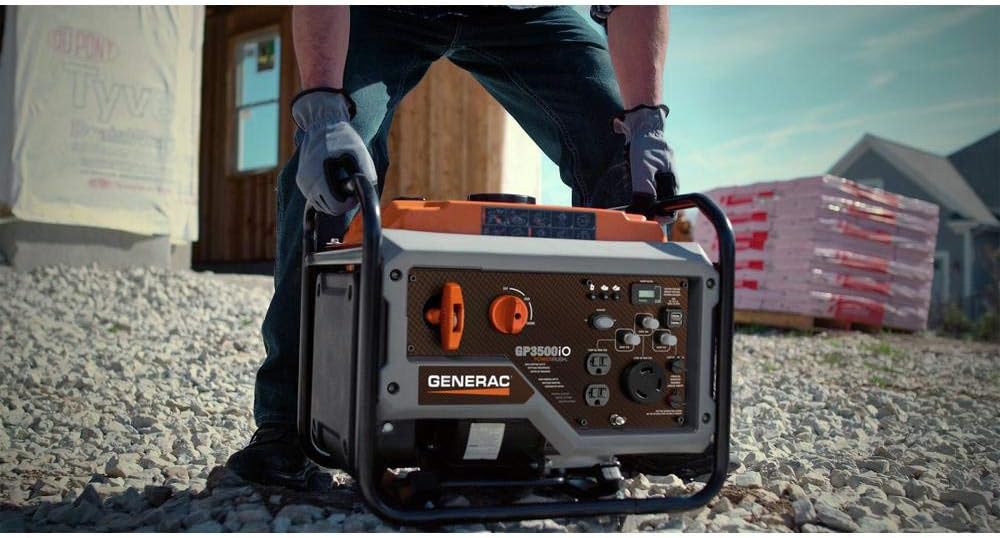
Figure 3: The lightweight design of the GP3500iO allows for easy portability and placement during setup.
Operating Instructions
Follow these steps to start and operate your Generac GP3500iO:
- PowerDial: Turn the PowerDial to the "CHOKE" position (if the engine is cold).
- Start Engine: Firmly pull the recoil starter handle until the engine starts.
- Run Position: Once the engine starts and runs smoothly, slowly turn the PowerDial to the "RUN" position.
- Connect Devices: Plug in your electrical devices to the appropriate outlets. Ensure the total wattage does not exceed the generator's running wattage.
- Economy Mode: For lighter loads, switch on the Economy Mode to reduce engine speed, save fuel, and lower noise levels.
- Shut Down: To turn off the generator, disconnect all electrical loads, then turn the PowerDial to the "STOP" position.
Video 1: Official product video demonstrating the features and portability of the Generac GP3500iO Inverter Generator, including its use at a job site and for charging sensitive electronics.

Figure 4: The GP3500iO in operation at a construction site, providing reliable power for various tools.

Figure 5: The generator providing clean, stable power for sensitive electronics in a recreational setting.
Maintenance
Regular maintenance ensures optimal performance and longevity of your generator. Always refer to the full owner's manual for detailed maintenance schedules and procedures.
- Check Oil Level: Before each use, check the engine oil level and add if necessary.
- Change Oil: Change the engine oil after the first 20 hours of operation, then every 50 hours or annually, whichever comes first.
- Clean Air Filter: Inspect and clean the air filter regularly. Replace if damaged.
- Spark Plug: Inspect the spark plug annually and replace if worn.
- Fuel System: Use a fuel stabilizer if storing the generator for more than 30 days to prevent fuel degradation.
Troubleshooting
Here are solutions to common issues you might encounter:
| Problem | Possible Cause | Solution |
|---|---|---|
| Engine will not start | No fuel, low oil, choke not set, old fuel, spark plug issue. | Add fresh fuel, add oil, set choke, drain old fuel and refill, check/replace spark plug. |
| No power output | Circuit breaker tripped, overload, economy mode engaged with high load. | Reset circuit breaker, reduce load, disengage economy mode for higher loads. |
| Engine runs rough | Stale fuel, dirty air filter, dirty spark plug. | Drain and refill with fresh fuel, clean/replace air filter, clean/replace spark plug. |
If issues persist, consult a qualified service technician or contact Generac customer support.
Specifications
| Feature | Detail |
|---|---|
| Brand | Generac |
| Model Name | GP3500iO |
| Item Model Number | 7128 |
| Starting Wattage | 3500 Watts |
| Running Wattage | 3000 Watts |
| Fuel Type | Gasoline |
| Engine Type | 4 Stroke |
| Engine Displacement | 212 Cubic Centimeters |
| Tank Volume | 2.37 Gallons |
| Runtime | 11 hours (at 25% load) |
| Item Weight | 74.3 Pounds |
| Product Dimensions (L x W x H) | 19.7" x 16.5" x 16.4" |
| Voltage | 120 Volts |
| Frequency | 60 Hz |
| Total Power Outlets | 4 (various types including USB) |
| Special Features | Portable, Super Quiet, Low Oil Shutdown, Hour Meter, POWERRUSH Technology |

Figure 6: Detailed dimensions of the Generac GP3500iO for planning storage and transport.
Warranty and Support
For specific warranty details, please refer to the warranty card included with your product or visit the official Generac website. Generac provides customer support for product inquiries, technical assistance, and service needs.
You can often find support resources, FAQs, and contact information on the manufacturer's website or through authorized service centers.
For additional information or to purchase accessories, visit the Generac Store on Amazon.
Related documents7128


Ask a question about this manual
Ask about setup, troubleshooting, compatibility, parts, safety, or missing instructions. Manuals+ will review the question and use this page’s manual context to help answer it.