
1. Introduction
This manual provides essential information for the safe and effective use of your Body-Solid Endurance R300 Air Resistance Indoor Rower. Please read all instructions carefully before assembly, operation, or maintenance. Retain this manual for future reference.
Important Safety Information
- Consult a physician before starting any exercise program.
- Ensure all parts are securely assembled before each use.
- Keep children and pets away from the equipment during operation.
- Place the rower on a flat, stable surface with adequate clearance around it.
- Wear appropriate athletic footwear and clothing.
- Stop exercising immediately if you feel faint, dizzy, or experience pain.
- Do not exceed the maximum user weight of 149 kg (330 lbs).

Figure 1.1: The Body-Solid Endurance R300 Air Resistance Indoor Rower. This image displays the complete assembly of the rower, highlighting its robust frame, air resistance flywheel, seat, and footrests.
2. Setup and Assembly
The Body-Solid Endurance R300 is designed for straightforward assembly. Due to its multi-piece construction, it can be easily assembled and disassembled for storage or transport. Please refer to the separate assembly guide included with your product for detailed, step-by-step instructions and diagrams. Ensure all components are present and undamaged before beginning assembly.
Key Assembly Points:
- Connect the main rail to the flywheel assembly.
- Attach the front and rear stabilizers.
- Install the seat onto the rail.
- Mount the console and connect any necessary cables.
- Verify all bolts and fasteners are tightened securely.
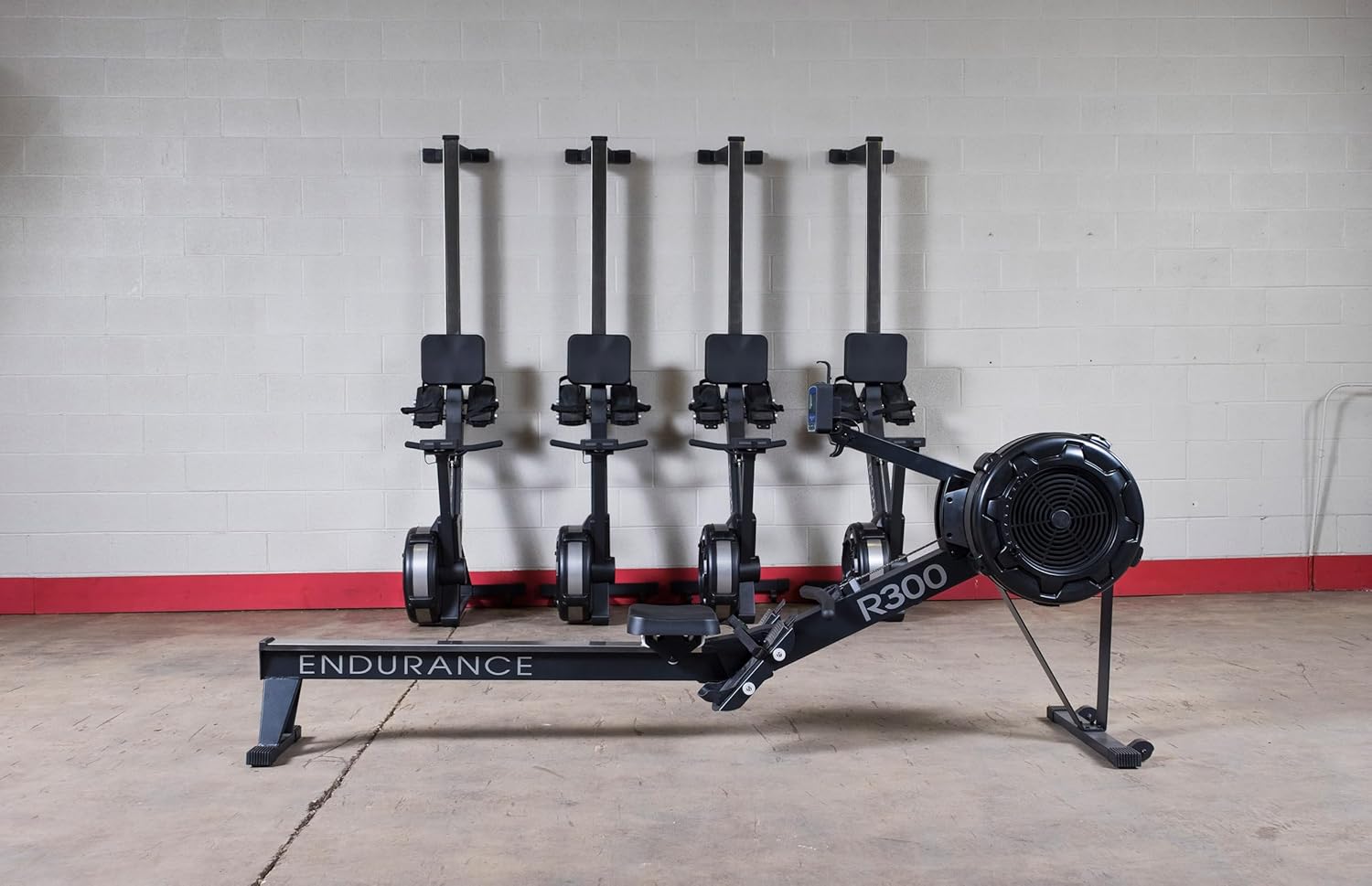
Figure 2.1: The Body-Solid Endurance R300 Rower in its upright storage position. This demonstrates the space-saving design, allowing the rower to be stored vertically when not in use.
3. Operating Instructions
3.1 Getting Started
- Foot Placement: Adjust the footrests to comfortably secure your feet with the straps. Ensure your heels are firmly against the footrest.
- Seating: Sit on the seat, ensuring a stable and balanced position.
- Grip: Grasp the ergonomic handle with both hands, palms down.
3.2 Rowing Technique
Proper rowing technique involves a coordinated movement of legs, core, and arms. The stroke consists of four phases: the catch, the drive, the finish, and the recovery.
- The Catch: Knees bent, shins vertical, arms extended forward, back straight, shoulders relaxed.
- The Drive: Push off with your legs, then swing your back, and finally pull with your arms towards your abdomen.
- The Finish: Legs extended, back slightly reclined, handle at your abdomen, elbows past your body.
- The Recovery: Extend arms forward, pivot forward from the hips, then bend knees to slide the seat forward to the catch position.
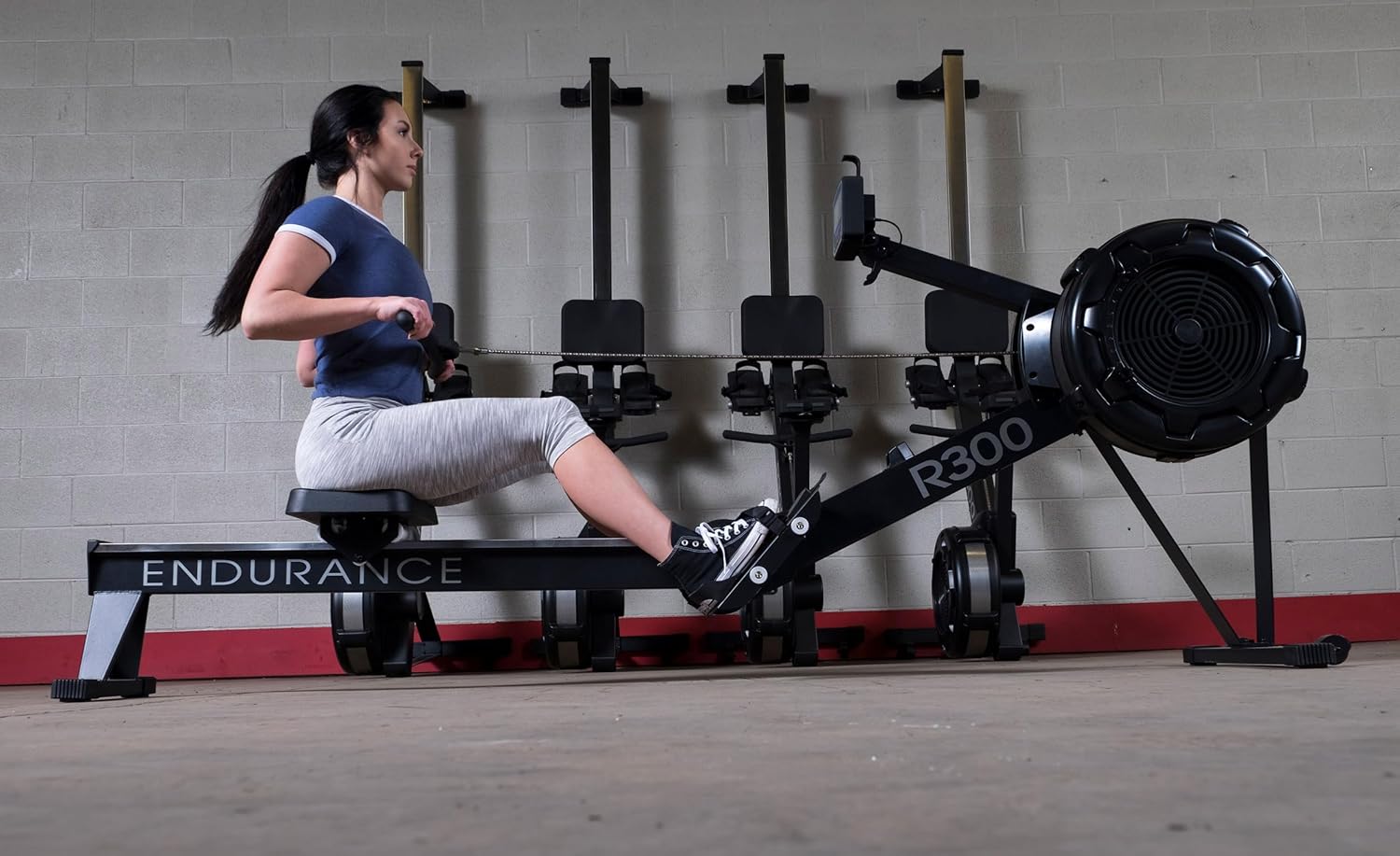
Figure 3.1: A user demonstrating the drive phase of a rowing stroke. Note the extended legs and engaged core.

Figure 3.2: A user demonstrating the finish phase of a rowing stroke, with the handle pulled towards the body.

Figure 3.3: A user demonstrating the recovery phase, extending arms forward before bending knees.
3.3 Air Resistance System
The R300 utilizes user-controlled air resistance. The intensity of your workout is directly proportional to the effort you apply. Rowing harder increases the resistance, providing a challenging workout for all fitness levels. The precision-engineered flywheel minimizes noise during operation.
3.4 Console Functions
The interactive console provides real-time feedback on your workout. It is self-generating, eliminating external power requirements, but can also use batteries for additional programs. The console reports the following metrics:
- Time: Duration of your workout.
- Heart Rate: Compatible with Polar heart rate monitors (not included).
- Calories: Estimated calories burned.
- Paddle Width: (Likely refers to stroke power/efficiency, or a specific metric for air rowers)
- Stroke Rate: Strokes per minute (SPM).
- Distance: Total distance covered.
- Watts: Power output.
The console also includes 8 pre-programmed exercise routines:
- Quick Start
- Distance
- Time
- Calories
- Game
- Intervals (20/10, 10/20, 10/10)

Figure 3.4: A detailed view of the R300's interactive console, displaying various workout metrics such as time, stroke rate, distance, and watts. The console features clear buttons for navigation and program selection.
3.5 Additional Features
- Adjustable Footrests: Provide a secure and comfortable fit for various foot sizes.
- Ergonomic Handle: Designed for natural hand and arm positions, reducing strain during long workouts.
- Cell Phone Holder: Conveniently located for entertainment or tracking workout data via a personal device.
4. Maintenance
Regular maintenance ensures the longevity and optimal performance of your R300 rower.
4.1 Cleaning
- Wipe down the frame, seat, and handle with a damp cloth after each use to remove sweat and dust.
- Avoid using abrasive cleaners or solvents that could damage the finish.
- Keep the console clean and dry.
4.2 Chain Maintenance
The R300 features a durable nickel-plated chain. Periodically inspect the chain for any signs of wear or damage. If the chain appears dry or noisy, apply a small amount of light machine oil (e.g., 3-in-1 oil) to a cloth and wipe it along the length of the chain. Do not over-lubricate.
4.3 Storage
The multi-piece design allows for easy disassembly and compact storage. To store, carefully separate the main rail from the flywheel assembly and store both components in a dry, safe place. Alternatively, the rower can be stored upright as shown in Figure 2.1.
5. Troubleshooting
| Problem | Possible Cause | Solution |
|---|---|---|
| Console display is blank or erratic. | Low or dead batteries (if installed). Loose connection. | Replace batteries. Check console cable connections. |
| Resistance feels inconsistent or too low/high. | Air damper obstruction. Incorrect rowing technique. | Ensure the air damper is clear of debris. Review proper rowing technique. Resistance is user-controlled by effort. |
| Unusual noise during operation. | Loose fasteners. Dry chain. Debris in flywheel. | Check and tighten all bolts. Lubricate the chain. Inspect flywheel for foreign objects. |
| Seat does not slide smoothly. | Dirt or debris on the monorail. Worn seat rollers. | Clean the monorail with a damp cloth. Contact customer support if rollers are worn. |
6. Specifications
| Feature | Detail |
|---|---|
| Model Name | R300 |
| Brand | Body-Solid Endurance |
| Resistance Mechanism | Air Resistance (User-controlled) |
| Product Dimensions (LxWxH) | 95.1" x 24.4" x 39.8" (241.5 cm x 62 cm x 101 cm) |
| Item Weight | 37 kg (81.1 lbs) |
| Maximum User Weight | 149 kg (330 lbs) |
| Frame Material | Metal |
| Chain Type | Nickel-plated |
| Console Display Type | LCD |
| Metrics Measured | Time, Heart Rate, Calories, Paddle Width, Stroke Rate, Distance, Watts |
| Power Source | Self-generating (Battery Powered for additional programs) |
| Special Features | Adjustable Foot Straps, Ergonomic Handle, Cell Phone Holder, 8 Pre-set Programs, Polar Compatible |
| UPC | 638448013438 |
7. Warranty Information
The Body-Solid Endurance R300 Air Resistance Indoor Rower is backed by a Limited Lifetime Warranty. This warranty covers defects in materials and workmanship under normal use and service. Specific terms and conditions may apply and can vary by region. Please refer to the warranty card included with your product or visit the official Body-Solid website for complete details regarding coverage, duration, and how to make a claim.
8. Customer Support
For technical assistance, parts inquiries, or any questions not covered in this manual, please contact Body-Solid customer support. Have your model number (R300) and purchase information ready when contacting support.
Website: www.bodysolid.com
Phone: Refer to the contact information provided on the Body-Solid website or your product packaging for the most current phone numbers.


