
Eonon GA8163
Eonon GA8163 Car Stereo User Manual
Model: GA8163 | Brand: Eonon
Introduction
This user manual provides comprehensive instructions for the installation, operation, and maintenance of your Eonon GA8163 car stereo. Please read this manual thoroughly before using the product to ensure proper functionality and to maximize your user experience. This unit is specifically designed for Mazda 3 models from 2010 to 2013.
Product Overview and Features
The Eonon GA8163 is an advanced car multimedia system offering a wide range of features for an enhanced in-car entertainment and navigation experience.
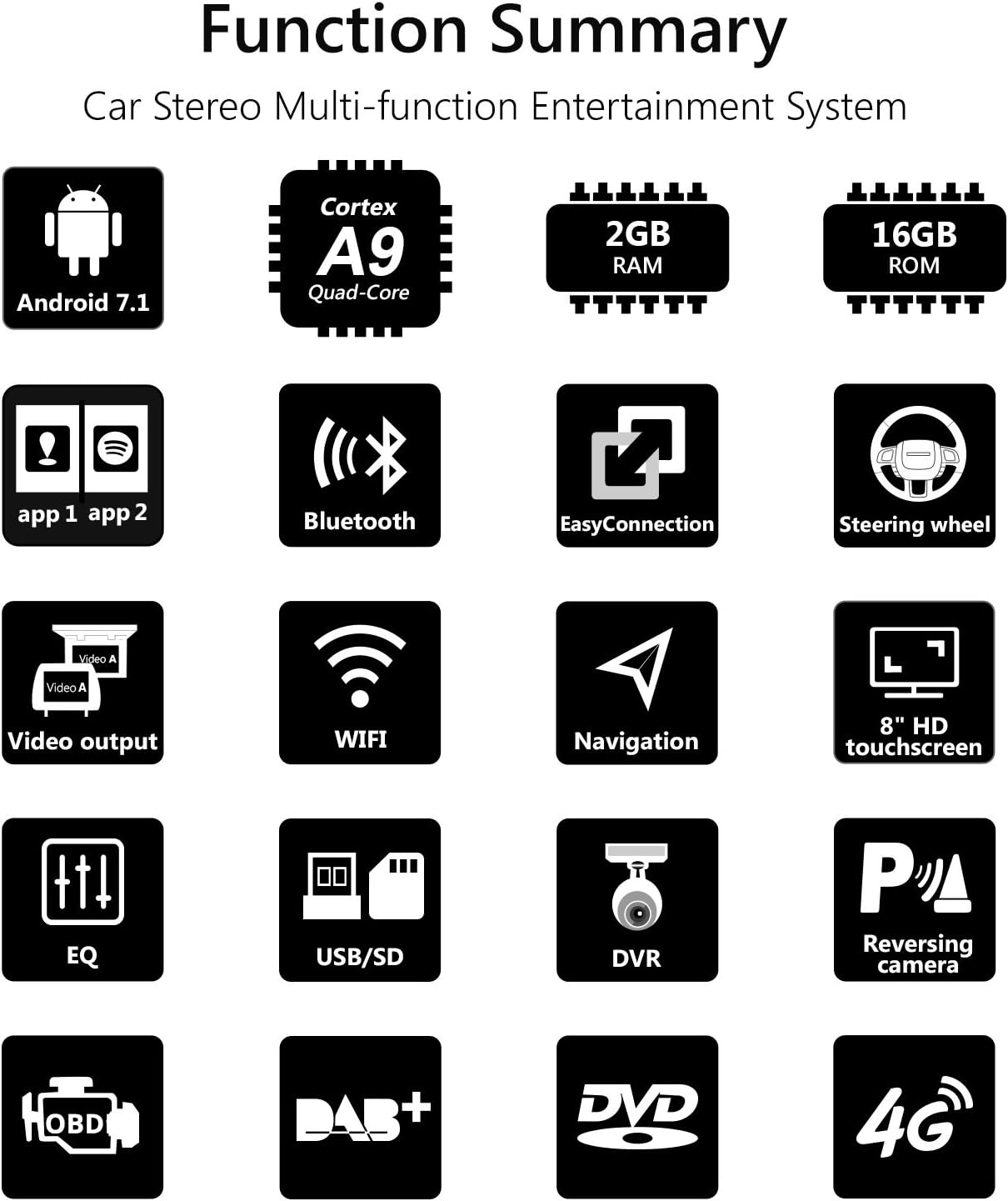
Figure 1: Overview of Eonon GA8163 key functions and features.
- Applicable Car Models: Specifically designed for Mazda 3 (2010-2013). Compatible with the analog hose system for seamless integration and improved sound quality.
- Operating System: Runs on the latest Android 7.1 Nougat.
- Performance: Equipped with a RK3188 1.6 GHz Cortex A9 Quad-Core CPU, 2GB RAM for smooth multi-application operation, and 16GB ROM for ample app installations and storage.
- Display: Features an 8-inch high-resolution 1024x600 digital capacitive touchscreen.
- EasyConnection: Allows for screen mirroring from Android devices via USB and iPhones via WiFi, with regular updates.
- Audio Control: Independent subwoofer, audio, and AV output control. Integrated amplifier output of 4 x 45W. Features a 7-band parametric equalizer function.
- Connectivity: Built-in WiFi, supports 4G and 3G Internet Dongle (optional, extra required).
- Bluetooth: Includes a special external microphone for clearer hands-free calls. Supports Bluetooth music playback.
- Steering Wheel Control: Compatible with most steering wheel control functions for easy song, channel, and volume adjustments, enhancing safety and convenience.
- Multitasking: Split-screen mode enables running two applications side by side, e.g., navigation while listening to music.
- Media Playback: Integrated DVD player compatible with AVI, DVD, DVD+R, DVD-R, DVD+RW, DVD-RW, MP3, CD, CD-RW, JPEG formats. Supports USB flash drives and micro SD cards up to 64GB.
- Optional Accessories Support: Supports Eonon V0054 external DAB+ (not included), Eonon R0008 Camera (not included), and Eonon V0056 OBD2 diagnostic tool (not included).
Specifications
| Feature | Specification |
|---|---|
| Manufacturer | Eonon |
| Package Dimensions | 38.86 x 26.67 x 21.34 cm |
| Gross Weight | 4 kg |
| ASIN | B079HXH8WN |
| Product Available on Amazon.es Since | February 22, 2018 |
| Operating Voltage | DC12 V |
| Maximum Operating Current | 15 A |
| Screen Size | 8 Inches |
| Screen Type | LCD, Capacitive Touchscreen |
| Connectivity Technology | Bluetooth, Wi-Fi |
| Supported Media Types | CD, MP3, DVD-R, DVD, AVI, DVD-RW, DVD+RW, DVD+R, JPEG |
Installation and Setup
Proper installation is crucial for the optimal performance of your Eonon GA8163 unit. It is recommended that installation be performed by a qualified professional.
Retaining Original Car Functions
The GA8163 is designed to integrate seamlessly with your Mazda 3, retaining many original car functions.

Figure 2: Illustration of retained original car functions after Eonon GA8163 installation.
- Dashboard Function: Retains original dashboard display and functionality.
- LCD Screen: Retains the original LCD screen.
- Steering Wheel Controls: Most steering wheel control functions are retained for convenience.
- Reversing Control: The head unit automatically switches to reverse mode when reversing.
- Handbrake Control: The head unit enters safe mode and video playback is disabled when the handbrake is engaged. This can be enabled/disabled in settings.
- Car Headlights: Buttons on the head unit illuminate when headlights are turned on.
Wiring Diagram and Included Components
Refer to the diagram below for proper wiring connections and identification of included accessories.

Figure 3: Detailed wiring diagram and list of included components for the Eonon GA8163.
Included Components:
- 1 x GPS Antenna (3m)
- 1 x Power Cable
- 1 x Audio Output Harness
- 1 x AUX Input Harness
- 1 x Reversing Video Adapter Cable
- 1 x 3G/USB Adapter Cable
- 1 x AUX Harness
- 1 x CAN Bus
- 1 x USB Adapter Cable
- 1 x Audio Cable Designed For Bose System
- 2 x Mounting Brackets
- 1 x HDMI Adapter Cable
- 1 x External Microphone
- 1 x Disassembly Tool
- 2 x 15A Fuse
- 1 x HDMI Adapter Cable
- 8 x Screws
Ensure all components are present before beginning installation. Connect the cables as indicated in the diagram, paying close attention to the power, audio, and video connections.
Post-Installation Appearance
See how the Eonon GA8163 integrates into your Mazda 3 dashboard after installation.

Figure 4: Comparison of the car dashboard before and after installing the Eonon GA8163 unit.
Operation
Once installed, the Eonon GA8163 offers an intuitive interface for various functions.
Basic Interface and Navigation
The main screen provides access to core features like music, navigation, and settings.
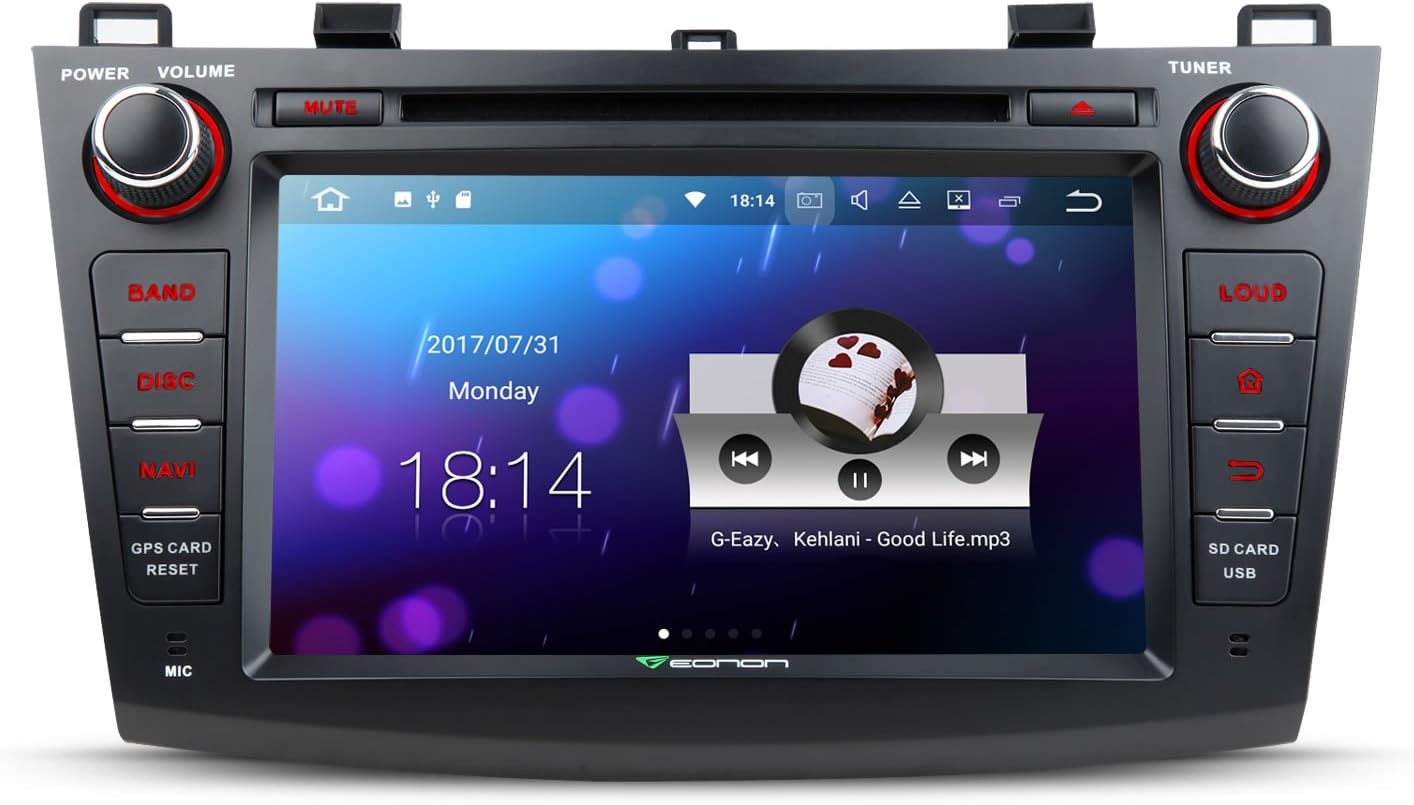
Figure 5: The main user interface of the Eonon GA8163, showing media playback and time display.
Split Screen Multitasking
Utilize the split-screen feature to run two applications simultaneously, enhancing convenience and productivity.

Figure 6: Example of split-screen multitasking, showing navigation and music playback simultaneously.
- To activate split screen, open one app, then long-press the recent apps button (usually a square icon) or drag another compatible app from the recent apps list to one side of the screen.
- Adjust the size of each app window by dragging the divider bar.
Media Playback (DVD, USB, SD)
Insert a DVD into the disc slot or connect a USB drive/SD card to the designated ports. The system will automatically detect and allow you to browse media files.
- DVD: Insert disc into the slot. Select 'Disc' from the main menu.
- USB/SD: Connect your storage device. Select 'USB' or 'SD' from the main menu to access files.
Bluetooth Connectivity
Pair your mobile device via Bluetooth for hands-free calling and music streaming.
- Go to the 'Bluetooth' application on the head unit.
- Enable Bluetooth on your mobile device and search for available devices.
- Select 'Eonon GA8163' (or similar name) from the list on your phone.
- Confirm the pairing code on both devices.
- Once paired, you can make/receive calls and play music through the car speakers.
Maintenance
To ensure the longevity and optimal performance of your Eonon GA8163, follow these maintenance guidelines:
- Cleaning: Use a soft, dry cloth to clean the touchscreen and exterior. For stubborn smudges, slightly dampen the cloth with water or a screen-safe cleaner. Avoid abrasive materials or harsh chemicals.
- Temperature: Avoid exposing the unit to extreme temperatures, direct sunlight for prolonged periods, or excessive humidity.
- Disc Care: Handle DVDs and CDs by their edges. Keep them clean and free of scratches to prevent playback issues.
- Software Updates: Periodically check the Eonon official website for any available software or firmware updates to ensure the system runs efficiently and securely.
Troubleshooting
If you encounter issues with your Eonon GA8163, refer to the following common troubleshooting steps:
- No Power:
- Check all power connections to ensure they are securely plugged in.
- Verify the car's fuse box and the unit's inline fuse (15A) are intact. Replace if blown.
- No Sound:
- Ensure the volume is not muted or set to minimum.
- Check speaker wire connections.
- Verify audio output settings in the system menu.
- Touchscreen Unresponsive:
- Perform a soft reset by pressing the 'RESET' button (usually a small pinhole, refer to unit diagram).
- Ensure the screen is clean and free of debris.
- Bluetooth Connection Issues:
- Ensure Bluetooth is enabled on both the head unit and your mobile device.
- Delete previous pairings on both devices and attempt to re-pair.
- Move your mobile device closer to the head unit.
- Disc Playback Errors:
- Ensure the disc is clean and free of scratches.
- Verify the disc format is supported by the unit (refer to Specifications).
If the issue persists after attempting these steps, please contact Eonon customer support for further assistance.
Warranty and Support
For warranty information, please refer to the warranty card included with your product packaging or visit the official Eonon website. Warranty terms and conditions may vary by region and purchase date.
Customer Support:
If you require technical assistance, have questions about your product, or need to report a defect, please contact Eonon customer support through their official website or the contact information provided in your product documentation. When contacting support, please have your product model (GA8163) and purchase details ready.
You can visit the Eonon store on Amazon for more information: Eonon Amazon Store
Ask a question about this manual
Ask about setup, troubleshooting, compatibility, parts, safety, or missing instructions. Manuals+ will review the question and use this page’s manual context to help answer it.