
ENGWE ENGWE 4-Wheel Folding Mobility Scooter
ENGWE 4-Wheel Folding Mobility Scooter User Manual
Model: ENGWE 4-Wheel Folding Mobility Scooter
Brand: ENGWE
1. General Safety Guidelines
Before operating your ENGWE Mobility Scooter, please read and understand all safety instructions. Failure to follow these guidelines may result in injury or damage to the scooter.
- Always operate the scooter on stable, level surfaces. Avoid steep inclines or uneven terrain.
- Ensure the battery is fully charged before each use to prevent unexpected power loss.
- Do not exceed the maximum weight capacity of 265 lbs (120 kg).
- Use the headlight and horn as necessary to ensure visibility and alert others, especially in low-light conditions.
- Always engage the brake when stopping or parking the scooter.
- Keep hands and feet clear of moving parts.
- Consult local regulations regarding mobility scooter use in public spaces.
2. Setup and Assembly
Your ENGWE Mobility Scooter requires minimal assembly. Follow these steps to get your scooter ready for use:
- Adjust the Angle: Begin by adjusting the angle of the tiller (handlebar column) to a comfortable position.
- Install the Battery: Carefully install the battery into its designated compartment. Ensure it is securely connected.
- Install the Seat: Place the seat onto the main frame, ensuring it locks into place. The seat is designed for 360° swivel for easy boarding.
- Install the Basket: Attach the front basket to the tiller for convenient storage of personal items.

Figure 2.1: The ENGWE 4-Wheel Folding Mobility Scooter in its assembled state, showcasing its compact design and front basket.

Figure 2.2: Visual guide illustrating the four simple steps for assembling the mobility scooter.
After assembly, charge the battery using the included charger until the indicator shows a full charge. Familiarize yourself with the controls before your first ride.
3. Operating Instructions
Operating your ENGWE Mobility Scooter is intuitive. Here's how to use its main features:
3.1 Control Panel Overview
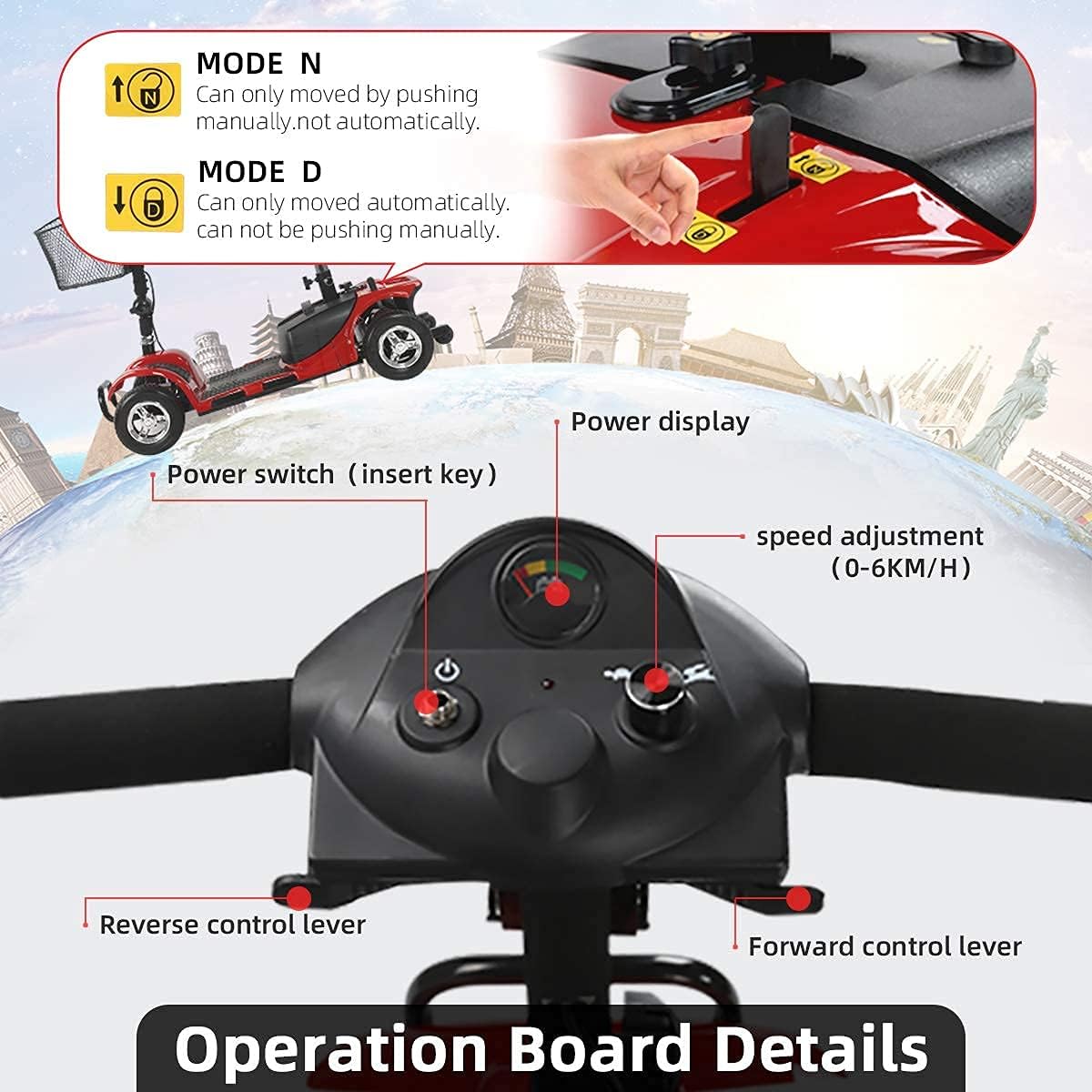
Figure 3.1: The main control panel of the scooter, highlighting key operational components.
- Power Switch (Insert Key): Insert the key and turn to power on/off the scooter.
- Power Display: Indicates the current battery level. Ensure sufficient charge before use.
- Speed Adjustment (0-6 KM/H): Use the dial to set your desired maximum speed.
- Forward Control Lever: Press to move the scooter forward.
- Reverse Control Lever: Press to move the scooter backward.
3.2 Driving Modes
The scooter features two driving modes, controlled by a lever near the front:
- Mode N (Neutral): In this position, the scooter can be manually pushed or pulled. This is useful for moving the scooter without power.
- Mode D (Drive): In this position, the scooter is engaged for powered operation and cannot be pushed manually. This mode also activates the auto-braking feature.

Figure 3.2: The auto-braking switchable lever, controlling the scooter's drive and neutral modes.
3.3 Adjustable Features
- Seat Adjustment: The seat is adjustable for height and can swivel 360 degrees, providing comfort and ease of access.
- Armrests: The armrests are adjustable to suit individual user preferences.

Figure 3.3: Illustration of the adjustable seat and tiller for personalized comfort.
3.4 Safety Features
- Headlight and Horn: Integrated headlight for improved visibility and a horn to alert pedestrians or other users.
- Anti-Tipper Wheels: Dual rear anti-tipper wheels provide additional stability and prevent the scooter from tipping backward, especially on inclines.
- Heavy Duty Front Bumper: Provides protection against minor collisions.
- Reflective Tape: Rear taillights are equipped with night reflective tape for enhanced safety during low-light operation.

Figure 3.4: Key safety components including the front bumper, reflective tape, and anti-tipper wheels.
4. Maintenance
Regular maintenance ensures the longevity and optimal performance of your ENGWE Mobility Scooter.
- Battery Care: Always charge the battery fully after each use. Avoid completely draining the battery. If storing the scooter for an extended period, ensure the battery is fully charged and periodically recharge it.
- Cleaning: Wipe down the scooter with a damp cloth. Avoid using harsh chemicals or abrasive cleaners. Do not spray water directly onto electrical components.
- Tires: The scooter is equipped with 8-inch solid anti-slip tires, which require minimal maintenance. Periodically check for debris or damage.
- General Inspection: Regularly check all nuts, bolts, and connections to ensure they are secure. Inspect the frame for any signs of damage.

Figure 4.1: The dual 12V 12Ah battery system, crucial for the scooter's power and range.
5. Troubleshooting
This section addresses common issues you might encounter with your ENGWE Mobility Scooter.
5.1 Scooter Stops Moving
If your scooter unexpectedly stops moving, consider the following:
- Check Battery Level: Ensure the battery has sufficient charge. A low battery can cause the scooter to stop.
- Check Drive Mode: Verify that the scooter is in 'D' (Drive) mode and not 'N' (Neutral) mode. In 'N' mode, the scooter can be pushed manually and will not operate under power.
- Power Cycle: Turn the scooter off, remove the key, wait a few seconds, then reinsert the key and turn it on again.
- Overload Protection: The scooter may have stopped due to an overload. Reduce the load and try again.
Video 5.1: This video demonstrates how to check and switch between 'D' (Drive) and 'N' (Neutral) modes, which can resolve issues if the scooter stops moving or needs to be pushed manually.
5.2 Other Issues
- No Power: Ensure the key is fully inserted and turned to the 'ON' position. Check battery connections.
- Unusual Noises: If you hear unusual noises, stop the scooter immediately and inspect for loose parts or obstructions.
If troubleshooting steps do not resolve the issue, please contact customer support.
6. Specifications
Key technical specifications for the ENGWE 4-Wheel Folding Mobility Scooter:
| Feature | Specification |
|---|---|
| Motor Power | 250W (24V) |
| Battery | 24V 12A (Dual 12V 12Ah) |
| Max Speed | 6.2 mph (10 km/h) |
| Max Range | Up to 15.5 miles (25 km) |
| Weight Capacity | 265 lbs (120 kg) |
| Net Weight | 88.18 lbs (39.99 kg) |
| Product Dimensions | 41.34 x 17.72 x 29.53 inches (105 x 45 x 75 cm) |
| Tire Type | 8-inch Solid Anti-slip Tires |
| Turning Angle | 10-15° |
| Material | Stainless Steel Frame |

Figure 6.1: Dimensional overview of the scooter, including length, height, and weight capacity.

Figure 6.2: Internal view highlighting the powerful 24V 180W motor.

Figure 6.3: Detail of the durable 7.5-inch solid wheels, designed for various terrains.
7. Warranty and Support
ENGWE is committed to providing exceptional customer support and reliable after-sales service.
- After-Sales Service: Our dedicated 24/7 professional support team is available to answer any pre-sale inquiries and provide reliable after-sales service.
- Customer Support: For any questions, concerns, or assistance, please refer to the customer support information provided at the time of purchase or visit the official ENGWE store.
- User Guide (PDF): A detailed PDF user guide is available for download here for additional information.
Related documentsENGWE 4-Wheel Folding Mobility Scooter


Ask a question about this manual
Ask about setup, troubleshooting, compatibility, parts, safety, or missing instructions. Manuals+ will review the question and use this page’s manual context to help answer it.