
Leupold 173805
Leupold RX-1600i TBR Laser Rangefinder
User Instruction Manual
Model: 173805
Introduction
The Leupold RX-1600i TBR/W with DNA is a high-performance laser rangefinder designed for precision distance measurement in various outdoor conditions. It offers advanced features for hunters and shooters, including True Ballistic Range with Wind (TBR/W) technology for accurate shot placement.
This manual provides essential information for the proper setup, operation, maintenance, and troubleshooting of your RX-1600i TBR Laser Rangefinder.
Key Features
- Model #173805 - RX-1600I Rangefinder, TBR/W: Identifies the specific model with its core technologies.
- True Ballistic Range / Wind (TBR/W) Technology: Provides ballistically calculated ranges for extremely accurate shots at longer distances and steeper angles. It can also generate a hold point for a 10-mph wind at a 90-degree angle out to 800 yards.
- Bow Mode: Uses the distance and the angle of a shot to calculate a ballistic equivalent to the target for more accurate uphill and downhill archery shots.
- Advanced OLED Display: Features bright red characters with adjustable brightness settings, ensuring clear visibility in various lighting conditions and offering best-in-class light transmission.
- Last Target Mode: Ensures the rangefinder reads the farthest target in the laser's path, preventing interference from foreground objects like grasses and twigs for a more accurate range.
Setup
- Battery Installation: Locate the battery compartment, typically on the side or bottom of the unit. Insert a fresh CR2 Lithium battery, ensuring correct polarity. Close the compartment securely to maintain waterproof integrity.
- Power On/Off: Press the power button (usually located on top) to turn the unit on. The display will illuminate. To turn off, press and hold the power button, or the unit may automatically power off after a period of inactivity to conserve battery life.
- Diopter Adjustment: Rotate the eyepiece to adjust the diopter until the display reticle and readings appear sharp and clear for your eye. This ensures optimal viewing clarity.
- Mode Selection: Familiarize yourself with the 'MODE' button. Pressing it typically cycles through different modes such as TBR/W, Bow Mode, and Line of Sight (LOS). Refer to the operating section for detailed mode descriptions.
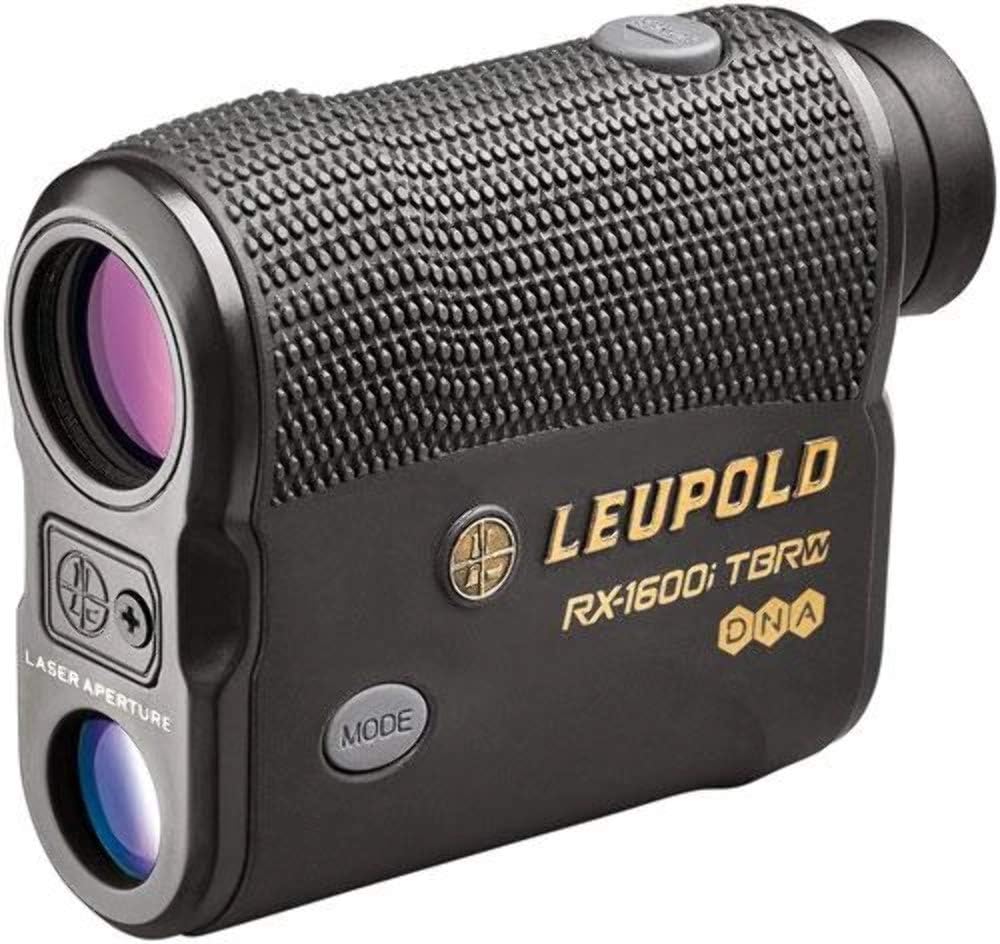
Figure 1: Front-side view of the Leupold RX-1600i TBR Laser Rangefinder.
Operating Instructions
- Ranging a Target: Aim the rangefinder at your desired target. Press and release the power button. The distance to the target will be displayed on the OLED screen. For continuous scanning, press and hold the power button while sweeping across multiple targets.
- Using TBR/W Mode: In TBR/W mode, the rangefinder calculates the true ballistic range, compensating for incline/decline and providing a holdover value for wind. This is crucial for accurate long-range shots.
- Activating Bow Mode: Select Bow Mode for archery applications. This mode provides the equivalent horizontal distance to the target, which is essential for accurate arrow trajectory on sloped terrain.
- Adjusting Display Brightness: The OLED display brightness can be adjusted to suit ambient light conditions. Typically, this is done by holding the 'MODE' button and pressing the power button to cycle through brightness levels.

Figure 2: Side view of the rangefinder, highlighting the mode button for operational adjustments.
Video 1: Official Leupold video demonstrating the features and use of the TBR Laser Rangefinder.
Maintenance
- Cleaning Lenses: Use a clean, soft lens cloth to gently wipe the objective and eyepiece lenses. Avoid using abrasive materials or harsh chemicals that could damage the coatings.
- General Cleaning: Wipe the body of the rangefinder with a damp cloth to remove dirt or debris. Ensure the unit is dry before storing.
- Storage: Store the rangefinder in a cool, dry place away from direct sunlight and extreme temperatures. If storing for extended periods, remove the battery to prevent leakage.
- Battery Replacement: Replace the CR2 battery when the low battery indicator appears on the display. Always use a high-quality CR2 Lithium battery for optimal performance.
Troubleshooting
| Problem | Possible Cause | Solution |
|---|---|---|
| No display or dim display | Low or dead battery; incorrect brightness setting. | Replace battery; adjust display brightness (refer to Operating Instructions). |
| Inaccurate readings or no reading | Target too close/far; reflective surface; obstruction; dirty lenses. | Ensure target is within range (6-1600 yards); aim at a non-reflective surface; clear line of sight; clean lenses. |
| Unit not powering on | Battery incorrectly installed or completely drained. | Check battery orientation; replace with a new battery. |
Specifications
| Specification | Value |
|---|---|
| Brand | Leupold |
| Model Name | 173805 |
| Magnification | 6x |
| Measuring Range | 6 - 1600 yards (Reflective Target) |
| Color | Black (173805) |
| Material | Aluminum, Rubber |
| Item Weight | 0.82 Pounds |
| Product Dimensions (LxWxH) | 6"L x 4"W x 5"H |
| Battery Type | CR2 Lithium (Included) |
| Water Resistance Level | Waterproof |
| International Protection Rating | IP54 |

Figure 3: Back view of the rangefinder, showing the battery compartment and serial number.
Warranty Information
The Leupold RX-1600i TBR Laser Rangefinder comes with a manufacturer's warranty. Please refer to the official Leupold website or the documentation included with your product for specific warranty terms and conditions. The warranty description states: "See manufacturer".
Support
For additional support, product registration, or to explore other Leupold products, please visit the official Leupold website or their Amazon Brand Store:
Visit the Leupold Brand Store on Amazon
You can also find more information and resources on their official website.
Related documents173805


Ask a question about this manual
Ask about setup, troubleshooting, compatibility, parts, safety, or missing instructions. Manuals+ will review the question and use this page’s manual context to help answer it.