
1. Product Overview
The TecTake Mobile Pedestal is a functional storage unit designed for offices, children's rooms, or any space requiring organized storage. It features six easy-to-open drawers and four smooth-gliding castors for mobility. The top surface has rounded edges for safety.
Key Features:
- Six spacious drawers for various items.
- Four smooth-running castors for easy movement.
- Rounded edges on the top surface for enhanced safety.
- Easy assembly and cleaning.
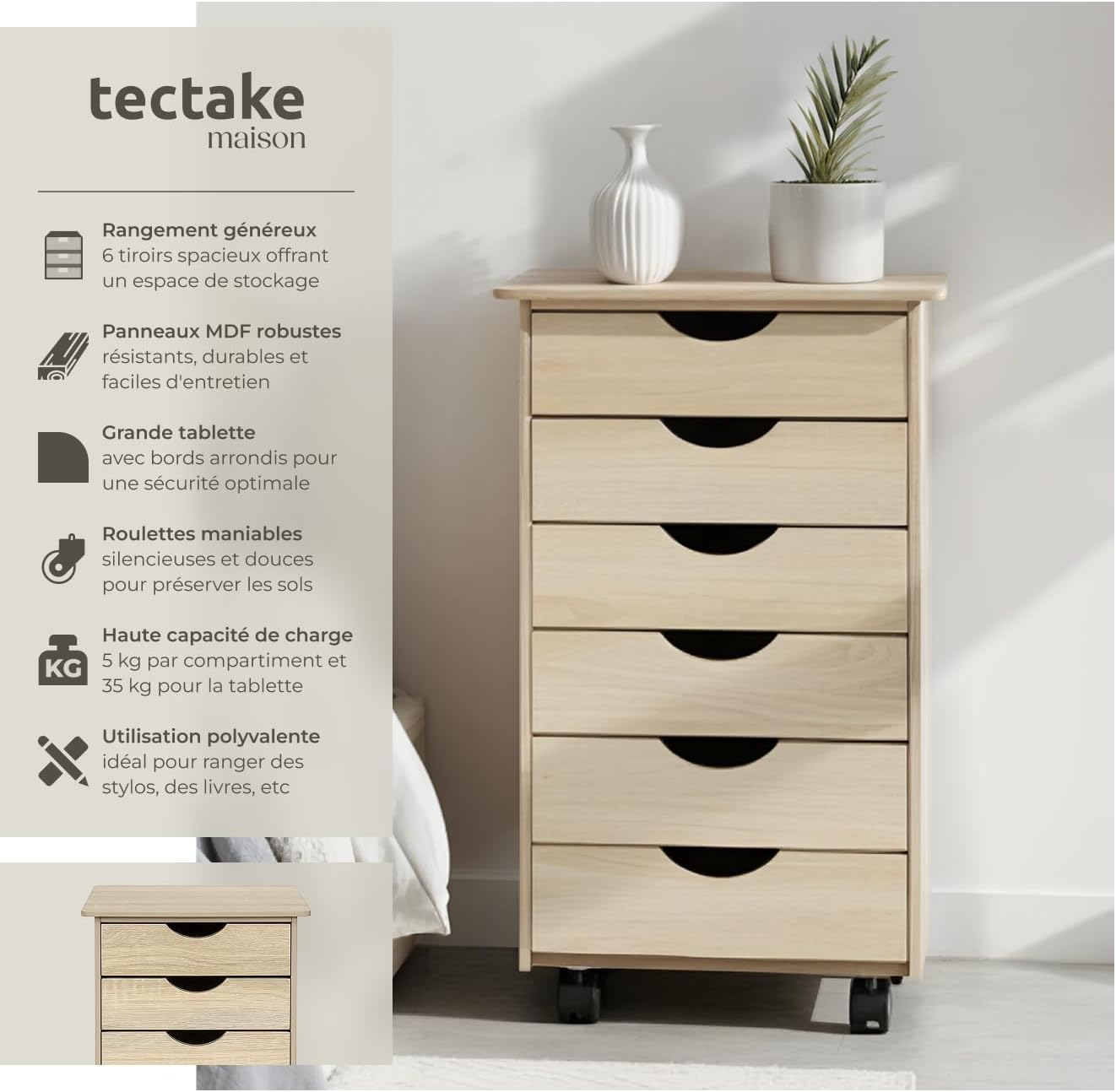
Image 1: TecTake Mobile Pedestal with six drawers, showcasing its oak finish and compact design.
2. Package Contents
Before beginning assembly, please ensure all components listed below are present in your package.
- Mobile Pedestal with six drawers (disassembled components)
- Assembly Instructions (this document)
- Mounting Hardware (screws, dowels, etc.)
3. Safety Information
- Keep small parts away from children during assembly.
- Ensure all screws are tightened securely to prevent instability.
- Do not overload drawers; adhere to specified weight limits.
- Avoid placing hot items directly on the top surface without protection.
4. Setup and Assembly
Assembly is required for this product. Please follow these steps carefully. It is recommended to have a second person assist with assembly.
Step-by-Step Assembly:
- Prepare Components: Unpack all parts and verify against the parts list (if provided separately). Lay them out on a clean, soft surface to prevent scratches.
- Assemble the Frame: Attach the side panels to the base and top panels using the provided screws and dowels. Ensure the castor mounting points are at the bottom.
- Install Castors: Securely attach the four castors to the designated points on the bottom panel of the frame.
- Assemble Drawers: For each of the six drawers, assemble the front, back, and side panels. Slide the bottom panel into the grooves and secure with screws.
- Insert Drawers: Carefully slide each assembled drawer into its respective slot in the main frame. Ensure they glide smoothly.
Video 1: Assembly guide for a similar mobile storage unit. This video demonstrates the general process of assembling the frame and drawers.

Image 2: An exploded view showing the individual components of the mobile pedestal, illustrating how they fit together during assembly.
5. Operating Instructions
Using the Drawers:
The drawers are designed for smooth operation. To open, gently pull the integrated handle. To close, push the drawer back until it is flush with the unit. Avoid forcing drawers if they encounter resistance.
Mobility:
The unit is equipped with four castors for easy relocation. To move the pedestal, simply push or pull it to the desired position. Ensure the path is clear of obstacles to prevent damage to the unit or flooring.

Image 3: A close-up view of an open drawer, demonstrating its capacity for storing office supplies.
6. Maintenance and Care
- Cleaning: Wipe the surfaces with a soft, damp cloth. Avoid abrasive cleaners or harsh chemicals that may damage the finish.
- Dusting: Regularly dust the unit to maintain its appearance.
- Drawer Runners: If drawers become stiff, a small amount of silicone spray on the runners can improve their glide.
- Tightening Screws: Periodically check and tighten all screws to ensure the unit remains stable.
7. Troubleshooting
| Problem | Possible Cause | Solution |
|---|---|---|
| Drawers do not slide smoothly. | Misaligned runners, debris in runners, or loose screws. | Check alignment of runners, clean any debris, or apply silicone spray. Tighten screws if loose. |
| Unit is wobbly. | Loose assembly screws. | Ensure all assembly screws are tightened securely. |
| Castors not rolling freely. | Debris caught in castor wheels or loose attachment. | Clean castor wheels. Check and tighten castor attachment screws. |
8. Specifications
| Feature | Detail |
|---|---|
| Total Dimensions (LxWxH) | Approx. 36 x 40 x 65 cm |
| Drawer Dimensions (LxWxH) | Approx. 28 x 28 x 8 cm |
| Castor Diameter | Approx. 4 cm |
| Top Surface Load Capacity | 35 kg |
| Per Drawer Load Capacity | 5 kg |
| Weight | Approx. 10.5 kg |
| Material | MDF |
| Model Number | 800055 |

Image 4: Detailed diagram showing the overall dimensions and individual drawer dimensions of the mobile pedestal.
9. Warranty and Support
For warranty information and customer support, please refer to the purchase documentation or contact TecTake customer service directly. Contact details can typically be found on the manufacturer's website or your purchase receipt.
Note: Keep your proof of purchase for any warranty claims.