1. Introduction
This manual provides essential instructions for the safe and efficient operation, maintenance, and troubleshooting of your Silex 2439 Stainless Steel Grill and Cooking Plate. Please read this manual thoroughly before first use and retain it for future reference.
2. Important Safety Instructions
WARNING: To reduce the risk of fire, electric shock, or injury, always follow basic safety precautions.
- Read all instructions before using the appliance.
- Do not touch hot surfaces. Use handles or knobs.
- To protect against electrical hazards, do not immerse cord, plugs, or the appliance in water or other liquid.
- Close supervision is necessary when any appliance is used by or near children.
- Unplug from outlet when not in use and before cleaning. Allow to cool before putting on or taking off parts.
- Do not operate any appliance with a damaged cord or plug, or after the appliance malfunctions or has been damaged in any manner.
- The use of accessory attachments not recommended by the appliance manufacturer may cause injuries.
- Do not use outdoors.
- Do not let cord hang over edge of table or counter, or touch hot surfaces.
- Do not place on or near a hot gas or electric burner, or in a heated oven.
- Extreme caution must be used when moving an appliance containing hot oil or other hot liquids.
- Always attach plug to appliance first, then plug cord into the wall outlet. To disconnect, turn any control to "off", then remove plug from wall outlet.
- Do not use appliance for other than intended use.
3. Product Components
Familiarize yourself with the parts of your Silex 2439 Grill.
- Stainless Steel Housing
- Upper Grill Plate
- Lower Grill Plate
- Heat-Resistant Handles
- Temperature Control Dial (numbered 1-5)
- Power Indicator Light
- Non-Stick Coating

Figure 1: The Silex 2439 Grill in its closed position, showcasing the stainless steel exterior and black handles. This view highlights the compact design of the appliance.
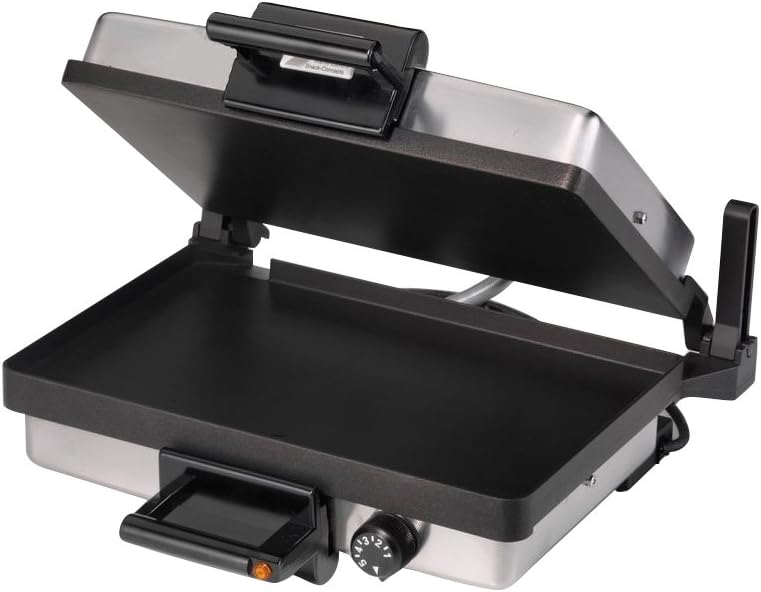
Figure 2: The Silex 2439 Grill with its lid open, revealing the non-stick upper and lower cooking plates. This image demonstrates the ample cooking surface available for various food items.

Figure 3: A close-up view of the temperature control dial on the Silex 2439 Grill. The dial is clearly marked with settings from 1 to 5, allowing for precise heat adjustment during cooking.
4. Setup and First Use
- Unpacking: Carefully remove the grill from its packaging. Retain packaging materials for storage or disposal.
- Initial Cleaning: Before first use, wipe the cooking plates with a damp cloth or sponge. Dry thoroughly. Do not immerse the appliance in water.
- Placement: Place the grill on a stable, heat-resistant, and dry surface. Ensure there is adequate ventilation around the appliance.
- Power Connection: Ensure the temperature control dial is set to '0' (off). Plug the power cord into a grounded 230V electrical outlet.
- Pre-heating: For the first use, it is recommended to pre-heat the grill for approximately 5-10 minutes on a medium setting (e.g., '3') without food. This helps to burn off any manufacturing residues. A slight odor or smoke may be present during this initial pre-heating; this is normal.
- Cool Down: Allow the appliance to cool completely after the initial pre-heating cycle.
5. Operating Instructions
5.1 General Grilling
- Preparation: Ensure the grill plates are clean. Lightly brush the cooking plates with a small amount of cooking oil, if desired, for certain foods.
- Pre-heating: Close the grill and turn the temperature control dial to your desired setting (1-5). The power indicator light will illuminate. Allow the grill to pre-heat for 5-10 minutes until the indicator light may turn off, signaling it has reached the set temperature.
- Cooking: Carefully open the grill and place your food onto the lower cooking plate. Close the lid. The floating hinge design allows for even cooking of thicker items.
- Monitoring: Cooking times will vary depending on the type and thickness of the food. Periodically check food for desired doneness.
- Completion: Once cooking is complete, carefully remove food using heat-resistant utensils.
- Shut Down: Turn the temperature control dial to '0' (off) and unplug the appliance from the wall outlet.
5.2 Temperature Settings Guide
| Setting | Recommended Use |
|---|---|
| 1-2 (Low) | Warming, gentle cooking, delicate items. |
| 3 (Medium) | Sandwiches, paninis, vegetables, fish. |
| 4-5 (High) | Meats, poultry, searing, faster cooking. |
Note: These are general guidelines. Adjust settings based on specific food items and personal preference.
6. Cleaning and Maintenance
CAUTION: Always unplug the grill and allow it to cool completely before cleaning.
- Exterior: Wipe the exterior stainless steel housing with a soft, damp cloth. Do not use abrasive cleaners or scouring pads.
- Cooking Plates:
- For light residue, wipe the non-stick plates with a damp cloth or paper towel.
- For stubborn food residue, dampen a cloth with warm, soapy water and gently wipe the plates. Avoid metal utensils or abrasive materials that can damage the non-stick coating.
- Ensure plates are completely dry before storing or next use.
- Storage: Store the grill in a clean, dry place. The power cord can be wrapped around the base for tidy storage.
- Do Not Immerse: Never immerse the entire appliance, cord, or plug in water or any other liquid.
7. Troubleshooting
| Problem | Possible Cause | Solution |
|---|---|---|
| Grill does not heat up. | Not plugged in; power outlet malfunction; temperature dial set to '0'. | Ensure the appliance is securely plugged into a working 230V outlet. Turn the temperature dial to a desired setting (1-5). Check household circuit breaker. |
| Food is not cooking evenly. | Grill not pre-heated sufficiently; uneven food thickness. | Allow the grill to pre-heat fully until the indicator light cycles off. Ensure food items are of similar thickness for best results. |
| Excessive smoke during cooking. | Food residue on plates; too much oil used; high-fat food. | Clean plates thoroughly before use. Use minimal oil. For high-fat foods, ensure proper ventilation. |
| Non-stick coating appears damaged. | Use of metal utensils or abrasive cleaners. | Always use wooden, plastic, or silicone utensils. Clean with soft cloths and non-abrasive cleaners. |
If the problem persists after attempting these solutions, please contact customer support.
8. Product Specifications
- Model: Silex 2439
- Power: 2000 W
- Voltage: 230 V
- Material: Stainless Steel, Metal
- Color: Silver
- Cooking Plate Dimensions: 34 cm x 22 cm
- Product Dimensions (L x W x H): 36 cm x 40 cm x 17 cm
- Weight: 7 kg
- Features: Double Non-Stick Coating, Scratch-Resistant Plates, Temperature Control Dial
9. Warranty Information
Silex products are manufactured to high-quality standards. For specific warranty terms and conditions, please refer to the warranty card included with your purchase or visit the official Silex website. Keep your proof of purchase for any warranty claims.
10. Customer Support
For technical assistance, spare parts, or general inquiries, please contact Silex customer service. Contact details can typically be found on the official Silex website or on the product packaging.
Online Resources: www.silex.com (Example link, replace with actual if available)


