
1. Introduction
This manual provides essential information for the safe and efficient operation, maintenance, and troubleshooting of your Bostitch DSA-3522-E 10.8V Cordless Carton Stapler. Please read these instructions carefully before using the tool to ensure proper function and to prevent injury or damage.
The Bostitch DSA-3522-E is designed for reliably closing shipping boxes and offers flexibility through its cordless, battery-powered operation. It is capable of processing staples with lengths between 18mm and 22mm.
2. Safety Information
WARNING: Read all safety warnings, instructions, illustrations, and specifications provided with this power tool. Failure to follow all instructions listed below may result in electric shock, fire, and/or serious injury.
- Always wear appropriate personal protective equipment, including eye protection, when operating the stapler.
- Keep the work area clean and well-lit. Cluttered or dark areas invite accidents.
- Do not operate power tools in explosive atmospheres, such as in the presence of flammable liquids, gases, or dust.
- Keep children and bystanders away while operating a power tool. Distractions can cause you to lose control.
- Ensure the stapler is switched off and the battery is removed before making any adjustments, changing accessories, or storing the tool.
- Use only Bostitch recommended staples and accessories for this tool.
- For commercial use, please observe all relevant building regulations and safety standards.
3. Package Contents
Verify that all items listed below are included in your package:
- 1 x Bostitch DSA-3522-E Li-ion Cordless Carton Stapler
- 2 x Bostitch 1.5 Ah 10.8V Li-ion Batteries (Part No. 9R201498)
- 1 x Bostitch Battery Charger (Part No. 9R209782)
- 1 x Box of 2000 Bostitch 18mm Carton Staples (Part No. 1331800Z)
- 1 x Box of 2000 Bostitch 22mm Carton Staples (Part No. 1332200Z)
- 1 x Carrying Case

Image 1: Complete Bostitch DSA-3522-E kit, including the stapler, batteries, charger, and staples, all contained within the carrying case.
4. Product Components and Features
Familiarize yourself with the main components of your Bostitch DSA-3522-E stapler:
- Stapler Body: Main housing for motor and mechanism.
- Handle with Trigger: Ergonomic grip for operation.
- Magazine: Holds the staples. Capacity: 108 staples.
- Battery Port: For inserting the 10.8V Li-ion battery.
- Staple Length Adjustment: Allows manual configuration of staple length (18-22mm).
- Staple Tension Adjustment: Allows manual configuration of stapling force.
- Additional Hand Rest: Provides enhanced comfort during extended use.
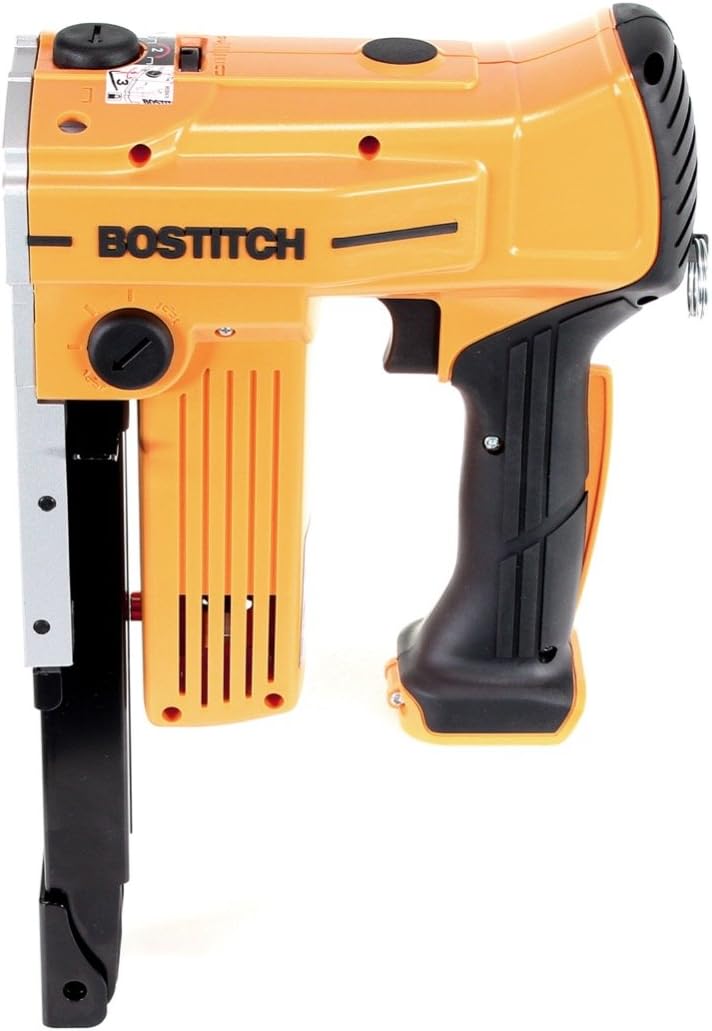
Image 2: Side view of the Bostitch DSA-3522-E cordless carton stapler, highlighting its ergonomic design and adjustment dials.
5. Setup
5.1 Battery Charging
- Connect the Bostitch battery charger (9R209782) to a suitable power outlet.
- Insert the 10.8V Li-ion battery into the charger. Ensure it clicks securely into place.
- Allow approximately 45 minutes for a fully discharged battery to reach full charge. The charger will indicate when charging is complete.
- Remove the battery from the charger once fully charged.

Image 3: The Bostitch 10.8V Li-ion battery charger with two batteries, ready for charging.
5.2 Loading Staples
- Ensure the battery is removed from the stapler before loading staples.
- Locate the staple magazine release mechanism, typically at the rear or bottom of the stapler.
- Open the magazine.
- Insert a strip of Bostitch 18mm or 22mm carton staples into the magazine with the points facing forward.
- Close the magazine securely until it latches.

Image 4: Boxes of Bostitch 18mm and 22mm carton staples, compatible with the DSA-3522-E stapler.
6. Operating Instructions
- Insert Battery: Once staples are loaded, insert a charged 10.8V Li-ion battery into the stapler's battery port until it locks into place.
- Adjust Settings:
- Staple Length: Use the manual adjustment mechanism to select the desired staple length (18mm or 22mm) based on the carton thickness.
- Staple Tension: Adjust the staple tension dial to control the driving force, ensuring staples are flush with the carton surface without over-penetration.
- Position the Stapler: Place the stapler's nose firmly against the carton surface where the staple is to be driven.
- Operate: Press the trigger to drive a staple. The stapler is designed for efficient, reliable closure of shipping boxes.
- Battery Life: A fully charged battery can drive up to 800 staples, depending on material and staple settings. Monitor the battery indicator, if available, and recharge as needed.
- After Use: Always remove the battery from the stapler when not in use or before performing any maintenance.
7. Maintenance
Regular maintenance ensures the longevity and optimal performance of your stapler.
- Cleaning: Keep the tool clean and free of dust and debris. Use a dry cloth to wipe down the exterior. Do not use solvents or harsh chemicals.
- Magazine Inspection: Periodically inspect the staple magazine for any obstructions or damage. Clear any jammed staples carefully with the battery removed.
- Battery Care: Store batteries in a cool, dry place. Do not expose them to extreme temperatures. Recharge batteries before they are completely depleted to prolong their lifespan.
- Storage: Store the stapler and its accessories in the provided carrying case in a dry, secure location, out of reach of children.
8. Troubleshooting
If you encounter issues with your Bostitch DSA-3522-E stapler, refer to the following common problems and solutions:
| Problem | Possible Cause | Solution |
|---|---|---|
| Stapler does not fire. | Battery is not charged or not inserted correctly. Safety mechanism not engaged. | Ensure battery is fully charged and properly inserted. Ensure the stapler nose is firmly pressed against the workpiece. |
| Staples are jamming. | Incorrect staple size. Damaged staples. Magazine obstruction. | Use only recommended Bostitch 18mm or 22mm staples. Remove battery, clear jammed staples carefully. Inspect magazine for damage. |
| Staples are not driven flush. | Staple tension too low. Incorrect staple length for material. | Increase staple tension using the adjustment dial. Ensure correct staple length (18mm or 22mm) is selected for the carton thickness. |
| Staples over-penetrate or damage carton. | Staple tension too high. | Decrease staple tension using the adjustment dial. |
9. Specifications
| Feature | Specification |
|---|---|
| Model | DSA-3522-E |
| Battery Type | Li-ion |
| Battery Voltage | 10.8 V |
| Staple Length | 18 - 22 mm |
| Magazine Capacity | 108 staples |
| Staple Crown Width | 35 mm |
| Staple Wire Thickness | 2.3 x 0.9 mm |
| Dimensions (L x W x H) | 343 x 114 x 203 mm |
| Weight | 2800 g (2.8 kg) |
| Operation Mode | Automatic |
10. Warranty and Support
For warranty information, service, or technical support, please refer to the warranty card included with your product or contact Bostitch customer service directly. Keep your purchase receipt as proof of purchase.
You can typically find contact information on the official Bostitch website or through your product retailer.


