
Introduction
The Superior Electronics Simply Numeric SUPTLB002 is a simplified universal remote control designed for ease of use. It features large, easily identifiable buttons and the ability to control up to two devices through a learning function. This manual provides detailed instructions for setting up, operating, and maintaining your remote control.

Image: The Superior Electronics Simply Numeric remote control, highlighting its simple design and branding.
Safety Information
- Keep the remote control away from water and excessive moisture.
- Avoid exposing the remote to direct sunlight or extreme temperatures.
- Do not attempt to disassemble or modify the remote control.
- Dispose of used batteries responsibly according to local regulations.
Package Contents
The package should contain:
- 1 x Superior Electronics Simply Numeric SUPTLB002 Universal Remote Control
- 1 x Instruction Manual (this document)
Note: 2 x 1.5V AAA batteries are not included and must be purchased separately.
Product Overview
The SUPTLB002 remote control features a minimalist design with essential buttons for common functions. It is designed to be intuitive and easy to handle.
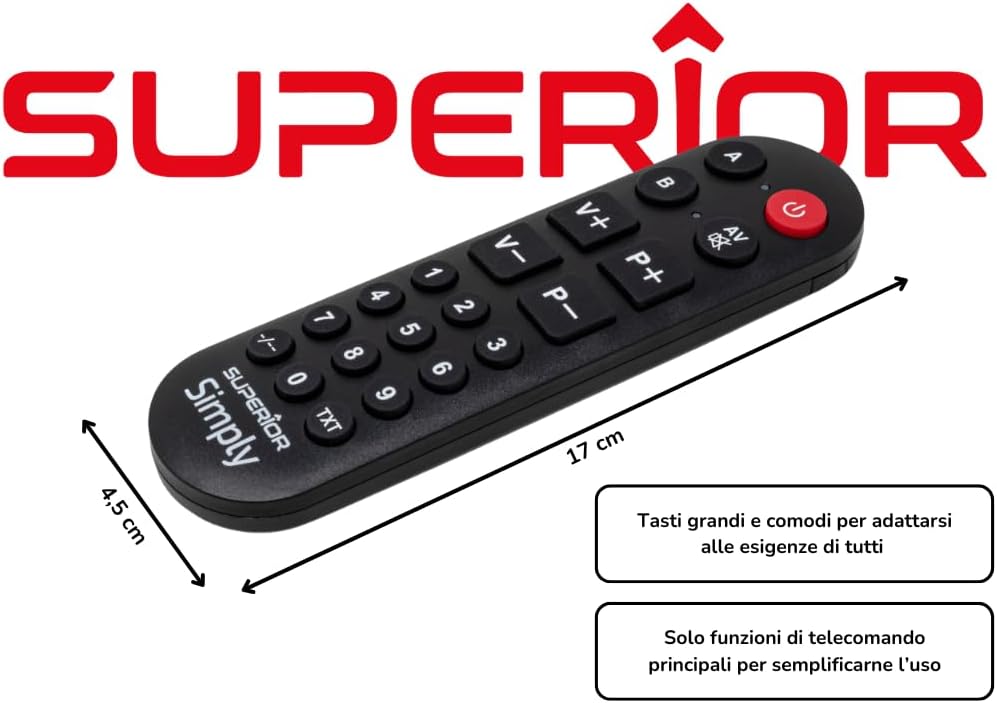
Image: Front view of the Simply Numeric remote control, showing the layout of its 20 buttons.

Image: Side view of the Simply Numeric remote control, illustrating its ergonomic profile.
The remote includes buttons for power, volume up/down, channel up/down, AV input, and numeric keys (0-9, -/--, TXT). It also features two dedicated buttons, A and B, for controlling different devices.
Battery Installation
- Locate the battery compartment cover on the back of the remote control.
- Slide the cover downwards or press the latch to open it.
- Insert two 1.5V AAA batteries, ensuring the correct polarity (+ and -) as indicated inside the compartment.
- Replace the battery compartment cover until it clicks securely into place.
Programming the Remote Control (Learning Function)
The Simply Numeric remote uses a learning function to copy signals from your original remote control. This process takes less than a minute per button.

Image: The Simply Numeric remote control with key features highlighted, including its learning function and compatibility.
Important Considerations:
- You must have a functional original remote control for the device you wish to control. This remote cannot be programmed if your original remote is not working.
- The Simply Numeric remote is compatible with most infrared (IR) televisions and electronic devices.
Step-by-Step Programming:
- Prepare Remotes: Place the Simply Numeric remote and your original remote control on a flat surface, facing each other, with their infrared emitters aligned at a distance of approximately 1-3 cm (0.4-1.2 inches).
- Enter Learning Mode: Press and hold the POWER button on the Simply Numeric remote for approximately 5 seconds until the red LED indicator light starts blinking slowly. This indicates it is in learning mode.
- Select Button to Program: Press the button on the Simply Numeric remote that you wish to program (e.g., 'Volume Up'). The LED will blink faster, waiting for a signal.
- Transmit Signal: Press and hold down the corresponding button on your original remote control (e.g., 'Volume Up') for several seconds. Continue holding until the LED on the Simply Numeric remote blinks rapidly three times and then stays solid. This confirms the signal has been learned.
- Repeat for Other Buttons: Repeat steps 3 and 4 for all other buttons you wish to program (e.g., Channel Up/Down, Numeric keys, AV).
- Exit Learning Mode: Once all desired buttons are programmed, press the POWER button on the Simply Numeric remote again to exit learning mode. The LED indicator will turn off.
Tip: If the LED does not blink rapidly three times and stay solid, the signal may not have been learned correctly. Ensure the remotes are properly aligned and try again, holding the original remote's button for a longer duration (up to 5 seconds or until the Simply Numeric remote's LED stops blinking).
Programming for Two Devices (A/B Buttons):
The remote can control two different devices by utilizing the 'A' and 'B' buttons. Each button acts as a selector for a different set of programmed commands.
- To program commands for Device 1, follow the steps above, but before selecting a button to program (step 3), press the A button. The LED next to 'A' will light up.
- To program commands for Device 2, follow the steps above, but before selecting a button to program (step 3), press the B button. The LED next to 'B' will light up.
- You can program different functions for the same physical button (e.g., 'Volume Up') under the 'A' and 'B' profiles, allowing you to control two distinct devices (e.g., TV and Set-top Box).
Operating the Remote Control
After successful programming, point the Simply Numeric remote control towards your device and press the desired button. The remote will transmit the learned infrared signal.
- To control Device 1 (e.g., TV), ensure the LED next to the A button is lit. If not, press A.
- To control Device 2 (e.g., Set-top Box), ensure the LED next to the B button is lit. If not, press B.
- The large buttons are designed for easy identification and comfortable use, especially for users who prefer a minimalist interface.
Maintenance and Care
- Clean the remote control regularly with a soft, dry cloth. Do not use liquid cleaners or abrasive materials.
- If the remote will not be used for an extended period, remove the batteries to prevent leakage.
- Avoid dropping the remote or subjecting it to strong impacts.
Troubleshooting
| Problem | Possible Cause | Solution |
|---|---|---|
| Remote does not respond after programming. | Incorrect programming; batteries are low or inserted incorrectly. |
|
| Cannot enter learning mode (LED does not blink). | Batteries are dead; power button not held long enough. |
|
| Remote does not work with my device. | Device is not IR-compatible; original remote is not functional; device is too new/old for learning function. |
|
| Buttons A/B do not switch devices. | Device selection not correctly made. |
|
Specifications
- Brand: Superior Electronics
- Model Number: SUPTLB002
- Color: Red
- Connectivity Technology: Infrared
- Special Feature: Universal, Learning Function
- Compatible Devices: Television (and other IR-controlled devices)
- Maximum Supported Devices: 2
- Number of Buttons: 20
- Controller Type: Push Button, Remote Control
- Maximum Range: 10 Meters
- Dimensions: 17.0 x 4.8 x 1.5 cm (approximately 6.7 x 1.9 x 0.6 inches)
- Weight: 104 g (approximately 3.7 oz)
- Batteries: 2 x 1.5V AAA (not included)

Image: The Simply Numeric remote control displaying its approximate dimensions.
Warranty and Support
This Superior Electronics product comes with a 2-year manufacturer's warranty from the date of purchase. This warranty covers defects in materials and workmanship under normal use.
For warranty claims or technical support, please contact Superior Electronics customer service through their official website or the retailer where the product was purchased. Please have your proof of purchase and product model number (SUPTLB002) ready when contacting support.