Introduction
This manual provides essential information for the safe and efficient operation, installation, and maintenance of your Candy Pop Evo FCP625XL/E Multifunction Oven. Please read these instructions carefully before using the appliance and retain them for future reference.
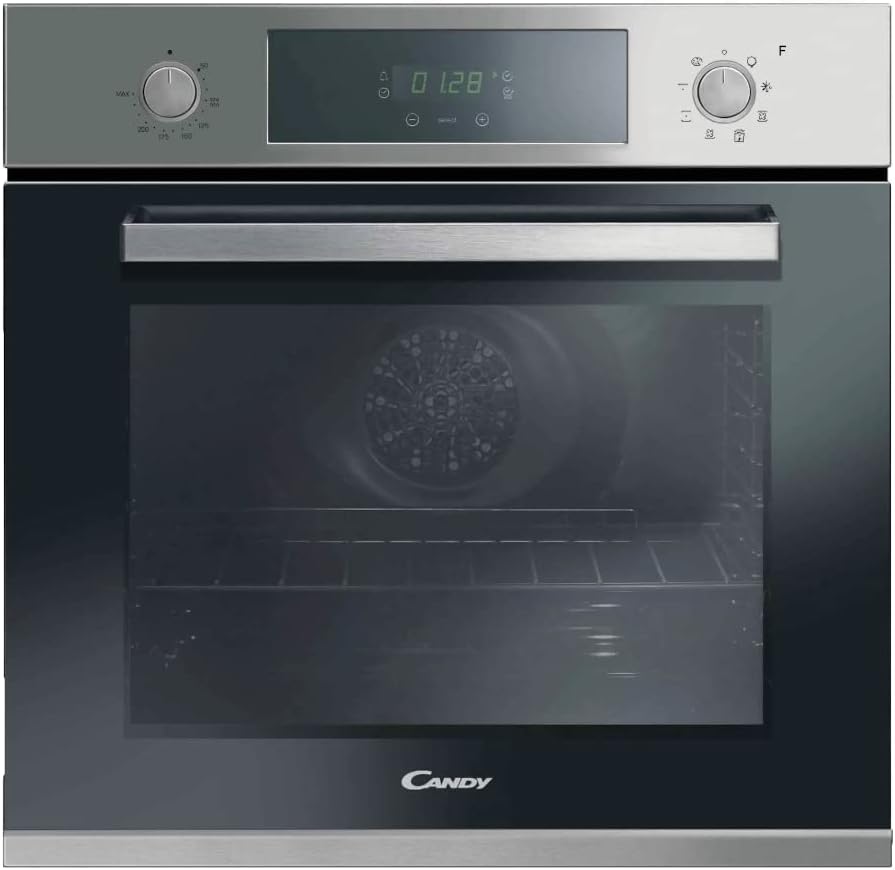
Image: Front view of the Candy Pop Evo FCP625XL/E Multifunction Oven, showcasing its stainless steel finish, black glass door, and digital control panel.
Important Safety Information
Always adhere to the following safety precautions to prevent personal injury or damage to the appliance.
- Ensure the oven is installed by a qualified technician in accordance with local regulations.
- Do not touch hot surfaces. Use oven mitts or pot holders.
- Keep children away from the appliance during operation.
- Never use abrasive cleaners or sharp metal scrapers to clean the oven door glass, as they can scratch the surface, which may result in shattering.
- Disconnect the appliance from the power supply before performing any maintenance or cleaning.
Installation
The Candy Pop Evo FCP625XL/E oven is designed for built-in installation. Ensure the cabinet dimensions meet the required specifications for proper ventilation and fit.
Dimensions and Clearance
- Product Dimensions (H x W x D): 59.5 cm x 59.5 cm x 56.7 cm
- Integration Hollow Dimensions (H x W x D): 59 cm x 56 cm x 56 cm

Image: The Candy oven seamlessly integrated into a modern kitchen cabinet, demonstrating its built-in design.
Electrical Connection
The oven operates on 230 Volts and has a wattage of 2100 watts. It must be connected to a suitable electrical supply by a qualified electrician. Ensure the circuit is adequately protected.
Unpacking and Positioning
- Carefully remove all packaging materials.
- Check the oven for any signs of damage. Do not install if damaged.
- Position the oven into the prepared cabinet opening, ensuring it is level and securely fastened.
Operating Instructions
Your Candy Pop Evo FCP625XL/E oven features a user-friendly interface with rotary knobs and a digital touch display for precise control.

Image: A detailed view of the oven's control panel, highlighting the digital display, temperature control knob, and function selector knob.
Control Panel Overview
- Temperature Knob: Used to select the desired cooking temperature.
- Function Selector Knob: Used to choose from the 8 pre-configured cooking functions.
- Digital Touch Display: Shows time, temperature, and selected functions. Allows for setting timers and other advanced options.
Cooking Functions
The oven offers 8 pre-configured functions, including Convection heating, for versatile cooking. Refer to the display for specific function icons.

Image: The oven interior with the door open, showing muffins baking on a wire rack, demonstrating the spacious 70L capacity.
Using the Timer
The integrated timer can be set for cooking duration or as a minute minder. Use the touch display to adjust the time settings.
First Use
Before first use, it is recommended to heat the empty oven at maximum temperature for approximately 30 minutes to burn off any manufacturing residues. Ensure adequate ventilation during this process.
Care and Maintenance
Regular cleaning and maintenance will ensure the longevity and optimal performance of your oven.
Aqualysis (Steam Cleaning)
Your oven features an Aqualysis steam cleaning function for easy removal of grease and food residues without harsh chemicals.
- Pour approximately 300ml of distilled water into the bottom cavity of the oven.
- Select the Aqualysis function (refer to your display for the specific icon).
- Heat the oven to 90°C for 30 minutes.
- Once the cycle is complete and the oven has cooled, wipe away softened residues with a damp cloth.
General Cleaning
- Clean the exterior surfaces with a soft, damp cloth and mild detergent. Avoid abrasive cleaners.
- The oven door is removable for easier cleaning of the glass panels. Consult the full instruction manual for detailed removal steps.
- The included tray and grids can be washed with warm soapy water.

Image: An interior shot of the oven, showing the removable wire racks and baking tray, designed for easy cleaning and versatile cooking.
Troubleshooting
Before contacting customer service, please refer to the following common issues and their solutions.
| Problem | Possible Cause | Solution |
|---|---|---|
| Oven does not heat up. | No power supply; incorrect function selected; door not closed properly. | Check power connection and circuit breaker. Ensure function and temperature are set. Close door firmly. |
| Uneven cooking. | Food placed too close to heating elements; incorrect temperature/function. | Use recommended rack positions. Adjust temperature or function as per recipe. |
| Steam/smoke during first use. | Residues from manufacturing process. | This is normal. Ensure good ventilation. It will dissipate after initial use. |
If the problem persists after attempting these solutions, please contact Candy customer support.
Technical Specifications
| Brand | CANDY |
| Model | 33701664 (FCP625XL/E) |
| Product Dimensions (H x W x D) | 59.5 x 59.5 x 56.7 cm |
| Item Weight | 28 kg |
| Capacity | 70 litres |
| Energy Efficiency Class | A+ |
| Annual Energy Consumption | 0.68 Kilowatt Hours |
| Heating Method | Convection |
| Wattage | 2100 watts |
| Fuel Type | Electric |
| Special Features | Auto Cook, Self-Cleaning (Aqualysis), Timer, Interior Light, Racks |
| Included Components | Electric oven, Electrical connection cable, 1 tray and 2 grids, Telescopic guide, Instruction Manual |

Image: The energy efficiency label for the Candy Pop Evo FCP625XL/E oven, indicating its A+ rating and energy consumption details.
Warranty and Support
For information regarding your product's warranty, please refer to the warranty card included with your purchase or visit the official Candy website. Keep your proof of purchase for warranty claims.
For technical assistance, spare parts, or service requests, please contact Candy customer support. You may need your product model number (33701664) and serial number (if applicable) when contacting support.
Online Resources: For additional support and frequently asked questions, visit the official Candy Store on Amazon or the main Candy website.


