
Introduction
Welcome to the Kurzweil SP1 88-Key Stage Piano. This manual provides essential information for setting up, operating, and maintaining your instrument. The SP1 is designed for musicians seeking a high-quality, portable stage piano with a focus on essential sounds and intuitive controls.
Package Contents
Please verify that all items are present in your package:
- Kurzweil SP1 88-Key Stage Piano
- Power Adapter
- Sustain Pedal
- User Manual (this document)
Product Overview
The Kurzweil SP1 features a streamlined design with an intuitive control panel and a fully-weighted hammer-action keyboard.
Front Panel Controls
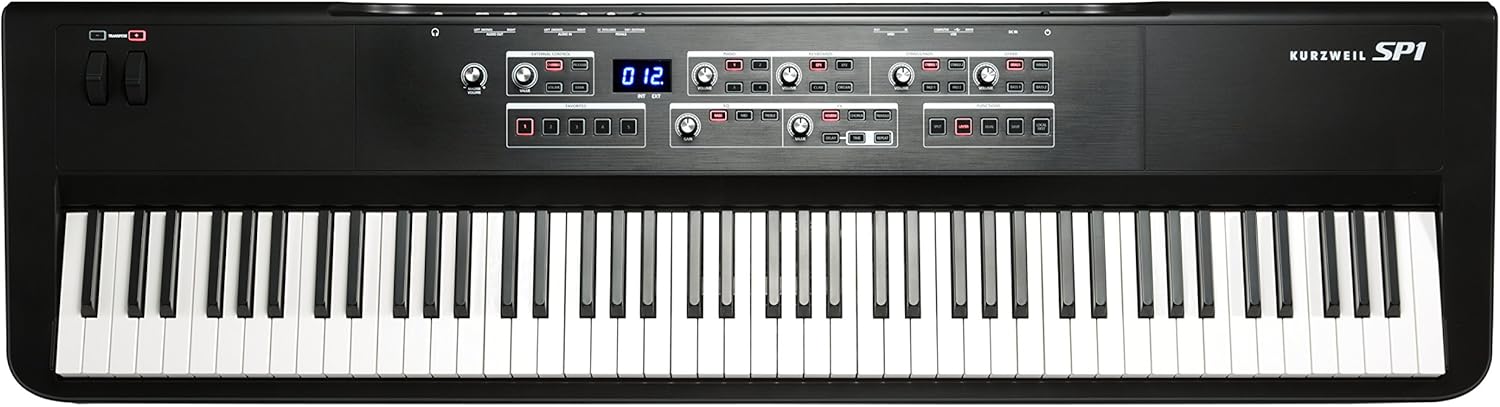
The main control panel is centrally located above the keyboard, providing access to sound categories, effects, and functions.

- Sound Categories: Dedicated sections for Piano, Keyboards (EP1, EP2, Clav, Organ), Strings/Pads (Strings 1, Strings 2, Pad 1, Pad 2), and Other (Brass, Winds, Bass 1, Bass 2). Each category has volume controls and sound selection buttons.
- EQ Section: 3-Band Master EQ with Bass, Mid, and Treble controls.
- FX Section: Individually adjustable effects including Reverb, Chorus, Tremolo, Delay, and Repeat.
- Functions: Buttons for Split, Layer, Dual, Save, and Local Dest.
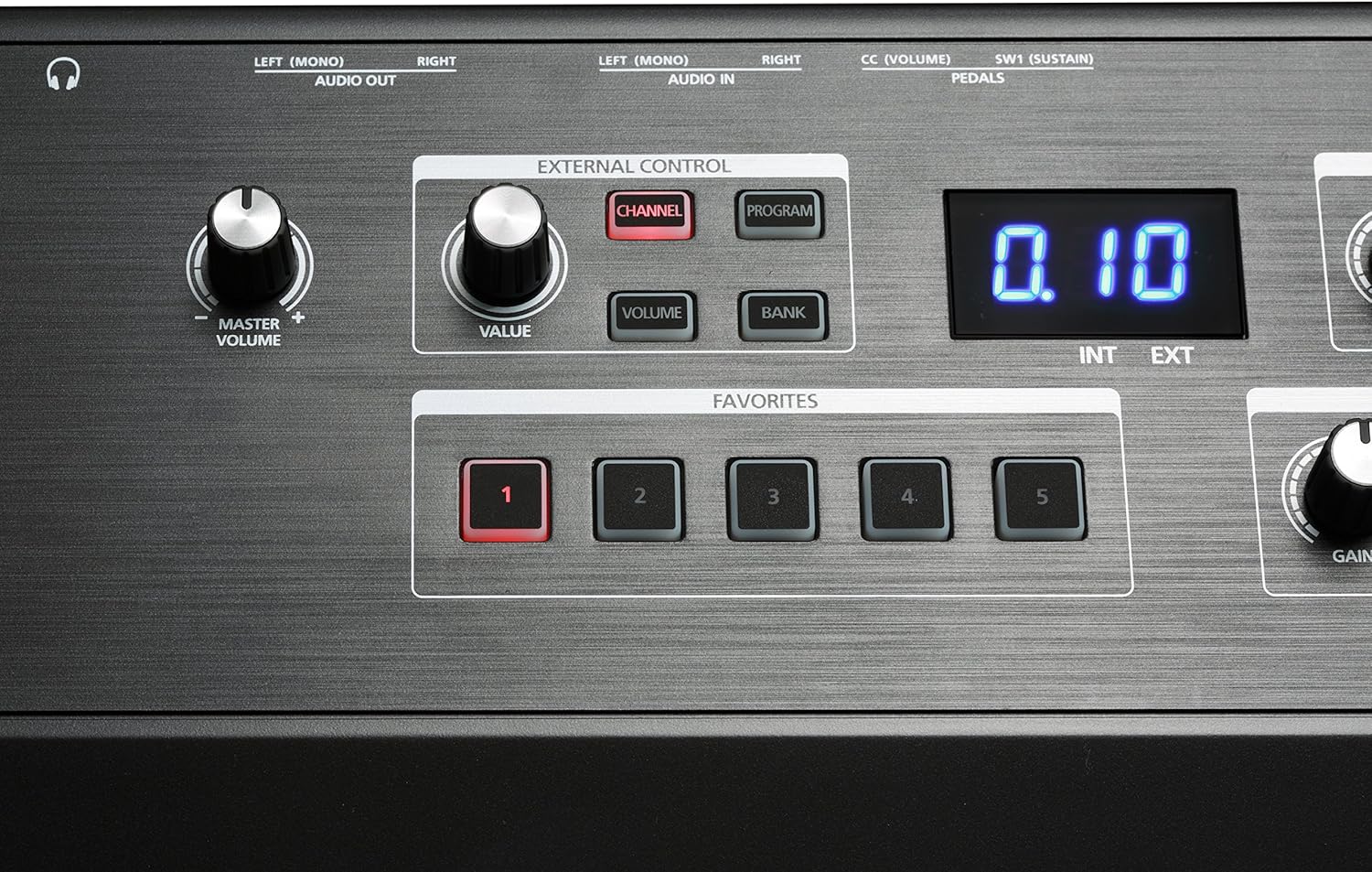
- External Control: Section with Channel, Program, Volume, and Bank buttons for controlling external MIDI instruments/software.
- Favorites: Five dedicated buttons for saving and recalling custom settings.
- Pitch/Modulation Wheels: Located on the left side for expressive control.
- Transpose Buttons: Located near the pitch/mod wheels for quick key changes.
Rear Panel Connections

The rear panel provides all necessary connections for power, audio, MIDI, and pedals.
- DC IN: Power adapter input.
- USB: USB-A and USB-B ports for computer connection and USB drive.
- MIDI IN/OUT: Standard MIDI connectors for external MIDI devices.
- AUDIO IN (Left/Mono, Right): 1/4" audio jacks for connecting external audio sources like an MP3 player.
- AUDIO OUT (Left/Mono, Right): 1/4" audio jacks for connecting to an amplifier, mixer, or audio interface.
- Headphones: 6.35mm jack for private practice.
- Pedal Inputs: SW1 (Sustain) and CC (Volume) pedal inputs.
Setup
- Placement: Place the SP1 on a stable, flat surface or a keyboard stand. Ensure adequate ventilation around the instrument.
- Power Connection: Connect the included power adapter to the DC IN jack on the rear panel of the SP1, then plug the adapter into a suitable AC power outlet.
- Sustain Pedal: Connect the sustain pedal (if included or purchased separately) to the SW1 (Sustain) jack on the rear panel.
- Audio Output:
- For connecting to an amplifier or mixer: Use 1/4" cables to connect the AUDIO OUT (Left/Mono, Right) jacks to your audio system.
- For headphones: Plug your headphones into the 6.35mm Headphones jack.
- External Audio Input (Optional): To play along with an external audio device (e.g., MP3 player), connect it to the AUDIO IN (Left/Mono, Right) jacks using appropriate cables.
- MIDI/USB Connection (Optional): For connecting to a computer or other MIDI devices, use the USB or MIDI IN/OUT ports.
Operating Instructions
Power On/Off
To power on the SP1, press the power button located on the rear panel. To power off, press the power button again.
Adjusting Master Volume
Use the Master Volume knob, located on the left side of the control panel, to adjust the overall output level of the instrument.
Selecting Sounds
The SP1 organizes its 16 presets into four main categories: Piano, Keyboards, Strings/Pads, and Other.
- Locate the desired sound category section on the control panel.
- Press the corresponding button (e.g., 1 for German D Artis Grand Piano, EP1 for Electric Piano 1) to select a sound. The selected button will illuminate.
- Adjust the Volume knob within that category to balance the sound level.
Using Effects (FX)
The SP1 includes four individually adjustable effects.
- In the FX section, press the button for the desired effect (e.g., REVERB, CHORUS). The button will illuminate when active.
- Use the Value knob to adjust the intensity or parameter of the selected effect.
- For Delay and Repeat, additional Time knobs are available for fine-tuning.
Adjusting Equalization (EQ)
The 3-Band Master EQ allows you to shape the overall tone.
- In the EQ section, turn the Bass, Mid, and Treble knobs to boost or cut frequencies.
- The Gain knob adjusts the overall output level after EQ.
Saving and Recalling Favorites
The SP1 allows you to save up to five custom setups (combinations of sounds, effects, and EQ settings) as Favorites.

- Configure your desired sound, effects, and EQ settings.
- Press the SAVE button in the FUNCTIONS section.
- While the SAVE button is flashing, press one of the five Favorites buttons (1-5) to store your settings.
- To recall a saved Favorite, simply press the corresponding Favorites button.
Split, Layer, and Dual Modes
These functions allow for combining or dividing sounds across the keyboard.
- Split: Divides the keyboard into two sections, allowing different sounds to be played on each. Press the SPLIT button to activate.
- Layer: Stacks two sounds together to be played simultaneously across the entire keyboard. Press the LAYER button to activate.
- Dual: Similar to Layer, but often implies a specific combination or a more complex layering setup. Press the DUAL button to activate.
Refer to the full Kurzweil SP1 manual for detailed instructions on configuring Split, Layer, and Dual modes, including setting split points and selecting sounds for each part.
Transpose
The transpose function allows you to shift the pitch of the entire keyboard up or down in semitone steps.
Use the +/- buttons located near the pitch/mod wheels to transpose the keyboard.
Maintenance
- Cleaning: Use a soft, dry cloth to clean the surface of the instrument. For stubborn dirt, a slightly damp cloth can be used, followed by a dry cloth. Avoid abrasive cleaners, solvents, or waxes.
- Keyboard Care: Keep the keys clean. If they become dirty, wipe them gently with a soft, damp cloth.
- Storage: When not in use for extended periods, store the SP1 in a dry, dust-free environment, away from direct sunlight and extreme temperatures.
- Transportation: When transporting the instrument, use a padded case to protect it from physical damage.
Troubleshooting
| Problem | Possible Cause | Solution |
|---|---|---|
| No sound |
|
|
| Keys are not responding |
|
|
| Distorted sound |
|
|
If you encounter issues not covered here, please consult the Kurzweil support website or contact customer service.
Specifications
| Feature | Detail |
|---|---|
| Model Name | SP1 |
| Item Model Number | AMS-SP1-LB |
| Number of Keys | 88 |
| Keyboard Type | Fully-weighted hammer-action |
| Sounds | 16 programs (Piano, EP, Strings, Pads, Woodwinds, Basses) |
| Polyphony | 256 voices |
| Effects | Reverb, Chorus, Tremolo, Delay, Repeat |
| Equalizer | 3-Band Master EQ |
| Connectivity | 1/4" audio jacks (In/Out), USB-A, USB-B, MIDI In/Out, 6.35mm Headphones Jack, Pedal Inputs (Sustain, CC) |
| Power Source | USB (via power adapter) |
| Dimensions (L x W x H) | 52.5 x 15 x 5.75 inches |
| Item Weight | 6.6 pounds (approx. 3 kg) |
| Color | Black |
| UPC | 883793413512 |
Warranty and Support
For warranty information and technical support, please refer to the official Kurzweil website or contact your authorized dealer. Keep your purchase receipt as proof of purchase.


