
Introduction
Thank you for choosing the Arzum AR2002 50 Liter Electric Oven. This manual provides essential information for the safe and efficient use of your new appliance. Please read it thoroughly before first use and keep it for future reference.
The Arzum AR2002 is a 50-liter freestanding electric oven designed for various cooking and baking tasks. It features a sleek silver finish and robust construction, ensuring reliable performance in your kitchen.
Important Safety Instructions
When using electrical appliances, basic safety precautions should always be followed to reduce the risk of fire, electric shock, and injury to persons, including the following:
- Read all instructions before using the oven.
- Do not touch hot surfaces. Use handles or knobs.
- To protect against electric shock, do not immerse cord, plugs, or the appliance in water or other liquid.
- Close supervision is necessary when any appliance is used by or near children.
- Unplug from outlet when not in use and before cleaning. Allow to cool before putting on or taking off parts.
- Do not operate any appliance with a damaged cord or plug or after the appliance malfunctions or has been damaged in any manner.
- The use of accessory attachments not recommended by the appliance manufacturer may cause hazards.
- Do not use outdoors.
- Do not let cord hang over edge of table or counter, or touch hot surfaces.
- Do not place on or near a hot gas or electric burner, or in a heated oven.
- Extreme caution must be used when moving an appliance containing hot oil or other hot liquids.
- Always attach plug to appliance first, then plug cord into the wall outlet. To disconnect, turn any control to "off", then remove plug from wall outlet.
- Do not use appliance for other than intended use.
- Oversize foods or metal utensils must not be inserted in a toaster oven as they may create a fire or risk of electric shock.
- A fire may occur if the oven is covered or touching flammable material, including curtains, draperies, walls, and the like, when in operation.
- Do not clean with metal scouring pads. Pieces can break off the pad and touch electrical parts, creating a risk of electric shock.
- Do not store any materials, other than manufacturer's recommended accessories, in this oven when not in use.
- Do not place any of the following materials in the oven: paper, cardboard, plastic, or similar materials.
- Do not cover crumb tray or any part of the oven with metal foil. This will cause overheating of the oven.
Product Components
Familiarize yourself with the main parts of your Arzum AR2002 electric oven.


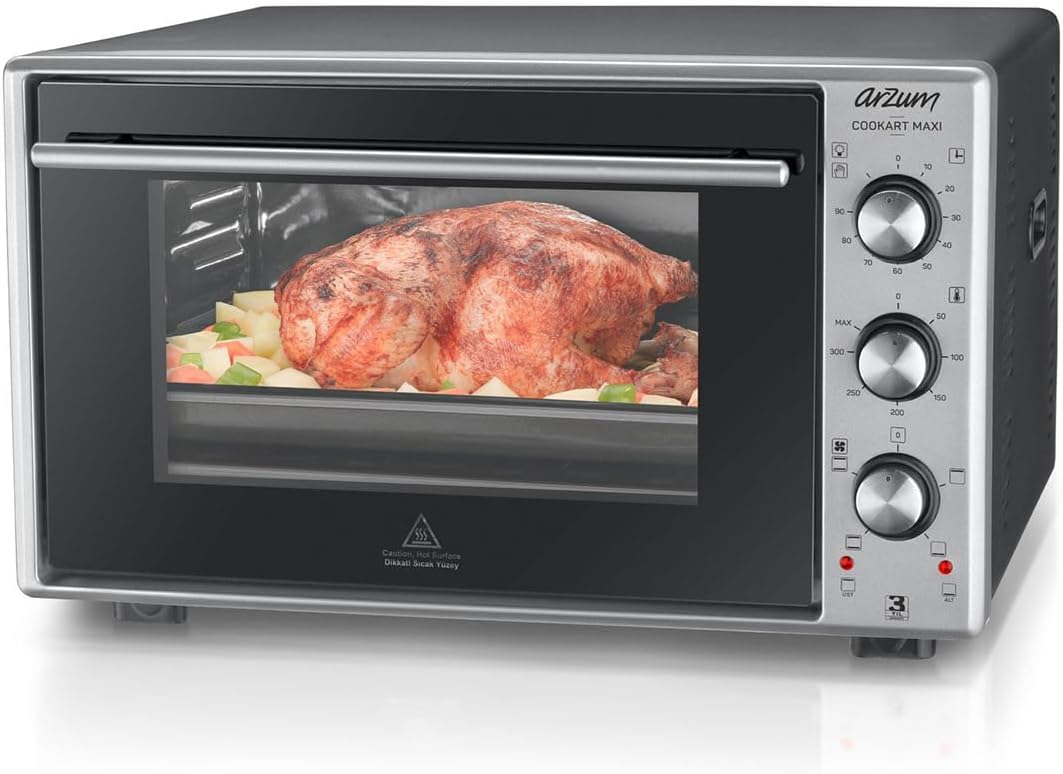

Key components include:
- Temperature Control Knob: Adjusts the oven temperature.
- Function Selector Knob: Selects heating elements (upper, lower, or both) and turbo fan.
- Timer Knob: Sets cooking duration.
- Double Glass Door: Provides insulation and allows viewing of food.
- Interior Light: Illuminates the oven cavity.
- Baking Tray: For general baking and roasting.
- Wire Rack: For grilling and supporting dishes.
- Rotisserie Spit (if included): For roasting poultry or meat.
Setup and First Use
- Unpacking: Carefully remove the oven from its packaging. Retain packaging materials for future transport or storage.
- Placement: Place the oven on a stable, heat-resistant surface. Ensure adequate clearance (at least 10 cm) on all sides for proper ventilation. Do not place near flammable materials.
- Cleaning: Before first use, wipe the interior and accessories with a damp cloth. Wash the baking tray and wire rack with warm, soapy water. Dry thoroughly.
- First Burn-in: To eliminate manufacturing odors, operate the empty oven for approximately 15 minutes at maximum temperature (250°C) with both upper and lower heating elements active. Ensure the area is well-ventilated during this process. A slight odor or smoke is normal during initial use.
- Power Connection: Ensure your power outlet matches the voltage and frequency specified on the oven's rating label. Plug the oven into a grounded electrical outlet.
Operating Instructions
This section details how to use your Arzum AR2002 electric oven for various cooking functions.
Control Panel Overview
- Top Knob (Timer): Sets cooking time from 0 to 90 minutes. The oven will turn off automatically when the timer reaches zero.
- Middle Knob (Temperature): Adjusts temperature from 50°C to 250°C.
- Bottom Knob (Function Selector):
- Off
- Upper Heating Element
- Lower Heating Element
- Upper and Lower Heating Elements
- Upper and Lower Heating Elements + Turbo Fan
- Rotisserie (if applicable)
General Cooking Steps
- Place food in the appropriate baking tray or on the wire rack.
- Close the oven door securely.
- Turn the Temperature Control Knob to the desired temperature.
- Turn the Function Selector Knob to the desired heating mode (e.g., upper and lower elements for baking).
- Turn the Timer Knob to the desired cooking time. The oven will start heating. The indicator light will illuminate.
- When the set time expires, the oven will switch off, and a bell will sound.
- Carefully remove cooked food using oven mitts.
Using the Turbo Fan
The turbo fan (convection) function ensures more even heat distribution, which is ideal for baking multiple items or for faster, more uniform roasting. Select the function with the fan symbol on the Function Selector Knob.
Using the Rotisserie (if applicable)
If your model includes a rotisserie function, insert the spit through the center of the food (e.g., chicken). Secure with forks. Place the spit into the designated slots inside the oven. Select the rotisserie function on the Function Selector Knob. Ensure the drip tray is placed below to catch juices.
Care and Maintenance
Regular cleaning and maintenance will prolong the life of your oven and ensure optimal performance.
- Before Cleaning: Always unplug the oven from the power outlet and allow it to cool completely before cleaning.
- Exterior Cleaning: Wipe the exterior surfaces with a soft, damp cloth and mild detergent. Do not use abrasive cleaners or metal scouring pads, as these can scratch the finish.
- Interior Cleaning: For the interior, use a damp cloth with a mild, non-abrasive oven cleaner. For stubborn stains, a paste of baking soda and water can be applied, left for a short period, and then wiped clean. Ensure all cleaner residue is removed.
- Accessories: The baking tray, wire rack, and rotisserie spit (if applicable) can be washed in warm, soapy water or in a dishwasher.
- Double Glass Door: The double glass door is designed for easy cleaning. Wipe with a soft cloth and glass cleaner. Avoid harsh chemicals.
- Storage: When not in use for extended periods, ensure the oven is clean and dry. Store it in a cool, dry place.
Troubleshooting Guide
Before contacting customer service, please refer to the following common issues and their solutions.
| Problem | Possible Cause | Solution |
|---|---|---|
| Oven does not turn on. | Not plugged in; power outage; timer not set. | Check power cord connection; verify power supply; set the timer knob. |
| Food not cooking evenly. | Incorrect rack position; uneven food distribution; fan not active. | Adjust rack position; arrange food evenly; use the turbo fan function. |
| Excessive smoke during cooking. | Food residue or grease buildup; high-fat food. | Clean the oven interior and accessories thoroughly; use a drip tray for fatty foods. |
| Oven light not working. | Bulb burnt out. | Contact customer service for bulb replacement. Do not attempt to replace yourself. |
| Timer bell does not sound. | Timer mechanism fault. | Contact customer service. |
Technical Specifications
- Brand: Arzum
- Model: AR2002
- Type: Electric Oven
- Capacity: 50 Liters
- Power (Total): 1600 Watts (800W Upper, 800W Lower)
- Color: Silver
- Dimensions (H x W): 38 cm x 51 cm (approximate, based on product description)
- Weight: 18.15 kg (approximate)
- Control Type: Push Button Knobs
- Door Type: Drop-down, Double Glass
- Special Features: Temperature Control, Turbo Fan, Interior Light, Easy-clean Enamel Coated Interior, Pop-up Buttons
- Included Components: Baking Tray, Wire Rack, Instructions for Use
- Origin: Made in Turkey
Warranty and Support
Arzum products are manufactured with high quality standards. For warranty information, please refer to the warranty card included with your product or visit the official Arzum website. Keep your purchase receipt as proof of purchase.
For technical support, spare parts, or service inquiries, please contact your local Arzum authorized service center. Contact details can typically be found on the warranty card or the manufacturer's website.
Website: www.arzum.com (This is a placeholder, actual link might vary by region)


