
1. Introduction
Thank you for choosing the ILC GU10 LED Color Changing Light Bulb. This remote-controlled LED bulb offers versatile lighting with 12 color options, dimmable warm white (2700K), and dynamic RGB effects. Designed for various applications, it provides an energy-efficient lighting solution with convenient features like timing functions and multi-bulb synchronization. Please read this manual thoroughly before installation and use to ensure proper operation and safety.
2. Safety Information
- Ensure the power is turned off before installing or replacing the bulb.
- This bulb is designed for indoor use only.
- Do not use with standard dimmer switches. Brightness adjustment is controlled via the provided remote control. Using a dimmer switch may damage the bulb.
- Avoid looking directly into the light source when it is on, as it may cause eye strain.
- Keep the remote control away from water and high temperatures.
- Do not disassemble the bulb or remote control.
3. Package Contents
Your package includes:
- ILC GU10 LED Color Changing Light Bulbs (8 Count)
- Remote Control(s) (Note: One remote control can operate all bulbs.)
4. Product Features
- GU10 Base: Standard GU10 twist-and-lock base for easy installation in compatible fixtures.
- Color Changing (RGB): Offers 12 vibrant colors to create various atmospheres.
- Warm White (2700K): Provides a comfortable 2700K warm white light, equivalent to a 40W incandescent bulb.
- Dimmable: Adjust brightness levels (3 levels) using the remote control.
- Dynamic Modes:
- Flash Mode: Provides a stage effect, ideal for parties or dynamic settings.
- Smooth Mode: Automatically cycles through colors, creating a relaxing ambiance.
- Memory Function: Remembers the last color or mode used when turned off and on.
- Synchronization: Multiple bulbs can be controlled simultaneously with one remote, ensuring consistent color changes in dynamic modes.
- Timing Function: Set the bulb to turn off automatically after a specified number of hours. A 24-hour cycle timing option allows for daily automatic on/off schedules.
- High Color Rendering Index (CRI): CRI 85+ ensures accurate color representation.
- Flicker-Free: Provides stable light output at all brightness levels, preventing visible flicker in photos or videos.
- Beam Angle: 45-degree beam angle for focused spotlighting.

Image: ILC GU10 LED bulbs illuminating different rooms with various color settings, demonstrating versatile application.
5. Setup
5.1 Installation
- Turn off Power: Before installation, ensure the power supply to the light fixture is completely turned off at the circuit breaker.
- Remove Old Bulb: Carefully remove the existing GU10 bulb from the fixture.
- Insert New Bulb: Align the two pins of the ILC GU10 LED bulb with the sockets in the fixture. Push the bulb into the socket and twist clockwise to lock it into place.
- Restore Power: Once the bulb is securely installed, restore power to the light fixture.

Image: Illustration of a person installing a GU10 bulb into a recessed ceiling fixture, highlighting the plug-and-play design.
5.2 Important Note on Dimmer Switches
This ILC GU10 LED bulb is NOT compatible with traditional dimmer switches. All dimming and brightness adjustments are performed using the included remote control. Using the bulb with an external dimmer switch may cause malfunction or damage to the bulb and void the warranty.

Image: A visual guide indicating the correct GU10 base type and explicitly showing that the bulb is not compatible with dimmer switches.
6. Operating Instructions
The ILC GU10 LED bulb is operated using the provided remote control. Ensure the remote has a working CR2032 battery (not included with all packs) and is pointed towards the bulb(s) you wish to control.
6.1 Basic Functions
- Power On/Off: Press the ON button to turn the bulb on, and the OFF button to turn it off.
- Color Selection: Press any of the 12 color buttons (e.g., Red, Green, Blue) to change the bulb's color.
- Warm White: Press the Warm White button to switch to 2700K warm white light.
- Brightness Adjustment: Use the Dim Up and Dim Down buttons to adjust the brightness (3 levels available).
6.2 Dynamic Modes
- Flash Mode: Press the Flash button to activate a rapid color-changing effect.
- Smooth Mode: Press the Smooth button for a gradual, automatic cycle through colors.
- Speed Adjustment (Dynamic Modes): While in Flash or Smooth mode, use the Speed Up and Speed Down buttons to control the transition speed.
6.3 Timing Functions
- One-Off Timing: Press the 1H button to set the bulb to turn off automatically after 1 hour.
- Daily Cycle Timing: Press the 24H button to activate a daily recurring timer. The bulb will turn on and off automatically at the set times each day.

Image: An illustration demonstrating the daily cycle timing function, showing lights turning on at 6:00 PM and off at 5:00 AM automatically.

Image: An illustration of the delay turning off function, showing lights on at 10:00 PM and off at 11:00 PM for peaceful sleep.
7. Remote Control Functions
The remote control provides full command over your ILC GU10 LED bulbs. Below is a detailed overview of its buttons:

Image: A detailed diagram of the remote control, showing all buttons and their corresponding functions for the ILC GU10 LED bulb.
- ON/OFF: Power on/off the bulb.
- Energy-saving mode: Reduces power consumption.
- Flash mode (C): Activates rapid color cycling.
- Smooth mode (S): Activates gradual color cycling.
- Timer, daily cycle mode (24H): Sets a daily recurring timer.
- One-Off timing (1H): Sets a 1-hour auto-off timer.
- Dim Up (Speed up flash): Increases brightness or flash speed.
- Dim Down (Speed down flash): Decreases brightness or flash speed.
- R, G, B: Direct selection for Red, Green, Blue colors.
- Fixed Preset Colors: 12 buttons for direct selection of various static colors.
- Lighting Mode: Cycles through different lighting effects.
8. Maintenance
- Cleaning: Ensure the bulb is off and cool before cleaning. Wipe with a soft, dry cloth. Do not use liquid cleaners.
- Bulb Replacement: The average lifespan of these LED bulbs is approximately 2 years. When replacement is needed, follow the installation steps in Section 5.1.
- Remote Battery: The remote control requires one CR2032 battery. Replace the battery when the remote's range or responsiveness decreases.
9. Troubleshooting
| Problem | Possible Cause | Solution |
|---|---|---|
| Bulb does not turn on. | No power to the fixture, bulb not installed correctly, or bulb is faulty. | Check power supply, ensure bulb is securely twisted into the socket, try another bulb if available. |
| Remote control not working. | Remote battery is dead, remote is too far from the bulb, or obstruction between remote and bulb. | Replace CR2032 battery, move closer to the bulb, remove any obstructions. |
| Bulb flickers or behaves erratically. | Used with a standard dimmer switch, unstable power supply. | Ensure the bulb is not connected to a dimmer switch. Check power source stability. |
| Colors are not consistent across multiple bulbs. | Bulbs may be out of sync. | Turn all bulbs off and then on again simultaneously using the remote to re-synchronize. |
10. Specifications
| Feature | Detail |
|---|---|
| Brand | ILC |
| Model Number | BR16-SSDQ |
| Bulb Base | GU10 |
| Bulb Shape Size | PAR16 |
| Light Type | Color Changing (RGB), Warm White |
| Color Temperature | 2700 Kelvin (Warm White) |
| Wattage | 5 Watts |
| Incandescent Equivalent | 40 Watts |
| Brightness | 450 Lumens |
| Voltage | 85-265 Volts AC (Accepted frequency: 50-60 Hertz) |
| Control Method | Remote Control |
| Dimmable | Yes, via remote control (Not compatible with wall dimmers) |
| Color Rendering Index (CRI) | 85+ |
| Beam Angle | 45 Degrees |
| Average Life | 2 Years (approx. 25,000+ hours) |
| Indoor/Outdoor Usage | Indoor |
| Material | Iron |
| Product Dimensions | 0.01"W x 2.16"H (50mm Diameter x 55mm Height) |
| Item Weight | 13.4 ounces (for the pack) |
| Remote Battery | 1 CR2032 battery required (not always included) |

Image: Detailed diagram illustrating the dimensions (50mm diameter, 55mm height) and key electrical specifications (Voltage AC 85V-265V, Wattage 5W, Brightness 450LM) of the ILC GU10 LED bulb.
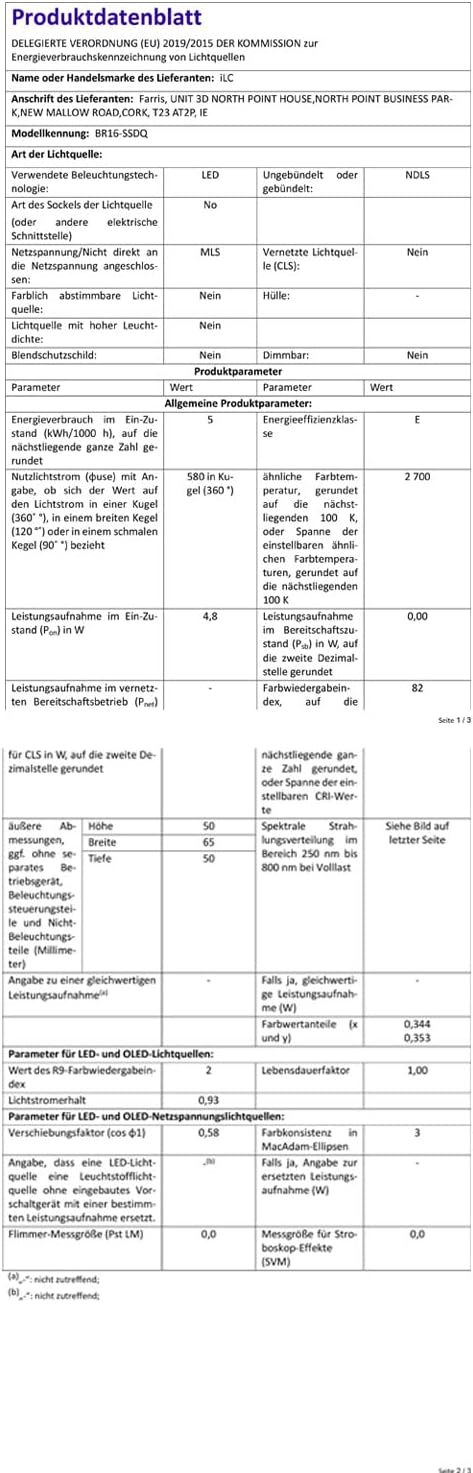
Image: German Product Data Sheet for the ILC BR16-SSDQ LED bulb. This document provides detailed technical specifications in German.

Image: EU Energy Label for the ILC BR16-SSDQ LED bulb, indicating an energy efficiency class of E and consumption of 5 kWh/1000h. For more details, visit eprel.ec.europa.eu/qr/1054441.
11. Warranty and Support
ILC products are designed for reliability and performance. While specific warranty details are not provided in the product information, the average life of these bulbs is stated as 2 years. For any product inquiries, technical support, or warranty claims, please contact ILC customer service through their official channels or the retailer where the product was purchased.
You can visit the ILC Store for more information: ILC Store
12. Product Videos
Color Changing GU10 LED Lights with Remote
Video: This video demonstrates the color-changing capabilities of the ILC GU10 LED bulbs installed in a track lighting fixture. It showcases various colors and the soft white option, highlighting the versatility for creating different ambiances.