
Introduction
Thank you for purchasing the Vorago KSP-300 8-inch Bluetooth TWS Speaker. This portable speaker system is designed to provide high-quality audio with versatile connectivity options, including Bluetooth, USB, and TF card playback. It features a built-in rechargeable battery, LED lighting, and includes a wired microphone and remote control for an enhanced audio experience, perfect for karaoke and gatherings. Please read this manual carefully to ensure proper use and to maximize the performance of your device.
Safety Information
- Do not expose the device to water, moisture, or extreme temperatures.
- Avoid dropping or subjecting the speaker to strong impacts.
- Do not attempt to disassemble or repair the unit yourself. Refer all servicing to qualified personnel.
- Keep the speaker away from heat sources and direct sunlight.
- Ensure proper ventilation to prevent overheating.
- Use only the specified charging adapter to avoid damage to the battery.
Package Contents
Please check the package for the following items:
- Vorago KSP-300 Speaker
- Wired Microphone
- Remote Control
- Charging Cable
- User Manual
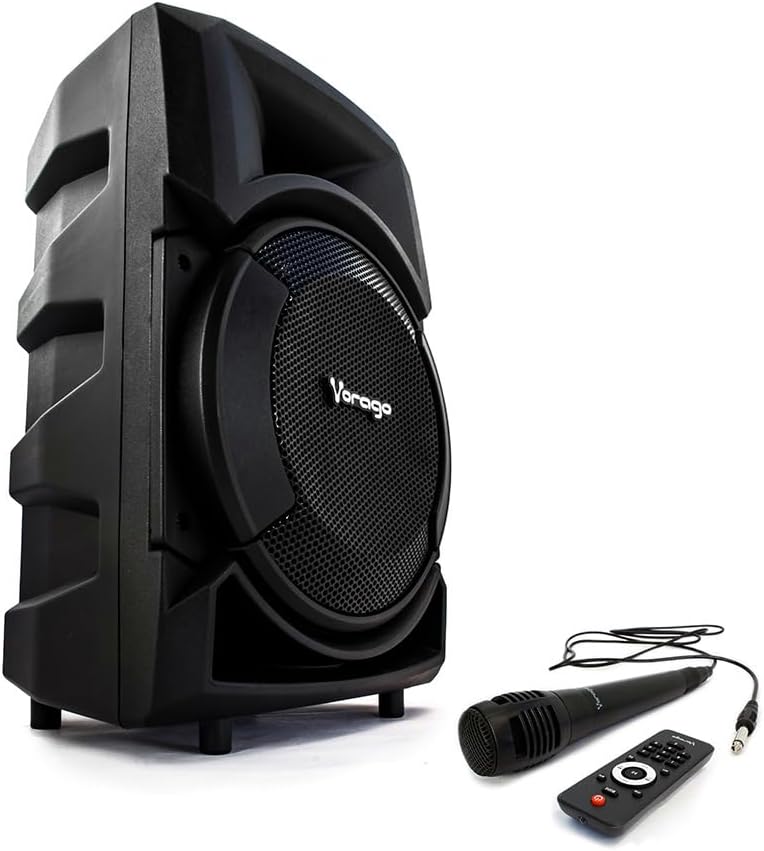
Image: Vorago KSP-300 speaker shown with its wired microphone and remote control accessories.
Product Overview
The Vorago KSP-300 features an intuitive control panel and various ports for connectivity. Familiarize yourself with the layout before operation.

Image: Detailed view of the Vorago KSP-300 speaker's rear control panel, highlighting the various ports and adjustment knobs.
Control Panel Features:
- Power Switch: Turns the speaker on or off.
- Volume Knobs: Adjust master volume, microphone volume, and echo.
- Mode Button: Switches between Bluetooth, USB, TF, and AUX input modes.
- Play/Pause Button: Controls media playback.
- Previous/Next Track Buttons: Navigates through tracks.
- USB Port: For USB flash drive playback.
- TF Card Slot: For TF (Micro SD) card playback.
- Microphone Input: Connects the wired microphone.
- AUX Input: For connecting external audio devices via a 3.5mm cable.
- Charging Port: For connecting the power adapter.
Setup
1. Initial Charging
Before first use, fully charge the speaker. Connect the charging cable to the speaker's charging port and the other end to a suitable power source. The charging indicator will illuminate and turn off once fully charged. A full charge typically takes several hours.
2. Powering On/Off
Locate the power switch on the control panel. Flip the switch to the 'ON' position to power on the speaker. You will hear an audible prompt. To power off, flip the switch to the 'OFF' position.
Operating Instructions
1. Bluetooth Pairing
The speaker supports Bluetooth connectivity for wireless audio streaming.
- Turn on the speaker. It will automatically enter Bluetooth pairing mode, indicated by a flashing LED or an audible prompt.
- On your mobile device (smartphone, tablet, etc.), enable Bluetooth and search for available devices.
- Select "KSP-300" from the list of devices. Once paired, you will hear a confirmation sound.
- You can now play audio from your device through the speaker.

Image: The Vorago KSP-300 speaker, emphasizing its rechargeable battery and Bluetooth connectivity for portable use.
2. True Wireless Stereo (TWS) Function
If you have two KSP-300 speakers, you can pair them together for a True Wireless Stereo experience.
- Ensure both KSP-300 speakers are powered on and in Bluetooth mode, but not yet paired to any device.
- On one of the speakers, press and hold the TWS button (if available, or a designated pairing button) until you hear a pairing tone.
- The two speakers will automatically connect to each other. Once connected, one speaker will act as the master (left channel) and the other as the slave (right channel).
- Now, connect your mobile device to the master speaker via Bluetooth as described in step 1.

Image: The Vorago KSP-300 speaker, illustrating its True Wireless Stereo (TWS) capability, Super Bass, and 30 RMS power output.
3. USB/TF Card Playback
Insert a USB flash drive or TF (Micro SD) card into the respective port. The speaker will automatically switch to USB/TF mode and begin playing audio files. Use the Play/Pause and Previous/Next buttons to control playback.
4. Microphone Usage (Karaoke)
Connect the wired microphone to the microphone input port on the control panel. Adjust the microphone volume and echo effect using the dedicated knobs. The microphone can be used in any audio mode.

Image: Icons depicting the remote control and microphone features included with the Vorago KSP-300 speaker.
5. LED Light Operation
The speaker features an integrated LED light. The light typically activates automatically when the speaker is on. Refer to the control panel for any dedicated light mode buttons, if available, to change patterns or turn off the light.

Image: The Vorago KSP-300 speaker displaying its blue LED light, positioned outdoors next to a table and chair.
Maintenance
1. Cleaning
Wipe the speaker's exterior with a soft, dry cloth. Do not use abrasive cleaners, waxes, or solvents. Ensure no liquids enter the ports or openings.
2. Storage
When not in use for extended periods, store the speaker in a cool, dry place, away from direct sunlight and extreme temperatures. It is recommended to charge the battery periodically (e.g., every 3 months) to maintain its lifespan.
3. Battery Care
To prolong battery life, avoid fully discharging the speaker frequently. Charge the speaker when the low battery indicator appears. Do not leave the speaker connected to power for excessively long periods after it is fully charged.
Troubleshooting
| Problem | Possible Cause | Solution |
|---|---|---|
| No power | Battery is discharged; Power switch is off. | Charge the speaker; Turn on the power switch. |
| No sound | Volume is too low; Incorrect input mode; Device not paired. | Increase volume; Press 'Mode' button to select correct input; Re-pair Bluetooth device. |
| Bluetooth not connecting | Speaker not in pairing mode; Device too far; Interference. | Ensure speaker is in Bluetooth mode; Move device closer; Turn off other Bluetooth devices. |
| Microphone not working | Microphone not connected properly; Microphone volume too low. | Ensure microphone is fully plugged in; Increase microphone volume knob. |
| USB/TF card not playing | Incorrect file format; Card/drive not inserted correctly; Speaker not in USB/TF mode. | Ensure files are MP3 format; Re-insert card/drive; Press 'Mode' button to select USB/TF. |
Specifications
| Feature | Specification |
|---|---|
| Model Name | KSP-300 |
| Speaker Type | Component |
| Special Feature | Bluetooth |
| Recommended Use | For smartphones or tablets |
| Compatible Devices | Smartphone |
| Subwoofer Diameter | 8 Inches |
| Quantity | 1 unit |
| Surround Sound Channel Configuration | 5.0 |
| Color | Black |
| Included Components | Speaker |
| Product Dimensions | 27D x 30W x 49H centimeters |
| Product Weight | 4.5 Grams |
| Impedance | 4 Ohms |
| Wireless Communication Technology | Bluetooth |
| Speaker Size | 8 Inches |
| Power Source | Battery |
| Wattage | 30 watts |
| Connectivity Technology | Auxiliary, Bluetooth, USB |
| Audio Output Mode | Stereo |

Image: The Vorago KSP-300 speaker with its dimensions (height, width, depth) clearly indicated.
Warranty Information
The Vorago KSP-300 speaker comes with a 1-year limited warranty from the date of purchase. This warranty covers manufacturing defects and workmanship under normal use. It does not cover damage caused by misuse, accidents, unauthorized modifications, or normal wear and tear. Please retain your proof of purchase for warranty claims.

Image: The Vorago KSP-300 speaker, highlighting its 1-year warranty, MP3 player compatibility, and 3000 PMPO audio power.
Support
For technical assistance, troubleshooting beyond this manual, or warranty inquiries, please contact Vorago customer support. Refer to the official Vorago website or your product packaging for the most current contact information.