
1. Introduction
Thank you for choosing the Einhell GE-DP 7935 N-A ECO immersible waste water pump. This manual provides important information for the safe and efficient operation, setup, maintenance, and troubleshooting of your new pump. Please read these instructions carefully before using the product and keep them for future reference.
2. Safety Instructions
General Safety Warnings:
- Always disconnect the pump from the power supply before performing any maintenance, cleaning, or when the pump is not in use.
- Ensure the power supply voltage matches the rating on the pump's label.
- Do not operate the pump if the power cable or plug is damaged. Have it repaired by a qualified electrician.
- Never lift or carry the pump by its power cable. Use the integrated carrying handle.
- The pump is designed for pumping water. Do not use it for flammable, corrosive, or explosive liquids.
- Ensure the pump is placed on a stable surface and cannot tip over during operation.
- Keep children and unauthorized persons away from the operating area.
- The maximum water temperature for operation is 35° Celsius (95°F).
3. Product Description and Features
The Einhell GE-DP 7935 N-A ECO is a robust immersible pump designed for pumping waste water, and can also be used with clear water. It is suitable for applications such as emptying ponds, construction pits, and flooded basements. The pump incorporates Einhell's ECO-Power technology for high efficiency with low energy consumption.
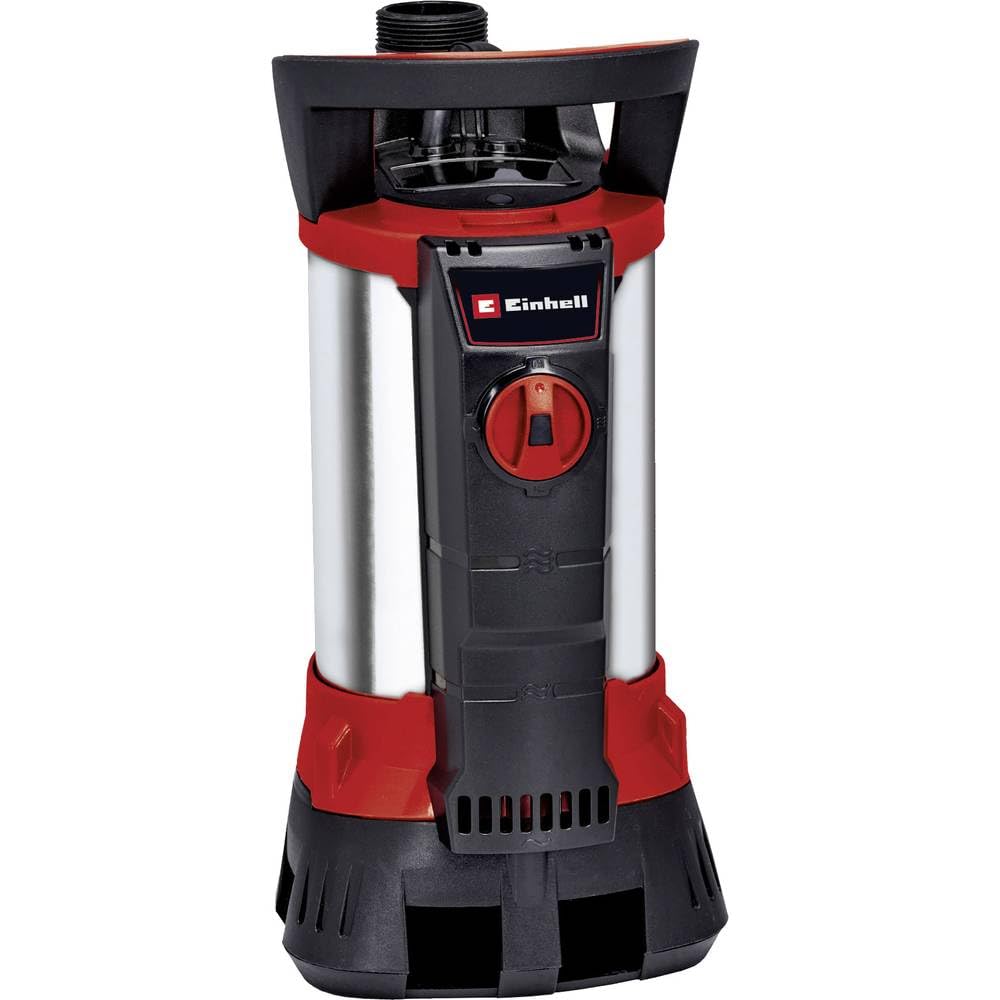
Image showing the Einhell GE-DP 7935 N-A ECO immersible waste water pump, highlighting its compact design and carrying handle.
Key Features:
- Aqua-Sensor Technology: Einhell's patented system for automatic switching on and off based on water level, replacing a traditional float switch.
- Continuous Mode: Option for continuous operation independent of water level.
- ECO-Power Technology: Ensures high delivery capacity with reduced energy consumption.
- Non-Return Valve: Prevents backflow of water.
- Mechanical Seal: High-quality sliding ring seal protects the motor from dirt, ensuring a long service life.
- Ergonomic Carrying Handle: For easy transport and lowering of the pump.
- Durable Construction: Housing made of high-quality impact-resistant plastic and stainless steel.
4. Technical Specifications
| Specification | Value |
|---|---|
| Model Number | GE-DP 7935 N-A ECO (4171460) |
| Power | 790 W |
| Maximum Flow Rate | 19,000 Liters Per Hour |
| Maximum Lifting Height (Head) | 9 meters |
| Maximum Immersion Depth | 7 meters |
| Maximum Water Temperature | 35° Celsius |
| Max. Dirt Particle Size | 35 mm |
| Hose Connection | 47.8 mm (1½ male thread) |
| Voltage | 230 Volts |
| Power Cable Length | 10 meters |
| Item Weight | 6.71 Kilograms (14.76 pounds) |
| Product Dimensions (L x W x H) | 10.63" x 6.69" x 18.5" |
| Material | Stainless Steel, Impact-resistant Plastic |
5. Setup
5.1 Unpacking:
- Carefully remove the pump and all accessories from the packaging.
- Check for any damage during transit. Do not operate a damaged pump.
- Ensure all included components (wastewater pump, universal connection) are present.
5.2 Hose Connection:
- Connect a suitable discharge hose to the pump's universal connection. The pump features a 47.8 mm (1½ male thread) connection.
- Ensure the connection is secure and watertight to prevent leaks.
5.3 Placement and Immersion:
- Place the pump on a firm, level surface in the water to be pumped.
- Ensure the pump is fully immersed in the water. The maximum immersion depth is 7 meters.
- Use the carrying handle and hanging eyelet to safely lower the pump into deeper areas.
5.4 Power Connection:
- Connect the power plug to a properly grounded electrical outlet.
- Ensure the power cable is not kinked, stretched, or submerged in water during operation.
6. Operation
The Einhell GE-DP 7935 N-A ECO pump offers two operating modes: Aqua-Sensor mode and Continuous mode.
6.1 Aqua-Sensor Mode:
- The Aqua-Sensor technology automatically switches the pump on and off based on the water level.
- The sensor detects the water level and activates the pump when the water reaches a preset level, and deactivates it when the water drops below a certain level.
- Refer to the specific settings on your pump for adjusting the Aqua-Sensor activation and deactivation levels.
6.2 Continuous Mode:
- For continuous operation, the pump can be set to bypass the Aqua-Sensor.
- In this mode, the pump will run continuously as long as it is connected to power and immersed in water.
- Monitor the water level manually in continuous mode to prevent dry running, which can damage the pump.
6.3 Pumping Considerations:
- The pump can handle dirt particles up to 35 mm in diameter. Larger particles may cause blockages or damage.
- Ensure the discharge hose is clear and unobstructed to maintain optimal flow rate.
- Avoid pumping water with temperatures exceeding 35° Celsius.
7. Maintenance
Regular maintenance ensures the longevity and optimal performance of your pump.
7.1 Cleaning the Pump:
- After each use, especially when pumping dirty water, rinse the pump thoroughly with clean water.
- Remove any debris or foreign objects that may have accumulated around the intake screen or impeller area.
- Always disconnect from power before cleaning.
7.2 Inspecting Components:
- Periodically check the power cable and plug for any signs of damage or wear.
- Inspect the hose connection for leaks or damage.
- Ensure the non-return valve is functioning correctly and not obstructed.
- The mechanical seal is designed for durability, but if you notice water leakage from the motor housing, contact customer support.
7.3 Winter Storage:
- If storing the pump for an extended period, especially in freezing temperatures, ensure all water is drained from the pump and hose.
- Store the pump in a dry, frost-free location.
8. Troubleshooting
Before contacting customer support, try these troubleshooting steps for common issues:
| Problem | Possible Cause | Solution |
|---|---|---|
| Pump does not start. | No power supply. Aqua-Sensor not activated (water level too low). Motor protection activated. | Check power connection and fuse. Ensure water level is above Aqua-Sensor activation point or switch to continuous mode. Allow pump to cool down; check for blockages. |
| Low pumping capacity. | Intake screen blocked. Hose kinked or obstructed. Air in the pump. | Clean the intake screen. Check and clear the discharge hose. Immerse pump fully and ensure no air pockets. |
| Pump runs continuously in Aqua-Sensor mode. | Aqua-Sensor malfunction or debris interfering with sensor. | Clean the Aqua-Sensor area. If problem persists, contact support. |
| Pump stops unexpectedly. | Overheating (thermal protection). Power interruption. | Disconnect power, allow to cool, check for blockages. Reconnect power. Check power supply. |
9. Warranty and Support
For warranty information, please refer to the separate warranty document included with your purchase or visit the official Einhell website. Keep your proof of purchase for any warranty claims.
If you encounter issues not covered in this manual or require technical assistance, please contact Einhell customer support. Contact details can typically be found on the product packaging or the official Einhell website.
Online Resources: For additional support, FAQs, and product information, visit the official Einhell website.


