
1. Introduction
This manual provides detailed instructions for the installation, operation, and maintenance of your Garza Power Infrared Motion Sensor for Power Outlets. This device is designed to automatically control connected appliances based on detected movement, offering convenience and energy efficiency.
Key features of your motion sensor include:
- Detection Angle: 120 degrees
- Adjustable Detection Distance: 2 to 9 meters
- Adjustable Brightness (Light Sensor): 3 to 2000 lux
- Adjustable Activation Time: 10 seconds to 7 minutes
- Maximum Load Support: 1200 Watts
- Designed for direct plug-in to power outlets.
2. Setup and Installation
Follow these steps to properly set up your Garza Power Infrared Motion Sensor.
2.1 Unpacking
Carefully remove the motion sensor from its packaging. Ensure all components are present (1 x motion sensor).
2.2 Placement and Mounting
The motion sensor is designed for wall mounting by plugging it directly into a power outlet. For optimal performance, install the sensor at a wall height between 1 and 1.8 meters.
Consider the detection angle of 120 degrees and the adjustable detection distance (2-9 meters) when choosing a location to ensure it covers the desired area without false triggers from external sources like moving trees or direct sunlight.
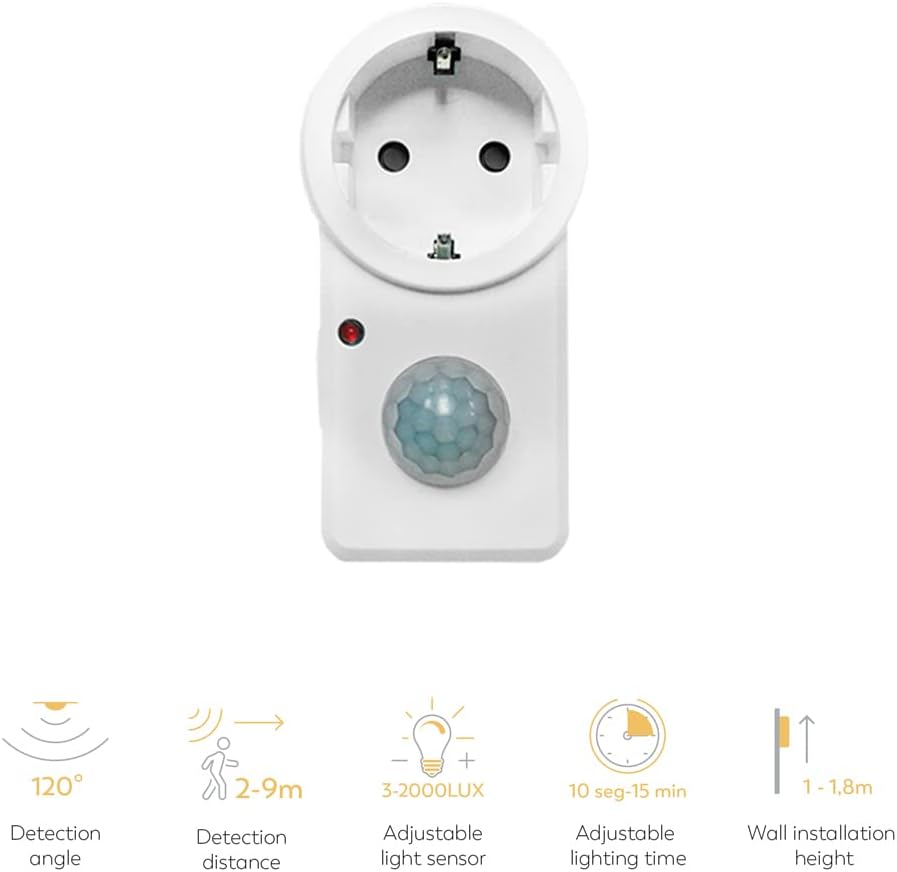
Image 1: Front view of the Garza Power motion sensor, illustrating the detection angle, distance, adjustable light sensor (lux), adjustable lighting time, and recommended wall installation height.

Image 2: Side view of the Garza Power motion sensor, highlighting the integrated power plug for direct connection to an outlet and a manual ON/OFF switch.
2.3 Connecting to Power
Plug the motion sensor directly into a standard power outlet. Ensure the outlet is functioning correctly and provides stable power.
2.4 Adjusting Settings
The sensor features adjustable dials or switches for fine-tuning its operation:
- Detection Distance: Adjust the sensitivity to detect movement within a range of 2 to 9 meters. Turn the dial to increase or decrease the detection radius.
- Brightness (LUX): This setting determines the ambient light level at which the sensor will activate. Set it to a low LUX value for activation only in dark conditions, or a high LUX value for activation in brighter conditions. The range is 3 to 2000 lux.
- Activation Time: This controls how long the connected device remains active after motion is last detected. The time can be set from 10 seconds to 7 minutes.
Test the settings after adjustment to ensure they meet your requirements.
3. Operating Instructions
Once installed and configured, the Garza Power motion sensor operates automatically.
3.1 Automatic Operation
When the sensor detects movement within its set detection range and the ambient light level is below the configured LUX setting, it will activate the connected appliance. The appliance will remain active for the duration of the set activation time. If motion is detected again during this period, the timer will reset.
3.2 Manual Override (if applicable)
Some models may include a manual ON/OFF switch. Refer to Image 2 for its location. If present, this switch allows you to manually turn off the sensor's automatic function, keeping the connected device off regardless of motion, or to bypass the sensor entirely (if it has a direct ON position).

Image 3: The Garza Power motion sensor ready for operation, plugged into a power outlet.
4. Maintenance
To ensure the longevity and optimal performance of your motion sensor, follow these simple maintenance guidelines:
- Cleaning: Gently wipe the sensor's surface with a soft, dry cloth. Do not use abrasive cleaners, solvents, or harsh chemicals, as these can damage the plastic or electronic components.
- Environment: Ensure the sensor is not exposed to excessive moisture, direct water spray, or extreme temperatures.
- Obstructions: Periodically check that the sensor lens is clear of dust, dirt, or any obstructions that could interfere with its detection capabilities.
5. Troubleshooting
If you encounter issues with your motion sensor, refer to the following common problems and solutions:
| Problem | Possible Cause | Solution |
|---|---|---|
| Sensor does not detect motion. |
|
|
| Connected device stays on too long or too short. |
|
|
| Connected device does not turn on at all. |
|
|
If the problem persists after trying these solutions, please contact customer support.
6. Specifications
| Brand | Garza |
| Model Number | 430044 |
| Color | White |
| Power Source | Corded Electric |
| Detection Angle | 120° |
| Adjustable Detection Distance | 2 - 9 meters |
| Adjustable Brightness (LUX) | 3 - 2000 lux |
| Adjustable Activation Time | 10 seconds - 7 minutes |
| Maximum Load | 1200 W |
| Recommended Installation Height | 1 - 1.8 meters |
| Mounting Type | Wall Mount (Plug-in) |
| Compatible Devices | Light fixtures and other appliances up to 1200W |
| Product Dimensions (D x W x H) | 9D x 5.2B x 10H centimeters |
| GTIN | 08430624430440 |
| Included Components | 1 x motion sensor |
7. Warranty
The Garza Power Infrared Motion Sensor comes with a 5-year warranty from the date of purchase. This warranty covers defects in materials and workmanship under normal use. Please retain your proof of purchase for warranty claims. The warranty does not cover damage caused by misuse, accidents, unauthorized modifications, or improper installation.
8. Customer Support
For further assistance, technical support, or warranty inquiries, please contact Garza customer service. Refer to the product packaging or the official Garza website for the most up-to-date contact information.


