
1. Introduction
Thank you for choosing the Retevis RT22 Walkie Talkies. This user manual provides essential information for the safe and efficient operation of your two-way radios. Please read this manual thoroughly before use and retain it for future reference. The RT22 is designed for clear communication, featuring a compact size, long battery life, and hands-free VOX operation, suitable for various activities.
2. Package Contents
Upon opening your Retevis RT22 package, please verify that all items listed below are present and in good condition:
- 2 x Retevis RT22 Radios
- 2 x Lithium Ion Batteries (included and pre-installed in some cases)
- 2 x USB Charging Cables
- 1 x Power Adapter (USB wall charger)
- 2 x Earpieces (2 Pin Covert Air Acoustic headset)
- 2 x Belt Clips
- 1 x User Manual (this document)

Image 2.1: The complete package contents for the Retevis RT22 Walkie Talkies, including two radios, batteries, charging cables, power adapter, earpieces, and belt clips.
3. Product Overview
Familiarize yourself with the various parts and controls of your Retevis RT22 radio.

Image 3.1: Front view of the Retevis RT22 radio, indicating the indicator light, power/volume knob, speaker, PTT button, channel selection buttons, microphone, and USB plug.
- Indicator Light: Displays radio status (e.g., transmitting, receiving, charging).
- Power/Volume Knob: Rotate to turn the radio on/off and adjust the volume.
- Speaker: Outputs received audio.
- PTT (Push-to-Talk) Button: Press and hold to transmit, release to receive.
- Channel + / Monitor Button: Press to increase channel number. Hold to activate monitor function.
- Channel - Button: Press to decrease channel number.
- Microphone: Captures your voice during transmission.
- USB Plug: Used for charging the radio.
- Antenna: Integrated for signal transmission and reception.
4. Setup
4.1 Battery Installation
The Retevis RT22 uses a rechargeable Lithium-Ion battery. Ensure the battery is correctly installed before first use.
- Locate the battery compartment cover on the back of the radio.
- Slide the cover downwards or unclip it to open the compartment.
- Insert the Lithium-Ion battery pack, ensuring the contacts align with those in the radio.
- Replace the battery compartment cover, ensuring it clicks securely into place.

Image 4.1: View of the Retevis RT22 radio with the battery cover removed, showing the battery and compartment.
4.2 Charging the Battery
Charge the battery fully before initial use to ensure optimal performance and battery life.
- Connect the USB charging cable to the USB plug on the side of the radio.
- Connect the other end of the USB cable to the provided power adapter.
- Plug the power adapter into a standard electrical outlet.
- The indicator light on the radio will illuminate red during charging. It will turn green when charging is complete.
- A full charge typically takes approximately 3-4 hours.
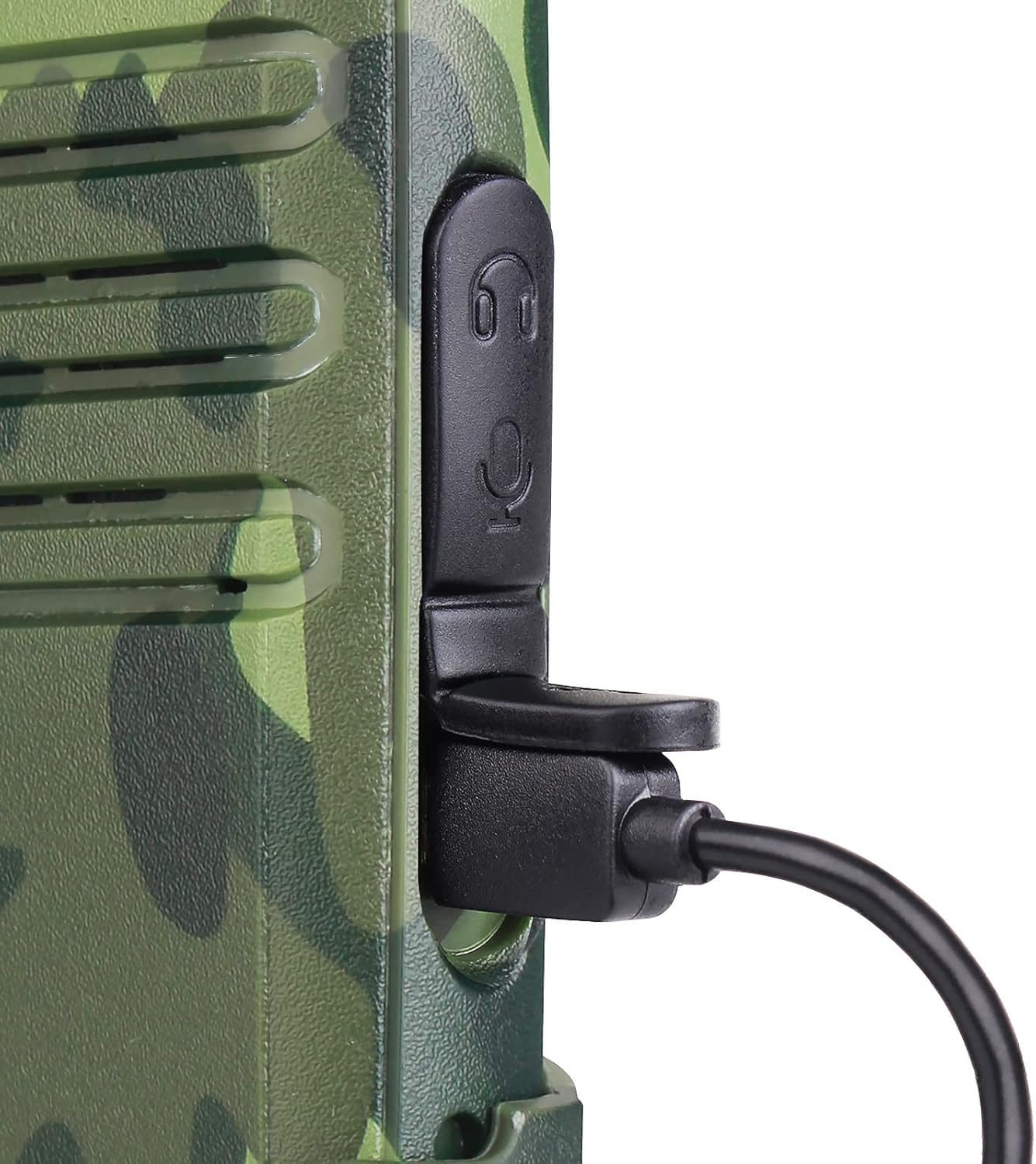
Image 4.2: A close-up view of the USB charging port on the Retevis RT22 radio with a charging cable inserted.
5. Operating Instructions
5.1 Power On/Off and Volume Adjustment
- To power on the radio, rotate the Power/Volume Knob clockwise until you hear a click and a voice prompt.
- To power off, rotate the knob counter-clockwise until you hear a click.
- Adjust the volume by rotating the Power/Volume Knob clockwise to increase and counter-clockwise to decrease.
5.2 Channel Selection
The RT22 has 16 channels. To communicate with another radio, both radios must be set to the same channel.
- Press the Channel + button to move to the next higher channel.
- Press the Channel - button to move to the next lower channel.
- The radio will announce the current channel number.
5.3 Transmitting and Receiving
- To transmit, press and hold the PTT (Push-to-Talk) Button on the side of the radio. Speak clearly into the microphone. The indicator light will glow red.
- Release the PTT button to stop transmitting and return to receive mode. The indicator light will glow green when receiving a signal.
5.4 VOX Function (Hands-Free Operation)
The Voice Operated Exchange (VOX) function allows you to transmit without pressing the PTT button. When VOX is enabled, the radio will automatically transmit when it detects your voice.
- VOX can be enabled or disabled via programming software (not covered in this basic manual). Refer to advanced programming guides if needed.
- When using the included earpiece, VOX sensitivity can be adjusted for optimal performance.
5.5 Squelch Function
The squelch function automatically mutes the speaker when no signal is being received, reducing background noise. The RT22 features an adjustable squelch level to optimize clear communication.
- The squelch level is typically pre-set for general use. Advanced users may adjust it via programming software.
- To temporarily disable squelch and listen for weak signals, press and hold the Monitor function (usually integrated with the Channel + button).
6. Maintenance
- Cleaning: Use a soft, damp cloth to clean the radio's surface. Do not use harsh chemicals or abrasive cleaners.
- Battery Care: To prolong battery life, avoid overcharging and fully discharging the battery. Store the radio and battery in a cool, dry place when not in use for extended periods.
- Storage: Keep the radio away from extreme temperatures, direct sunlight, and moisture.
- Repairs: Do not attempt to disassemble or repair the radio yourself. Refer all servicing to qualified personnel.
7. Troubleshooting
If you encounter issues with your Retevis RT22, please refer to the following common problems and solutions:
| Problem | Possible Cause | Solution |
|---|---|---|
| Radio does not power on. | Battery is low or not installed correctly. | Charge the battery. Ensure the battery is properly seated in the compartment. |
| Cannot transmit or receive. | Different channels. Out of range. Low battery. | Ensure both radios are on the same channel. Move closer to the other radio. Charge the battery. |
| Poor audio quality or static. | Weak signal. Obstructions. Squelch level too low. | Move to an open area. Adjust squelch level (if programmable). |
| VOX not working. | VOX disabled or sensitivity too low. | Ensure VOX is enabled and sensitivity is adjusted appropriately (via programming). |
8. Specifications
- Model: RT22
- Item Model Number: A9121D-C9003AX2
- Product Dimensions: 0.83"D x 2.2"W x 5.35"H (approx. 2.1cm D x 5.6cm W x 13.6cm H)
- Item Weight: 1 pound (approx. 450g)
- Batteries: 2 Lithium Ion batteries required (included)
- Battery Capacity: 1000mAh (Model: BL-22, Voltage: 3.7V, Power: 3.7Wh)
- Number of Channels: 16
- Frequency Range: FRS
- Talking Range Maximum: 2 Miles (under optimal conditions)
- Voltage: 3.7 Volts
- Water Resistance Level: Water Resistant
- Special Features: Easy to use, long battery life, VOX handsfree
- Manufacturer: Hongkong Retevis.CO.LTd
- FCC ID: 2AAR8RETEVISRT22

Image 8.1: Visual representation of the Retevis RT22 radio's dimensions.

Image 8.2: The back of the Retevis RT22 radio, displaying regulatory information including the FCC ID and battery specifications.
9. Safety Information
Please adhere to the following safety guidelines for safe operation:
- FCC Compliance: Our walkie talkies FCC ID is: 2AAR8RETEVISRT22. Our walkie talkies meet FCC part 95 rule.
- Do not operate the radio in explosive atmospheres (e.g., near flammable gas, dust particles, metallic powders).
- Do not expose the radio to direct sunlight for extended periods or place it near heating appliances.
- Use only original or approved accessories (battery, charger, earpiece) to avoid damage and ensure safety.
- Keep the radio out of reach of children.
- If the radio emits smoke or an unusual odor, immediately turn off the power and remove the battery. Contact customer support.
10. Warranty and Support
For warranty information or technical support, please refer to the official Retevis website or contact your retailer. Specific warranty terms may vary by region and purchase date. Please retain your proof of purchase for warranty claims.


