1. Introduction
This manual provides essential information for the safe and effective installation, operation, and maintenance of your Eaton 259129 3-Pole 160 Ampere Power Switch. Please read this manual thoroughly before proceeding with any installation or operation to ensure proper function and to prevent potential hazards.
2. Safety Information
WARNING: Electrical equipment should only be installed, operated, serviced, and maintained by qualified personnel. Failure to observe this instruction can result in death, serious injury, or property damage.
- Always disconnect power before working on or near the switch.
- Use appropriate personal protective equipment (PPE).
- Ensure all wiring conforms to local and national electrical codes.
- Do not operate the switch if it appears damaged.
- This device is designed for specific electrical parameters (3-pole, 160A). Do not exceed these ratings.
3. Product Overview
The Eaton 259129 is a robust 3-pole power switch designed for industrial and commercial applications, capable of handling up to 160 Amperes. It features a clear ON/OFF indication and adjustable trip settings for precise circuit protection.
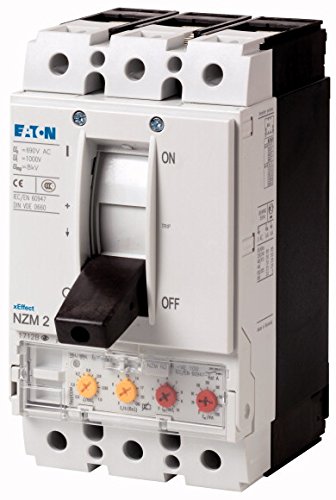
Figure 1: Front view of the Eaton 259129 3-Pole 160 Ampere Power Switch. This image displays the main ON/OFF lever, the three-pole terminals at the top and bottom, and the transparent cover revealing adjustable trip settings with yellow and red dials.
4. Setup and Installation
Installation must be performed by a qualified electrician in accordance with all applicable electrical codes and standards.
- Mounting: Securely mount the power switch in an appropriate enclosure or panel using suitable fasteners. Ensure adequate ventilation and clearance.
- Wiring: Connect the incoming power supply to the designated input terminals and the load to the output terminals. Ensure correct polarity and tight connections. Refer to the wiring diagram provided with the product packaging for specific terminal identification.
- Grounding: Ensure the switch is properly grounded according to local electrical codes.
- Trip Settings: Adjust the overload and short-circuit trip settings (visible under the transparent cover, as shown in Figure 1) to match the specific requirements of the protected circuit. Consult an electrical engineer if unsure about appropriate settings.
- Verification: After installation, verify all connections are secure and that the switch operates freely.
5. Operating Instructions
The Eaton 259129 Power Switch is designed for straightforward operation.
- To Turn ON: Push the operating lever firmly upwards until it clicks into the "ON" position.
- To Turn OFF: Pull the operating lever firmly downwards until it clicks into the "OFF" position.
- Tripped State: If an overload or short-circuit occurs, the switch will automatically trip to the "OFF" position (or an intermediate tripped position, depending on the mechanism). Before resetting, identify and rectify the cause of the trip. To reset, fully push the lever to the "OFF" position, then back to "ON".
6. Maintenance
Regular maintenance helps ensure the longevity and reliable operation of your power switch. Always disconnect power before performing any maintenance.
- Periodic Inspection: Visually inspect the switch and its connections for any signs of wear, damage, discoloration, or loose connections.
- Cleaning: Keep the switch free from dust and debris. Use a dry, lint-free cloth for cleaning. Do not use solvents or abrasive cleaners.
- Terminal Tightness: Periodically check the tightness of all terminal connections.
7. Troubleshooting
If the power switch is not functioning as expected, consider the following:
- Switch Trips Frequently: This indicates an overload or short-circuit condition in the protected circuit.
- Check for overloaded equipment.
- Inspect wiring for short circuits or ground faults.
- Verify that the trip settings are appropriate for the load.
- Switch Does Not Turn ON:
- Ensure the lever is fully pushed to the "OFF" position before attempting to turn "ON" (to reset if it was tripped).
- Check the incoming power supply.
- Inspect for internal damage (if suspected, contact qualified personnel).
For issues not resolved by these steps, contact a qualified electrician or Eaton customer support.
8. Specifications
| Feature | Detail |
|---|---|
| Brand | Eaton |
| Model Number | 259129 |
| Type | Power Switch / Circuit Breaker |
| Poles | 3P (3-Pole) |
| Rated Current | 160 A (Amperes) |
| Dimensions (L x W x H) | 50 x 1050 x 50 mm (5 x 105 x 5 cm) |
| Weight | 2.46 kg |
| International Article Code (EAN) | 04015082591298 |
9. Warranty and Support
This Eaton product is covered by a worldwide Eaton warranty. For specific warranty terms and conditions, please refer to the documentation included with your purchase or visit the official Eaton website.
For technical support, service, or inquiries, please contact Eaton customer service or visit their official support portal. You can find contact information on the Eaton website: www.eaton.com/us/en/support.html
10. Disposal
At the end of its service life, this product should be disposed of according to local regulations for electrical and electronic equipment. Do not dispose of with general household waste. Proper disposal helps prevent potential negative consequences for the environment and human health.


