
1. Introduction
Thank you for choosing the Mikado MD-909 Headphone and MP3 Player. This device combines high-quality audio playback with the convenience of an integrated MP3 player in an over-ear headphone design. This manual provides essential information for the safe and efficient use of your new product.
Package Contents:
- Mikado MD-909 Headphone and MP3 Player
- User Manual
- Warranty Certificate
2. Safety Information
- Do not expose the device to extreme temperatures, direct sunlight, or high humidity.
- Avoid dropping or subjecting the device to strong impacts.
- Do not attempt to disassemble or modify the device. This will void the warranty.
- Keep the device away from water and other liquids.
- Prolonged listening at high volume levels can cause hearing damage. Adjust volume to a safe level.
- Dispose of the device and its components responsibly according to local regulations.
3. Product Overview
The Mikado MD-909 is an over-ear headphone with an integrated MP3 player, designed for portable audio enjoyment. It features a comfortable design and intuitive controls.
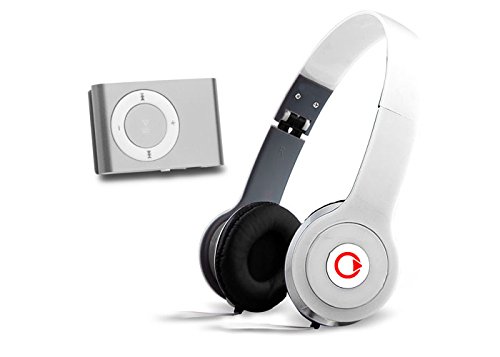
Figure 1: Mikado MD-909 Headphone and MP3 Player. This image displays the overall design of the white over-ear headphones, highlighting the earcups and headband structure, which also houses the MP3 player components.
Key Features:
- Integrated MP3 Player
- Over-ear design for comfort
- Color: White
- Durable construction
Component Identification:
(Please refer to the physical product for exact button locations.)
- Power Button: Used to turn the device on and off.
- Volume Controls: Buttons for increasing or decreasing audio volume.
- Track Navigation Buttons: Buttons for skipping to the next or previous track.
- Play/Pause Button: Controls music playback.
- Charging Port: For connecting the charging cable.
4. Setup
4.1 Initial Charging
Before first use, fully charge your Mikado MD-909. Connect the appropriate charging cable (not included, typically a standard USB cable) to the charging port on the headphone and then to a USB power source (e.g., computer, wall adapter). The charging indicator light will typically show red while charging and turn off or change color when fully charged.
4.2 Loading Music
To load music onto your MD-909 MP3 player:
- Ensure the device is powered off.
- Connect the MD-909 to your computer using a USB data cable (not included).
- The device should appear as a removable disk drive on your computer.
- Drag and drop your desired MP3 audio files into the device's storage folder.
- Once files are transferred, safely eject the device from your computer before disconnecting the cable.
5. Operating Instructions
5.1 Powering On/Off
- To Power On: Press and hold the Power button for approximately 3 seconds until an indicator light illuminates or an audible cue is heard.
- To Power Off: Press and hold the Power button for approximately 3-5 seconds until the indicator light turns off or an audible cue is heard.
5.2 Playing Music
- Ensure the device is powered on.
- Press the Play/Pause button to start playback.
- Press the Play/Pause button again to pause playback.
5.3 Volume Control
- Volume Up: Press the Volume Up button (+).
- Volume Down: Press the Volume Down button (-).
5.4 Track Navigation
- Next Track: Press the Next Track button (often labeled with a forward arrow or >>).
- Previous Track: Press the Previous Track button (often labeled with a backward arrow or <<).
6. Maintenance
6.1 Cleaning
- Use a soft, dry, lint-free cloth to clean the exterior surfaces of the headphones.
- Do not use abrasive cleaners, alcohol, or chemical solvents.
- Avoid getting moisture into any openings.
6.2 Storage
- Store the device in a cool, dry place away from direct sunlight and extreme temperatures.
- If storing for an extended period, charge the battery periodically (e.g., every 3-6 months) to maintain battery health.
7. Troubleshooting
| Problem | Possible Cause | Solution |
|---|---|---|
| Device does not power on. | Battery is depleted. | Charge the device fully. |
| No sound or low volume. | Volume is too low or muted. | Increase the volume using the volume buttons. |
| Cannot transfer music files. | Incorrect USB connection or device not recognized. | Ensure the device is powered off before connecting to PC. Try a different USB port or cable. Ensure the device appears as a removable drive. |
| Device freezes or is unresponsive. | Temporary software glitch. | Press and hold the Power button for an extended period (e.g., 10-15 seconds) to force a restart. |
8. Specifications
| Feature | Detail |
|---|---|
| Brand | Mikado |
| Model Number | MD-909 |
| Color | White |
| Product Type | Headphone with integrated MP3 Player |
| Design | Over-ear |
| Product Weight | 2.82 Kilograms |
| Country of Origin | China |
9. Warranty and Support
9.1 Warranty Information
The Mikado MD-909 comes with a 2-year manufacturer's warranty from the date of purchase. Please retain your proof of purchase for warranty claims. The warranty covers defects in materials and workmanship under normal use. It does not cover damage caused by misuse, accidents, unauthorized modifications, or normal wear and tear.
9.2 Customer Support
For technical assistance, warranty service, or general inquiries, please contact Mikado customer support. Refer to the warranty certificate or the official Mikado website for the most up-to-date contact information.