
1. Introduction and Overview
The Fujifilm FinePix XP130 is a rugged digital camera designed for outdoor adventures. It features a 16.4 MP BSI CMOS sensor, 5x optical zoom, and advanced connectivity options. This camera is built to withstand challenging environments, being waterproof, shockproof, freezeproof, and dustproof.

Figure 1: Front view of the Fujifilm FinePix XP130 camera, highlighting its rugged design and lens.
Key features include Bluetooth for automatic image transfer, Geo Tagging, Double Exposure, and Electronic Level functions, enhancing your photography experience in any setting.
2. What's in the Box
Upon unboxing your Fujifilm FinePix XP130, you should find the following items:
- Fujifilm FinePix XP130 Digital Camera
- Rechargeable Lithium-Ion Battery
- 16GB SD Card
- Battery Charger
- USB Cable
- Hand Strap
- User Manual (this document)
- USA Warranty Information
3. Setup
3.1. Charging the Battery
The camera uses an internal rechargeable Lithium-Ion battery. Connect the camera to the provided charger using the USB cable. The charging indicator will illuminate during charging and turn off when fully charged. Ensure the battery compartment is securely closed before charging or using the camera near water.
3.2. Inserting the Memory Card
The camera supports SDXC memory cards. A 16GB SD card is included. Open the battery/memory card compartment cover, insert the SD card into the slot with the contacts facing the correct direction, and close the cover securely. A click indicates proper closure.
3.3. Initial Power On
Press and hold the power button located on the top of the camera to turn it on. Follow any on-screen prompts for initial setup, such as setting the date and time.
4. Operating the Camera
4.1. Camera Controls and Displays
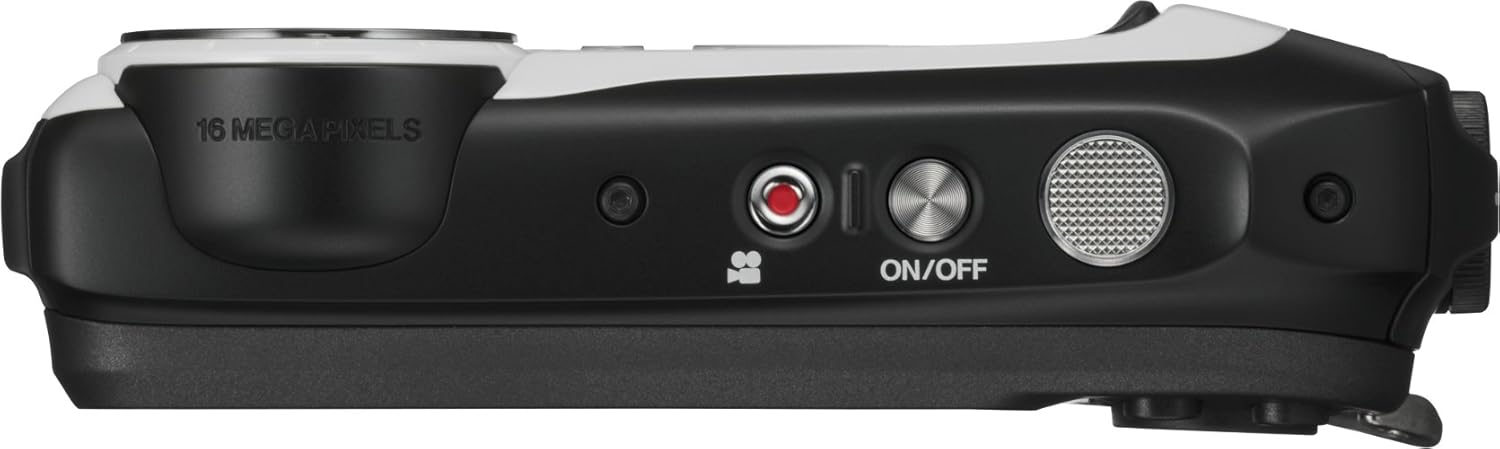
Figure 2: Top and side view of the camera, showing the power, shutter, and SOS buttons.

Figure 3: Rear view of the camera, displaying the LCD screen and navigation buttons.
The XP130 features a rear LCD screen for viewing and navigating menus, and a smaller front screen for selfies. Use the dedicated screen switch button to toggle between the front and rear displays.
- Power Button: Turns the camera on/off.
- Shutter Button: Captures photos or starts/stops video recording.
- SOS Button: Activates a flashing light for emergency signaling (even when the camera is off).
- Zoom Buttons (W/T): Controls the 5x optical zoom (28-140mm equivalent) and 18x digital zoom.
- Menu/OK Button: Accesses the camera menu and confirms selections.
- Navigation Buttons: Used to scroll through menu options and settings.
- Playback Button: Reviews captured photos and videos.
4.2. Shooting Modes
The camera offers various shooting modes to suit different scenarios:
- Automatic Mode: The camera automatically adjusts settings for optimal results.
- Time Photos: Set a delay before capturing a photo.
- Continuous Photos: Capture a rapid sequence of images.
- Time-Lapse Recording: Capture a series of photos over time to create a time-lapse video.
- Loop Recordings: Continuously record video, overwriting older footage when the memory card is full.
- Movie Mode: Records Full HD 1080p video at 29.97 or 30 FPS.
4.3. Connectivity
The XP130 offers multiple ways to connect and share your content:
- Bluetooth: Enables automatic and instant image transfer to paired smartphones and tablet devices.
- Wi-Fi: For wireless connectivity and remote control via a compatible app.
- USB: Connects to a computer for data transfer and charging.
- HDMI: For video output to compatible displays.
4.4. Geo Tagging
Utilize the Geo Tagging capability to embed location data from your smartphone directly into your photos as they are taken on your XP130. This feature requires pairing with a smartphone.
5. Key Features
The Fujifilm FinePix XP130 is engineered for durability and performance in challenging conditions:
- Waterproof: Submersible up to 65ft (20M), allowing for underwater photography and videography without additional housing.
- Shockproof: Designed to withstand drops from up to 5.8ft (1.75M), protecting against accidental impacts.
- Freezeproof: Operates reliably in temperatures as low as 14°F (-10°C).
- Dustproof: Sealed construction prevents dust and sand from entering the camera, ideal for dusty environments.
Video 1: A seller's review demonstrating the Fujifilm Waterproof Camera's features and usage.
6. Maintenance
To ensure the longevity and optimal performance of your FinePix XP130, follow these maintenance guidelines:
- Cleaning: After use, especially in saltwater, rinse the camera thoroughly with fresh water. Wipe dry with a soft cloth.
- Seals: Regularly inspect the rubber seals around the battery/memory card compartment for any dirt, sand, or damage. Clean them gently if necessary to maintain waterproof integrity.
- Lens Care: Use a soft, lint-free cloth specifically designed for camera lenses to clean the lens. Avoid abrasive materials.
- Storage: Store the camera in a cool, dry place away from direct sunlight and extreme temperatures.
7. Troubleshooting
If you encounter issues with your camera, refer to the following common troubleshooting steps:
- Camera Not Powering On: Ensure the battery is fully charged. Check that the battery is correctly inserted and the compartment cover is securely closed.
- Memory Card Error: Reinsert the memory card. If the error persists, try formatting the card (this will erase all data) or use a different compatible SD card.
- Poor Image Quality: Check lighting conditions. Ensure the lens is clean and free from smudges. Adjust shooting modes or exposure settings if necessary.
- Water Leakage: If you suspect water has entered the camera, immediately turn it off, remove the battery and memory card, and allow it to dry completely in a well-ventilated area. Contact customer support if the issue persists.
- Connectivity Issues: Ensure Bluetooth/Wi-Fi is enabled on both the camera and your smart device. Re-pair devices if necessary.
8. Specifications
| Sensor Type | 16.4 MP BSI CMOS (1/2.3-inch) |
| Optical Zoom | 5x (28-140mm equivalent) |
| Digital Zoom | Up to 18x |
| Video Resolution | 1080p Full HD (29.97/30 FPS) |
| Water Resistance | Waterproof to 65ft (20M) |
| Shock Resistance | Shockproof up to 5.8ft (1.75M) |
| Freeze Resistance | Freezeproof to 14°F (-10°C) |
| Dust Resistance | Dustproof |
| Connectivity | Bluetooth, Wi-Fi, USB, HDMI |
| Memory Card Type | SDXC (16GB included) |
| Display | Rear LCD screen, Front LCD screen |
| Battery Type | Lithium-Ion (Internal) |
| Item Weight | 16 ounces |
9. Warranty and Support
For detailed warranty information and customer support, please refer to the USA Warranty document included in your product packaging or visit the official Fujifilm website. Keep your proof of purchase for any warranty claims.


