
1. Introduction
Thank you for choosing the Rossmax CF155 Blood Pressure Monitor. This device is designed for accurate and convenient measurement of blood pressure and pulse rate at home. It incorporates advanced technologies to ensure reliable readings and user comfort.
Key features include:
- Movement Detection Technology
- Real Fuzzy Technology for optimal cuff inflation
- Hypertension Risk Indicator
- Irregular Heartbeat (IHB) Detection
- 90-reading memory storage with average of last three readings
- One-touch automatic operation
- Large LCD screen (55 x 63 mm)
- Latex-free universal cone cuff
2. Safety Information
Important Safety Instructions:
- Consult your physician for interpretation of blood pressure measurements. Self-diagnosis and treatment based on measurements can be dangerous.
- Do not adjust medication based on readings from this monitor without consulting your doctor.
- This device is intended for adult use only. Keep out of reach of children.
- Do not use this device on an injured arm or an arm undergoing medical treatment.
- Avoid taking measurements in a moving vehicle or on an airplane.
- Do not use this device in the presence of flammable gases.
- Use only authorized parts and accessories.
- If you experience discomfort during inflation, press the START/STOP button to immediately deflate the cuff.
3. Product Overview
The Rossmax CF155 Blood Pressure Monitor consists of the main unit with an LCD display and an arm cuff. Familiarize yourself with the components before use.
3.1 Main Unit

Image: The Rossmax CF155 main unit, showing the large LCD display with blood pressure and pulse readings, and the power button.
3.2 Arm Cuff
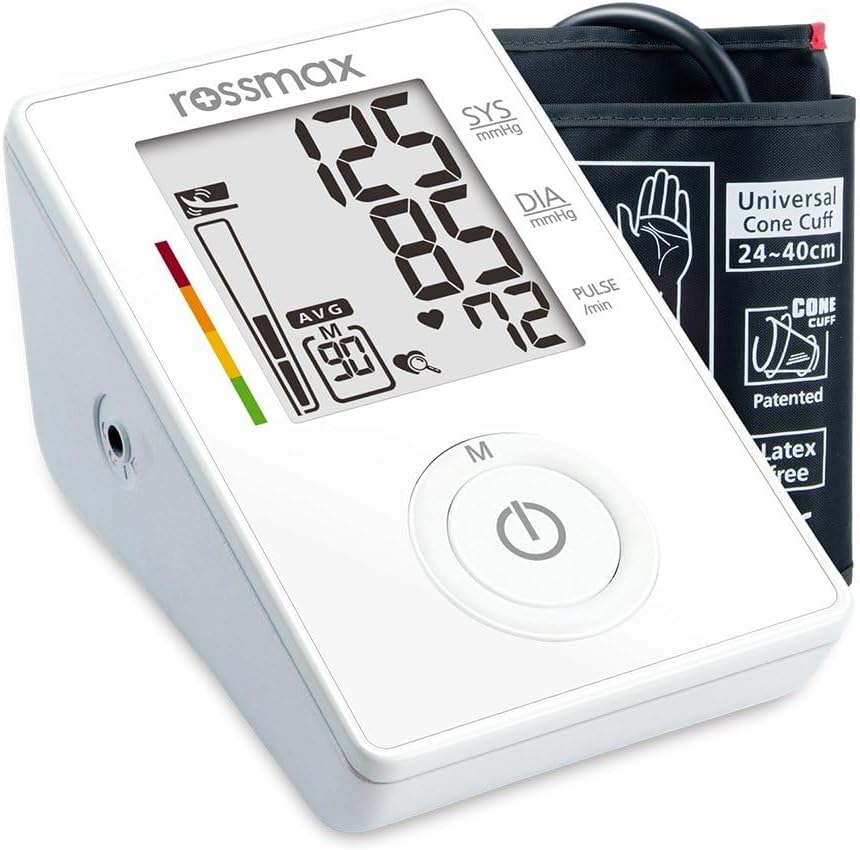
Image: The Rossmax CF155 monitor alongside its universal cone arm cuff, illustrating the complete product package.
The cuff is designed for arm circumferences between 24-40 cm.
4. Setup
4.1 Battery Installation
- Open the battery cover on the back of the monitor.
- Insert four AAA batteries, ensuring correct polarity (+/-).
- Close the battery cover securely.
The monitor requires 4 AAA batteries, which are included.
4.2 Cuff Connection
- Locate the air jack on the side of the main unit.
- Firmly insert the air tube connector from the cuff into the air jack.
5. Operating Instructions
5.1 Before Measurement
- Avoid eating, drinking alcohol, smoking, exercising, and bathing for 30 minutes before measurement.
- Rest for at least 15 minutes before taking a measurement.
- Take measurements in a quiet environment.
- Remove tight-fitting clothing from your upper arm.
5.2 Applying the Arm Cuff
- Sit comfortably with your back supported and feet flat on the floor.
- Place the cuff on your bare upper arm, approximately 1-2 cm above your elbow joint. The air tube should run down the center of your arm.
- Wrap the cuff snugly around your arm, ensuring it is not too tight or too loose.
- Rest your arm on a table so the cuff is at the same level as your heart.
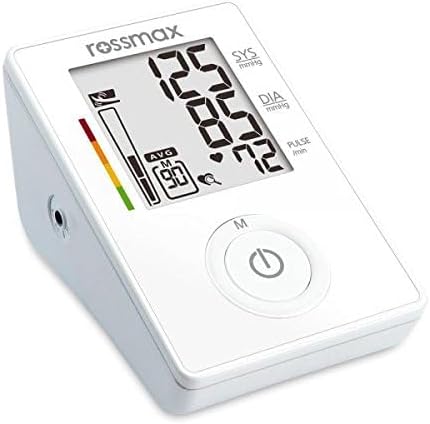
Image: Close-up of the monitor display, showing typical blood pressure readings (SYS, DIA, PULSE) and indicators for cuff pressure and memory.
5.3 Taking a Measurement
- Press the START/STOP button. The cuff will automatically inflate.
- Remain still and silent during the measurement.
- Once the measurement is complete, the systolic pressure, diastolic pressure, and pulse rate will be displayed on the LCD screen.
- The monitor will automatically store the reading in its memory.
- Press the START/STOP button again to turn off the device, or it will automatically shut off after 1 minute of inactivity.
5.4 Understanding Indicators
- Hypertension Risk Indicator: A color-coded bar on the left side of the display indicates the risk level of your blood pressure reading according to WHO guidelines.
- Irregular Heartbeat (IHB) Detection: If an irregular heartbeat is detected during the measurement, an IHB symbol will appear on the display. If this symbol appears frequently, consult your physician.
- Movement Detection: If excessive body movement is detected during measurement, a movement symbol will appear. This may indicate an inaccurate reading.
6. Memory Functions
The Rossmax CF155 stores up to 90 readings and can display the average of the last three measurements.
6.1 Accessing Memory
- With the monitor off, press the M button.
- The display will show the average of the last three readings.
- Press the M button repeatedly to scroll through individual past readings, from most recent to oldest.
6.2 Clearing Memory
To clear all stored readings, press and hold the M button for approximately 5 seconds while in memory mode. The display will show "CL" (Clear) and then turn off, indicating the memory has been erased.
7. Maintenance
7.1 Cleaning
- Wipe the monitor and cuff with a soft, dry cloth.
- If necessary, use a cloth lightly dampened with water or a mild detergent. Do not use abrasive cleaners or immerse the device in water.
7.2 Storage
- Store the device in a clean, dry place, away from direct sunlight, extreme temperatures, and humidity.
- Do not store the device with the cuff tightly rolled or folded, as this may damage the air tube.
7.3 Battery Replacement
When the low battery indicator appears on the display, replace all four AAA batteries with new ones. Do not mix old and new batteries or different types of batteries.
8. Troubleshooting
| Problem | Possible Cause | Solution |
|---|---|---|
| No power / Display blank | Batteries are dead or incorrectly inserted. | Replace batteries with new ones, ensuring correct polarity. |
| Error message (e.g., 'Err') | Cuff not applied correctly, movement during measurement, or air leakage. | Re-apply cuff correctly, remain still, check cuff connection. Try again. |
| Inconsistent readings | Improper measurement technique, stress, or environmental factors. | Ensure proper posture and technique. Rest before measurement. Consult a doctor if concerns persist. |
| IHB symbol appears frequently | Detection of irregular heartbeats. | This is an indicator, not a malfunction. Consult your physician for advice. |
9. Specifications
| Feature | Detail |
|---|---|
| Model Name | CF155 |
| Display Type | Digital LCD |
| Cuff Size | 24-40 cm (Universal Cone Cuff) |
| Power Source | 4 AAA Batteries (Included) |
| Memory Storage | 90 readings |
| Product Dimensions (L x W x H) | 13 x 11 x 18 cm |
| Item Weight | 500 grams |
| Age Range Description | Adult |
| Included Components | Cuff |
10. Warranty & Support
Rossmax products are manufactured to high-quality standards. For specific warranty details, please refer to the warranty card included with your product or contact your local Rossmax distributor. Keep your purchase receipt as proof of purchase.
For technical support or service inquiries, please contact the retailer where you purchased the device or visit the official Rossmax website for contact information in your region.


