
1. Introduction
Thank you for purchasing the Capello Play it All Bluetooth Wireless Home Stereo Speaker CI302. This device offers versatile audio playback options including Bluetooth wireless streaming, CD player functionality, and FM digital radio. This manual provides detailed instructions for setup, operation, maintenance, and troubleshooting to ensure optimal performance and longevity of your speaker system.
2. Important Safety Information
- Read all instructions before operating the device.
- Keep this manual for future reference.
- Do not expose the unit to rain or moisture to prevent fire or shock hazards.
- Ensure proper ventilation; do not block any ventilation openings.
- Place the unit on a stable, flat surface.
- Use only attachments/accessories specified by the manufacturer.
- Unplug the unit during lightning storms or when unused for long periods.
- Refer all servicing to qualified service personnel.
3. Package Contents
Please check that all items are present:
- Capello Play it All Bluetooth Wireless Home Stereo Speaker CI302
- Remote Control
- AC Power Adapter
- User Manual (this document)
4. Product Overview
Familiarize yourself with the main components and controls of your Capello Play it All speaker.
Front View

Figure 4.1: Front view of the Capello Play it All speaker, showing the speaker grille, digital clock display, and subtle branding.
Top Panel Controls

Figure 4.2: Top panel of the Capello Play it All speaker, illustrating the CD compartment, 'capello' logo, and various control buttons including PRESET, MODE, PAIRING, PROGRAM/CLOCK SET, SKIP, PLAY/PAUSE, STOP, REPEAT, and VOLUME.
- PRESET +/-: Navigate through saved FM radio stations.
- MODE: Switch between Bluetooth, CD, FM Radio, and Line-In modes.
- PAIRING: Initiate Bluetooth pairing mode.
- PROGRAM/CLOCK SET: Program CD tracks or set the clock.
- SKIP ◀◀ / ▶▶: Skip tracks on CD or adjust FM frequency.
- PLAY/PAUSE ▶▶: Play or pause CD playback.
- STOP ■: Stop CD playback.
- REPEAT: Repeat current track or all tracks on CD.
- VOL +/-: Adjust volume level.
- OPEN/CLOSE: Open or close the CD compartment.
- STANDBY: Power on/off the unit.
Rear Panel (Typical)
The rear panel typically includes the AC power input, FM antenna connection, and Line-In jack.
5. Setup
5.1 Power Connection
- Connect the AC power adapter to the DC IN jack on the rear of the speaker.
- Plug the other end of the adapter into a standard wall outlet.
- The unit will enter standby mode, and the digital clock display will illuminate.
5.2 FM Antenna Setup
For optimal FM radio reception, extend the FM wire antenna fully and position it for the best signal. Avoid placing it near other electronic devices that may cause interference.
5.3 Setting the Clock
- In standby mode, press and hold the PROGRAM/CLOCK SET button.
- The hour digits will begin to flash. Use the SKIP ◀◀ / ▶▶ buttons to adjust the hour.
- Press PROGRAM/CLOCK SET again to confirm the hour.
- The minute digits will flash. Use the SKIP ◀◀ / ▶▶ buttons to adjust the minutes.
- Press PROGRAM/CLOCK SET one last time to save the setting.
6. Operating Instructions
6.1 Power On/Off and Mode Selection
- Press the STANDBY button on the unit or the remote control to turn the speaker on or off.
- Press the MODE button repeatedly to cycle through available modes: Bluetooth, CD, FM Radio, and Line-In.
6.2 Bluetooth Wireless Streaming
- Turn on the speaker and select Bluetooth mode using the MODE button. The display will show 'BT' and flash, indicating it's in pairing mode.
- On your Bluetooth-enabled device (smartphone, tablet, computer), enable Bluetooth and search for available devices.
- Select 'Capello CI302' (or similar) from the list of devices.
- Once paired, the speaker will emit a confirmation tone, and 'BT' on the display will stop flashing.
- You can now play audio from your device through the speaker. Use your device or the speaker's controls for volume and track navigation.
6.3 CD Playback
- Press the OPEN/CLOSE button to open the CD compartment.
- Carefully place an audio CD (CD, CD-R/-RW) with the label side facing up into the compartment.
- Close the CD compartment. The unit will read the disc.
- If not already in CD mode, press the MODE button to select CD mode.
- Press the PLAY/PAUSE button to start playback.
- Use SKIP ◀◀ / ▶▶ to skip tracks, STOP ■ to stop, and REPEAT to cycle through repeat options.
6.4 FM Digital Radio
- Press the MODE button to select FM radio mode. The current frequency will be displayed.
- Auto Scan: Press and hold the PLAY/PAUSE button to automatically scan and save available FM stations as presets.
- Manual Tuning: Press SKIP ◀◀ / ▶▶ briefly to fine-tune the frequency. Press and hold to scan for the next strong station.
- Accessing Presets: Use the PRESET +/- buttons to cycle through saved stations.
6.5 Line-In Operation
- Connect an audio cable (not included) from the headphone jack or line-out of an external audio device to the LINE-IN jack on the speaker.
- Press the MODE button to select Line-In mode.
- Play audio from your connected device. Volume can be controlled via the speaker or the external device.
6.6 USB Charging
The speaker features a USB port for charging compatible devices (e.g., smartphones, tablets). Connect your device's USB charging cable (not included) to the USB port on the speaker. The speaker does not need to be in a specific mode for USB charging to function.
6.7 Remote Control Usage
The included remote control provides convenient access to all functions. Ensure the remote has working batteries and is pointed towards the front of the speaker.
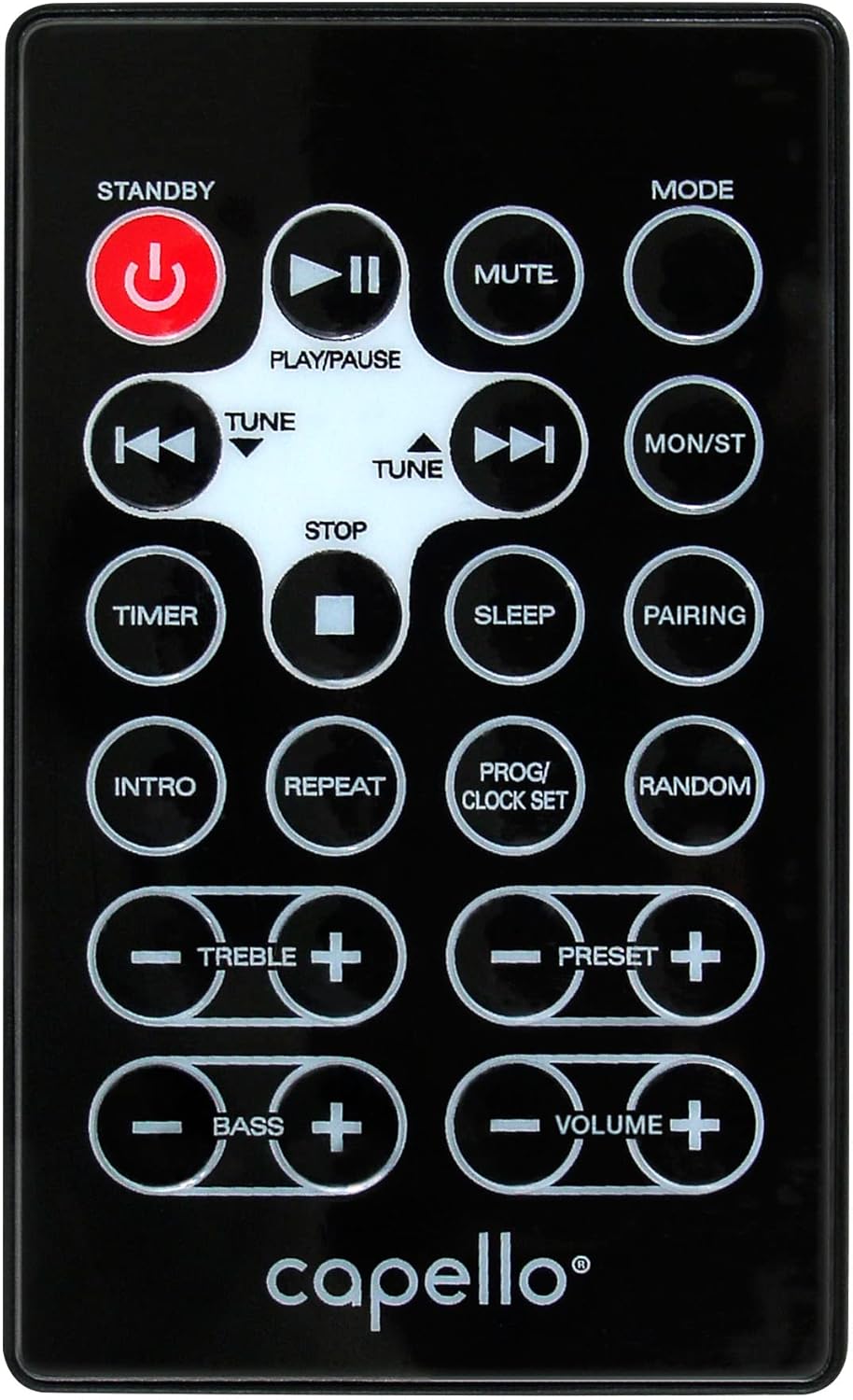
Figure 6.1: Layout of the remote control for the Capello Play it All speaker, showing buttons for Standby, Play/Pause, Mute, Mode, Skip/Tune, Stop, Timer, Sleep, Pairing, Intro, Repeat, Program/Clock Set, Random, Treble, Bass, and Volume controls.
- STANDBY: Power on/off.
- PLAY/PAUSE: Play or pause audio.
- MUTE: Mute or unmute audio.
- MODE: Cycle through input modes.
- SKIP/TUNE ◀◀ / ▶▶: Skip tracks or tune radio frequency.
- STOP: Stop playback.
- TIMER: Set sleep timer.
- SLEEP: Activate sleep function.
- PAIRING: Initiate Bluetooth pairing.
- INTRO: Play the first few seconds of each CD track.
- REPEAT: Repeat current track or all tracks.
- PROG/CLOCK SET: Program CD tracks or set clock.
- RANDOM: Play CD tracks in random order.
- TREBLE +/-: Adjust treble levels.
- BASS +/-: Adjust bass levels.
- VOLUME +/-: Adjust overall volume.
7. Maintenance
7.1 Cleaning
- Always unplug the unit from the power outlet before cleaning.
- Use a soft, dry cloth to wipe the exterior surfaces.
- Do not use abrasive cleaners, waxes, or solvents as they may damage the finish.
- For the CD lens, use a specialized CD lens cleaner disc.
7.2 Storage
If storing the unit for an extended period, unplug it from the power source and store it in a cool, dry place away from direct sunlight and extreme temperatures.
8. Troubleshooting
| Problem | Possible Cause | Solution |
|---|---|---|
| No power | Power cord not connected; outlet not active. | Ensure power cord is securely plugged in; try a different outlet. |
| No sound | Volume too low; incorrect mode selected; external device muted. | Increase volume; select correct input mode; check external device volume/mute. |
| CD skips or does not play | Dirty or scratched CD; CD inserted incorrectly; dirty CD lens. | Clean or replace CD; insert CD label-side up; use a CD lens cleaner. |
| Bluetooth pairing fails | Device too far; Bluetooth not enabled on device; speaker not in pairing mode. | Move device closer; enable Bluetooth; ensure speaker is in BT pairing mode. |
| Poor FM reception | Antenna not extended; interference. | Fully extend and reposition FM antenna; move away from other electronics. |
| Remote control not working | Batteries depleted; obstruction; not pointed at sensor. | Replace batteries; remove obstructions; point remote directly at the unit. |
9. Specifications
| Feature | Specification |
|---|---|
| Brand | Capello |
| Model Number | CI302 |
| Connectivity Technology | Bluetooth |
| Speaker Type | Stereo |
| Audio Output Mode | Stereo |
| Supported Audio Formats | CD, MP3 |
| Speakers Nominal Output Power | 10 Watts |
| Speakers Maximum Output Power | 10 Watts |
| Speaker Surround Sound Channel Configuration | 2.0 |
| Power Source Type | Corded Electric |
| Compatible Devices | Laptop, Smartphone, Tablet |
| Special Features | Digital Display, Portable, USB Port |
| Material Type | Plastic |
| Mounting Type | Table Top |
| Item Weight | 2.57 Kilograms |
| Package Dimensions | 38.3 x 24.2 x 18.5 cm |
| Batteries Included | No |
| Batteries Required | No |
10. Warranty and Support
This product is covered by a limited warranty. Please refer to the warranty card included in your package for specific terms and conditions. For technical support or customer service inquiries, please contact Capello customer support through their official website or the contact information provided with your purchase documentation.