
abode 103000/D
Abode 4-Piece Wireless Smart Security System (Model 103000/D) - User Manual
Brand: abode | Model: 103000/D
1. Introduction
The Abode 4-Piece Wireless Smart Security System is designed to provide comprehensive home security with easy DIY installation. This expandable system integrates with Apple HomeKit, Z-Wave, and Zigbee devices, offering flexible control and monitoring options. The 4-piece kit includes essential components to get your home security started.
What's Included in the 4-Piece Bundle:
- 1x Central Security Hub (with built-in 93dB siren, backup battery, and Ethernet connectivity)
- 1x Motion Sensor
- 1x Key Fob
- 1x Mini Door/Window Sensor
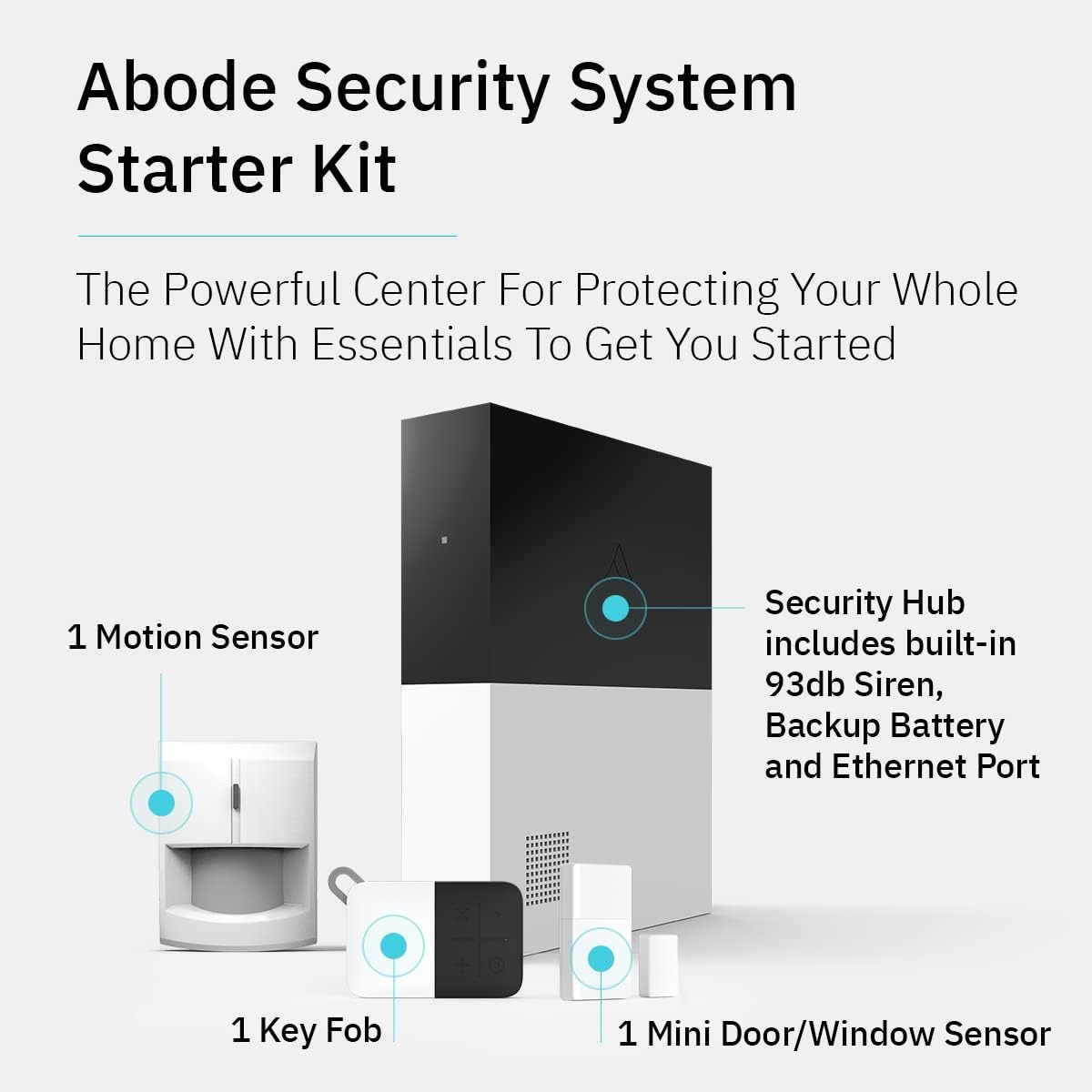
Figure 1: Abode Security System Starter Kit components with labels indicating the Security Hub, Motion Sensor, Key Fob, and Mini Door/Window Sensor.
2. System Components
2.1. Central Security Hub
The Security Hub is the core of your Abode system. It features a built-in 93dB siren for audible alerts, a backup battery for continued operation during power outages, and reliable Ethernet connectivity. It also serves as a Z-Wave and Zigbee smart home hub, allowing integration with a wide range of compatible smart accessories.

Figure 2: Abode Security Hub highlighting its Z-Wave compatibility for smart home integration.
2.2. Motion Sensor
The motion sensor detects movement within its field of view, triggering alerts or alarms based on your system's settings. It helps secure areas by identifying unauthorized activity.
2.3. Mini Door/Window Sensor
These compact sensors are designed to detect when a door or window is opened or closed. They provide immediate alerts if an entry point is breached while the system is armed.
2.4. Key Fob
The key fob offers a convenient way to arm or disarm your security system without needing to use the mobile app or keypad. It's a portable remote control for quick access.
3. Setup Instructions
The Abode system is designed for easy DIY installation. Follow these steps to set up your system:
- Connect the Gateway: Plug your Abode Gateway into power and connect it to your home router using the provided Ethernet cable.
- Download the Abode App: Download the Abode Security app from your smartphone's app store (available for iOS and Android).
- Create an Account: Open the app and follow the on-screen instructions to create your Abode account and set up your system.
- Pair Devices: Follow the in-app instructions to pair your included motion sensor, mini door/window sensor, and key fob with your Gateway. This typically involves activating a pairing mode on the device and confirming in the app.
- Install Sensors: Mount your mini door/window sensor on desired entry points and your motion sensor in areas where motion detection is needed. Use the provided adhesive or screws for installation.

Video: Eufy Security Home Alarm 5 Pc. Kit-Unboxing, Setup, Testing. This video provides a general overview of setting up a home alarm system, including unboxing, setup, and testing of components. While it features a different brand, the setup principles for sensors and keypads are similar.
4. Operating Your System
4.1. Arming and Disarming
Your Abode system can be armed and disarmed using the mobile app, key fob, or voice commands (with compatible devices like Alexa, Google Assistant, or Siri).
- Home Mode: Arms perimeter sensors (doors/windows) while allowing free movement inside.
- Away Mode: Arms all sensors (perimeter and motion) when no one is home.
- Standby/Disarmed: All sensors are disarmed.

Figure 3: Smartphone displaying Apple Home app controlling the Abode system, showing compatibility with Siri, Alexa, and Google Assistant.
4.2. Mobile App Control
The Abode app provides full control over your system, allowing you to arm/disarm, view sensor status, receive notifications, and customize settings from anywhere.

Figure 4: Smartphone displaying Abode app notifications and device dashboard, illustrating how to stay alert and monitor connected devices.
4.3. Professional Monitoring (Optional)
For enhanced security, optional 24/7 professional monitoring services are available. This service can automatically dispatch police, fire, or medical help when an alarm is triggered.

Figure 5: Image illustrating the benefits of 24/7 professional monitoring, including dispatch services and potential insurance discounts.
5. Maintenance
5.1. Battery Life
The included sensors (motion and mini door/window) use CR123A Lithium Metal batteries, which typically last up to 2 years. The keypad's built-in rechargeable battery can last up to 6 months before needing a recharge.
5.2. General Care
Keep all components clean and free from dust. Avoid placing sensors in direct sunlight or near heat sources, as this can affect performance. Regularly check the app for battery status updates.
6. Troubleshooting
- Sensors not appearing in HomeKit: If you add new sensors and they don't appear in your Apple Home app, you may need to delete the Abode system from HomeKit and re-add it. This might require reconfiguring automations.
- Alarm not triggering professional dispatch: Ensure your professional monitoring subscription is active and that your system is properly configured for dispatch. Check your notification settings in the Abode app.
- Connectivity issues: If your Gateway loses connection, check your internet connection and router. The Gateway supports both Ethernet and Wi-Fi connectivity, which can be configured in the app settings.
7. Specifications
| Feature | Specification |
|---|---|
| Brand | abode |
| Model Number | 103000/D |
| Power Source | Battery Powered (sensors), 120 Volts (Gateway) |
| Connectivity Technology | Wireless (Z-Wave, Zigbee, Wi-Fi, Ethernet) |
| Compatible Devices | Smartphone, Apple HomeKit, Z-Wave, Zigbee |
| Installation Type | Wireless DIY |
| Included Components | Gateway, Mini Door/Window Sensor, Keyfob, Motion Sensor, Sticker |
| Siren Noise Level | 93 Decibels |
| Sensor Battery Life | Up to 2 years (CR123A Lithium Metal) |
| Keypad Battery Life | Up to 6 months (rechargeable) |
8. Warranty and Support
8.1. Warranty
The Abode 4-Piece Wireless Smart Security System comes with a 1-year manufacturer's warranty.
8.2. Support
For technical assistance, troubleshooting, or additional information, please refer to the Abode mobile app's support section or visit the official Abode website. Online resources, FAQs, and customer service contact details are available to assist you.
Ask a question about this manual
Ask about setup, troubleshooting, compatibility, parts, safety, or missing instructions. Manuals+ will review the question and use this page’s manual context to help answer it.