
1. Introduction and Overview
This instruction manual provides essential information for the proper installation, operation, and maintenance of your Excel XLS-706 replacement pool and spa filter cartridges. These filters are designed to provide efficient filtration for clear water in compatible systems.

Image 1.1: Excel XLS-706 Replacement Pool Filter Cartridge.
2. Product Features
Excel XLS-706 filters are engineered for effective water purification. Key features include:
- Premium Filtration Media: Utilizes 4 oz. point-bonded non-woven media with a 20-micron nominal rating to capture fine particulate matter, including cedar and pine pollen.
- Efficient Flow Design: Features an engineered ABS core that optimizes water circulation and contributes to reduced energy usage.
- Durable End Caps: Equipped with Black Diamond end caps made from durable, chemically resistant polyurethane to prevent cracking and leaks, ensuring a longer lifespan.
- Secure Fit Banding: Designed with secure banding for structural integrity.

Image 2.1: Diagram illustrating the internal components and construction of Excel filters, highlighting the Cleanguard Ultra Efficient Media, Optimal Flow Engineered Core, Secure Fit Banding, and Durable End Caps.
3. Compatibility and Dimensions
The Excel XLS-706 filter is a direct replacement for the following models:
- Pentair Clean Clear 520
- Waterway 525
- Pentair CCP520 Cartridge
- Pentair R173578
- Pentair 178585
- Unicel C-7472
- Filbur FC-1978
- Pleatco PCC130
Cartridge Dimensions:
- Length: 32.0625 inches (32 1/16")
- Diameter: 7 inches
- Top Open Hole: 3 inches
- Bottom Open Hole: 3 inches

Image 3.1: Visual representation of the XLS-706 filter, detailing its length, diameter, and top/bottom opening sizes, along with a list of compatible filter models.

Image 3.2: Comparison table for Pentair Clean & Clear Plus replacement filter cartridges, showing various models including the XLS-706 4PACK for 520 SQFT systems.
4. Setup and Installation
Follow these general steps for replacing your pool or spa filter cartridge. Always refer to your specific pool/spa system's manual for detailed instructions.
- Turn Off System: Ensure your pool pump is turned off and all air pressure is removed from the filter housing.
- Open Housing: Carefully open the filter housing according to your system's instructions.
- Remove Old Cartridge: Remove the old filter cartridge(s) and set them aside for cleaning or disposal.
- Insert New Cartridge: Place the new Excel XLS-706 filter cartridge(s) into the filter housing, ensuring they are seated correctly.
- Secure Housing: Close and secure the filter housing.
- Restart System: Follow your system's instructions to restart the pump and check for leaks.
5. Operating Your Filter
Once installed, the Excel XLS-706 filter cartridges will continuously work to remove impurities from your pool or spa water. Monitor your system's pressure gauge; an increase in pressure typically indicates that the filters are accumulating debris and require cleaning.
6. Maintenance and Cleaning
Regular cleaning extends the life of your filter and maintains water quality. Excel filters are designed for easy cleaning.
- Prepare for Cleaning: Turn off your pool pump and remove air pressure from the filter housing.
- Remove Cartridge: Remove the filter cartridge(s) from the housing.
- Rinse: Spray the filter cartridge using a garden hose to clean. A spray nozzle is recommended for best results.
- Repeat: Flip the cartridge(s) over and repeat the spraying process to ensure all pleats are thoroughly cleaned.
- Reinstall: Return the clean filter cartridge(s) to the filter housing.
Recommendation: We recommend filter rotation while cleaning. Keep a clean, dry spare filter on hand. Swap the dirty filter with the clean spare. This allows the dirty filter to dry completely, which can aid in dislodging embedded debris, and ensures continuous filtration without downtime.
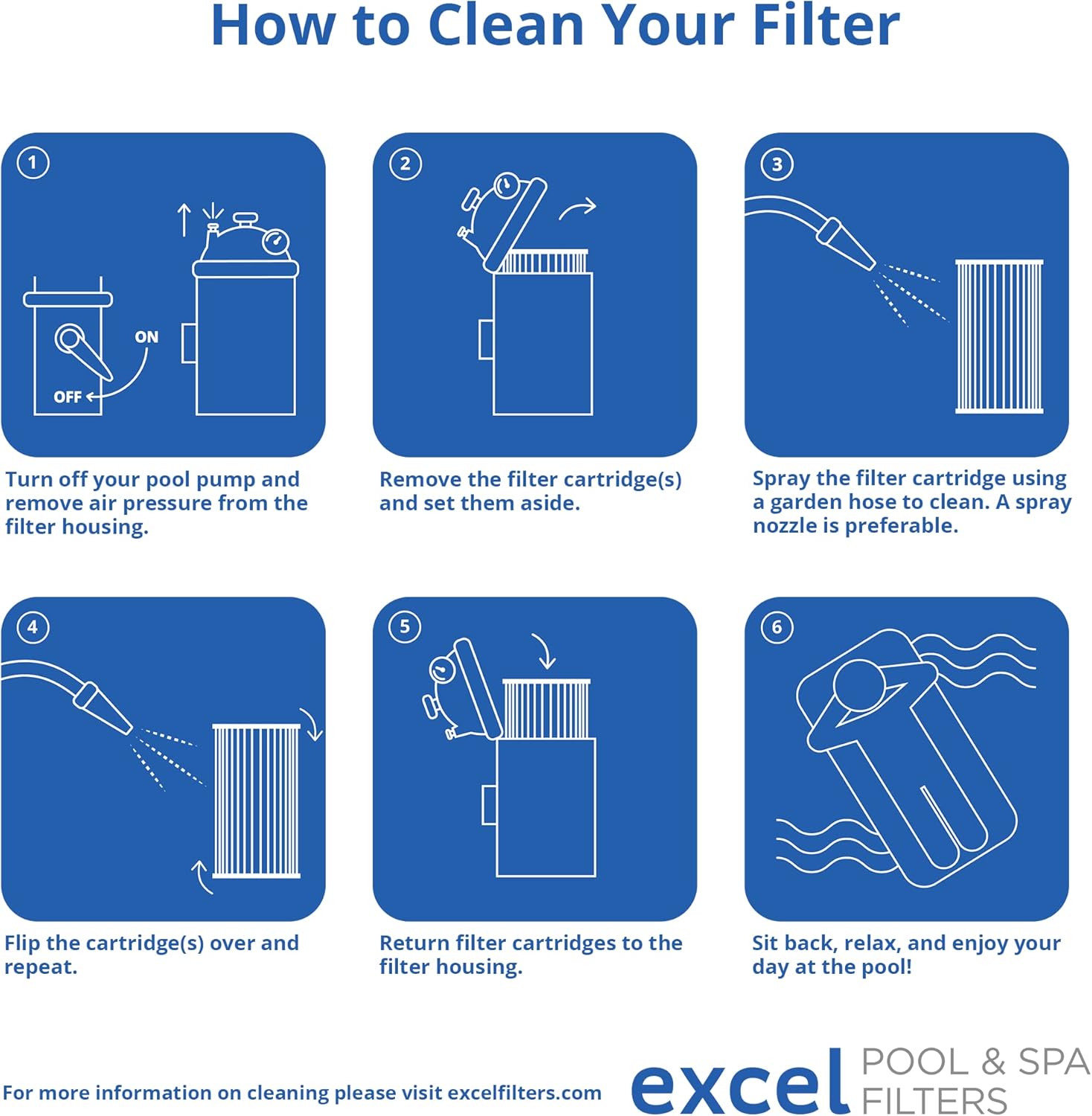
Image 6.1: Step-by-step visual guide on how to clean your pool filter, from turning off the pump to rinsing the cartridge and reinstalling it.
7. Troubleshooting
If you experience issues with your filtration system, consider the following:
- Reduced Water Flow: Check if the filter cartridge is clogged and requires cleaning. Ensure the pump is operating correctly.
- High Pressure: An elevated pressure gauge reading indicates a dirty filter. Clean the cartridge as described in the maintenance section.
- Cloudy Water: This may indicate a need for filter cleaning, chemical imbalance, or insufficient filtration time. Ensure the filter is clean and properly installed.
- Leaks: Verify that the filter housing is correctly sealed and all O-rings are in good condition and properly seated.
8. Specifications
| Specification | Detail |
|---|---|
| Model Number | XLS-706 |
| Package Dimensions | 34.33 x 15.35 x 15.2 inches |
| Item Weight | 23.4 pounds |
| Manufacturer | Eden Equipment |
9. Warranty and Support
All Excel Filters include a 6-month warranty and are designed for a 12-month service life under normal operating conditions and proper maintenance.
For further assistance or inquiries, please refer to the contact information provided by your retailer or visit the official Excel Filters website.
10. Product Videos
Excel Pool & Spa Filters - Made in the USA!
Video 10.1: An overview of Excel Pool & Spa Filters, highlighting their manufacturing in the USA and commitment to quality filtration.
Excel Filters - Unmatched Filtration
Video 10.2: This video details the superior filtration capabilities of Excel Filters, designed to capture dirt, debris, and oils for crystal-clear water.