
Introduction
This manual provides detailed instructions for the setup, operation, and maintenance of your ExquizOn P8I DLP Smart Projector. Designed for versatility, this mini portable projector features Android 7.0, 1GB RAM, 8GB ROM, and supports WiFi, USB, HDMI, Bluetooth, and TF card connectivity, making it suitable for home theater, business meetings, and travel.
What's in the Box
Please check the package contents to ensure all items are present:
- ExquizOn P8I DLP Smart Projector
- Power Adaptor
- Remote Control
- Mini Tripod
- User Manual (this document)
Product Overview
The ExquizOn P8I is a compact and powerful projector, offering a range of features for various multimedia needs. Its portable design allows for easy setup in different environments.
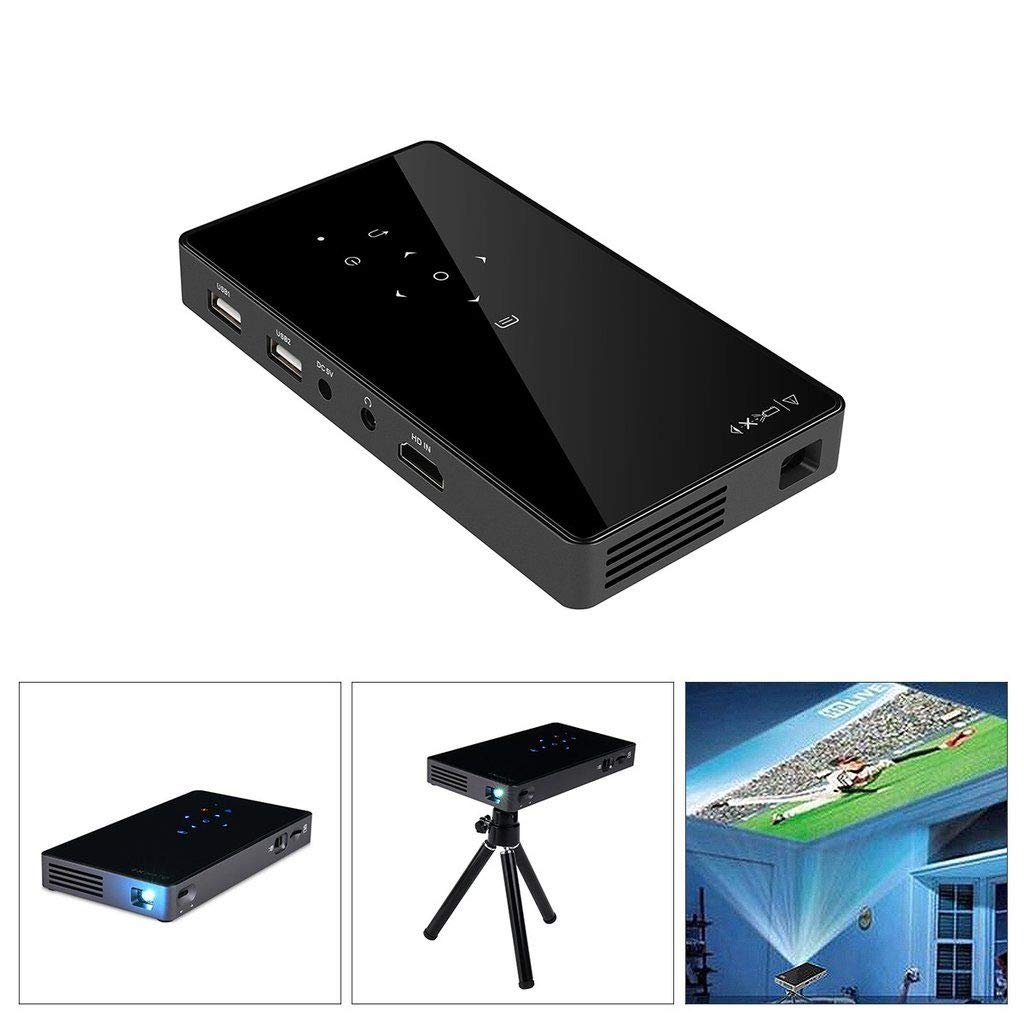
Image: Top-down view of the ExquizOn P8I projector, highlighting its compact size, control buttons, and various input/output ports on the side.
Key Features:
- Portable Design: Lightweight and compact for easy transport.
- HDMI Connectivity: Connect to laptops, gaming consoles, and other devices.
- USB Connectivity: Play media directly from USB drives.
- Android 7.0 OS: Built-in operating system for direct app access.
- Wireless Connectivity: Supports WiFi and Bluetooth for seamless integration.
Video: An overview of the ExquizOn P8I Smart Projector, showcasing its features, connectivity options, and various use scenarios.
Setup
Follow these steps to set up your projector:
- Power Connection: Connect the power adaptor to the projector and then to a power outlet.
- Placement: Place the projector on a stable, flat surface or mount it on the included tripod. Ensure proper ventilation around the device.
- Power On: Press the power button on the projector or remote control to turn it on.
- Focus Adjustment: Adjust the focus wheel until the projected image is clear.
- Keystone Correction: If the image appears trapezoidal, use the keystone correction feature (if available) to adjust it to a rectangular shape.

Image: The ExquizOn P8I projector positioned on its mini tripod, demonstrating a typical setup for projection.
Operating Instructions
The projector operates on Android 7.0, providing a familiar interface for navigation and app usage.
Navigation:
- Use the included remote control to navigate the Android interface.
- Connect a 2.4G wireless mouse or keyboard via USB for easier control.
- The touch panel on the projector itself can also be used for basic navigation.

Image: The projector's display showing the Android 7.1 operating system home screen, featuring icons for various applications and settings.
App Installation:
Access the Google Play Store to download and install your favorite streaming apps, games, and productivity tools directly onto the projector's 8GB internal storage (expandable up to 32GB via TF card).
Connectivity
The P8I projector offers multiple ways to connect to your devices and networks:
- Wi-Fi: Connect to your home or office Wi-Fi network (2.4G) to access online content, stream videos, and download apps.
- Bluetooth 4.0: Pair with external Bluetooth speakers for enhanced audio, or connect Bluetooth gamepads and other peripherals.
- HDMI Input: Use the HDMI port to connect laptops, gaming consoles, TV boxes, and other HDMI-enabled devices.
- USB Ports: Two USB ports allow connection of USB drives for media playback, or peripherals like a mouse and keyboard.
- TF Card Slot: Insert a TF (MicroSD) card to expand storage up to 32GB for media files and apps.
- Wireless Screen Mirroring: Supports Miracast and AirPlay for screen mirroring from compatible mobile phones and tablets.

Image: A visual representation of the projector's extensive connectivity options, illustrating how it can interface with various devices wirelessly and via physical ports.
Display & Performance
The ExquizOn P8I utilizes DLP technology for a clear and vibrant projection experience.
- Native Resolution: 854 x 480 pixels, supporting up to 1920 x 1080 (1080P Full HD) for video playback.
- Brightness: 100 ANSI Lumens, providing a brighter image than many mini projectors.
- Contrast Ratio: 1000:1 for good image depth.
- Light Source: OSRAM LED lamps with a lifespan of up to 30,000 hours.
- Projection Size: Adjustable from 40 to 120 inches, with optimal viewing distances.

Image: A chart detailing the relationship between projection distance (in meters) and screen size (in inches), helping users achieve the desired display dimensions.
Smart Features
Leverage the built-in Android 7.0 operating system for a smart and interactive experience.
- Android OS: Enjoy a familiar Android interface, allowing direct access to streaming services, web browsing, and more without needing an external device.
- App Ecosystem: Download applications from the Google Play Store, expanding the projector's functionality for entertainment, education, and business.
- Wireless Control: Connect wireless peripherals like keyboards, mice, and gamepads for enhanced interaction with the Android system.

Image: The projector's Android 7.1 interface, demonstrating its capability to run streaming and media applications smoothly.
Portability & Use Cases
The compact design of the ExquizOn P8I makes it an ideal companion for various scenarios.
- Pocket-Sized Design: Easily fits in your hand or bag, making it highly portable for on-the-go use.
- Versatile Applications: Perfect for creating a home cinema, outdoor theater, gaming sessions, business presentations, or sharing content during travel.
- Flexible Screen Sizes: Experience screen sizes from 30 to 200 inches, adapting to different room sizes and viewing preferences.
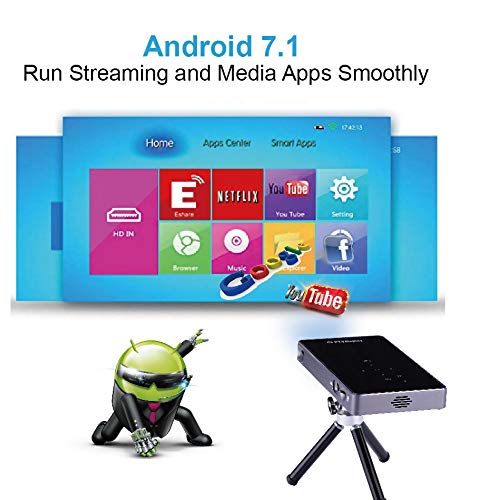
Image: A compilation of different usage scenarios for the projector, illustrating its adaptability for various entertainment and presentation needs.
Maintenance
Proper maintenance ensures the longevity and optimal performance of your projector.
- Cleaning the Lens: Use a soft, lint-free cloth specifically designed for optical lenses. Avoid abrasive materials or harsh chemicals.
- Ventilation: Ensure the projector's ventilation openings are clear and unobstructed to prevent overheating. Do not place the projector on soft surfaces that might block airflow.
- Storage: When not in use, store the projector in a cool, dry place, away from direct sunlight and extreme temperatures.
- Battery Care: For models with built-in batteries, avoid fully discharging the battery frequently. Charge it regularly to maintain battery health.
Troubleshooting
If you encounter issues with your projector, refer to the following common problems and solutions:
| Problem | Possible Cause | Solution |
|---|---|---|
| No image projected | Power cable loose, input source incorrect, lens cap on. | Check power connection, select correct input source (HDMI, USB, etc.), remove lens cap. |
| Blurry image | Out of focus, incorrect projection distance. | Adjust the focus wheel. Ensure the projector is within the recommended projection distance for the desired screen size. |
| No sound | Volume too low, external speaker not connected, audio output settings. | Increase volume. Check Bluetooth speaker connection or connect external speakers via audio jack. Verify audio output settings in Android OS. |
| Wi-Fi connection issues | Incorrect password, out of range, router issues. | Verify Wi-Fi password. Move projector closer to the router. Restart your Wi-Fi router. |
Specifications
Detailed technical specifications for the ExquizOn P8I DLP Smart Projector:
- Brand:
- ExquizOn
- Model Name:
- Microware (P8I)
- Display Type:
- DLP
- Native Resolution:
- 854 x 480
- Maximum Display Resolution:
- 854 x 480 (Supports 1080P video)
- Brightness:
- 100 ANSI Lumens
- Contrast Ratio:
- 1000:1
- Light Source Operating Life:
- 30,000 Hours
- Maximum Image Size:
- 120 Inches
- Minimum Throw Distance:
- 1.2 Metres
- Maximum Throw Distance:
- 1.2 Metres (Note: This seems to be a typo in the source data, usually max throw is larger than min throw. Assuming 1.2m is a reference point.)
- Connectivity Technology:
- Bluetooth, HDMI, USB, Wi-Fi
- Operating System:
- Android 7.0
- RAM:
- 1GB
- ROM:
- 8GB (Expandable up to 32GB via TF card)
- Controller Type:
- Remote Control
- Compatible Devices:
- Smartphones, Laptops, Tablets, Gaming Consoles, Media Players
- Battery:
- 5000 mAh
- Item Dimensions L x W x H:
- 14.7L x 8W x 1.8H Centimeters
- Item Weight:
- 0.6 Pounds
- Country of Origin:
- China
Warranty & Support
The ExquizOn P8I DLP Smart Projector comes with a standard brand warranty. For specific warranty terms, duration, and to register your product, please refer to the warranty card included in your package or visit the official ExquizOn support website.
For technical support, troubleshooting assistance beyond this manual, or service inquiries, please contact ExquizOn customer service through their official channels. Contact information can typically be found on the product packaging or the brand's website.