
PitPat PP02
PitPat Dog Activity and Fitness Monitor User Manual
Model: PP02
Introduction
The PitPat Dog Activity and Fitness Monitor is a lightweight, durable device designed to help you understand and manage your dog's activity levels, rest, distance covered, and calories burned. Developed with veterinary input, it integrates with an easy-to-use mobile application to provide personalized recommendations and track progress towards fitness goals. This manual provides essential information for setting up, operating, maintaining, and troubleshooting your PitPat monitor.

Figure 1: PitPat Dog Activity Monitor and packaging. The device is a small, black square with an orange paw print button, designed to attach to a dog's collar.

Figure 2: Key benefits of the PitPat monitor, highlighting its subscription-free operation, waterproof design, durability, and universal collar compatibility.
Setup
Follow these steps to set up your PitPat Dog Activity Monitor:
- Download the PitPat App: Search for 'PitPat' in your smartphone's app store (iOS or Android) and download the official application.
- Battery Installation: Your PitPat monitor comes with a pre-installed CR2032 battery. If you need to replace it, refer to the 'Maintenance' section. The device is designed for ultra-long battery life (1+ years) without recharging.
- Attach to Collar: Securely attach the PitPat monitor to your dog's collar or harness. Its feather-light design ensures comfort for your pet.
- Initial Pairing and Calibration:
- Open the PitPat app and follow the on-screen instructions to pair your device via Bluetooth.
- Utilize the "Tune Distance Estimate" feature within the app. This involves walking your dog on a leash and comparing the distance recorded by the PitPat to a known human-measured distance to improve accuracy.

Figure 3: The PitPat monitor securely attached to a dog's collar, demonstrating its compact and unobtrusive design.
Operating the PitPat Monitor
The PitPat monitor works in conjunction with its dedicated mobile app to provide insights into your dog's activity:
- Data Syncing: To view your dog's activity data, open the PitPat app and ensure your device is within Bluetooth range. The app will automatically sync the data from the monitor. Note that you must physically press the button on the device to initiate data transfer if you are not in close proximity for automatic syncing.
- Activity Tracking: The app displays daily exercise, rest periods, distance covered, and calories burned. This information helps you monitor your dog's overall activity patterns.
- Goal Setting & Achievements: Set personalized activity goals based on your dog's breed, age, and weight. The app allows you to track progress and earn achievement badges for reaching milestones.
- Weight Management & Feeding Recommendations: The PitPat app can assist with weight management by providing accurate feeding recommendations based on your dog's activity levels and target weight.
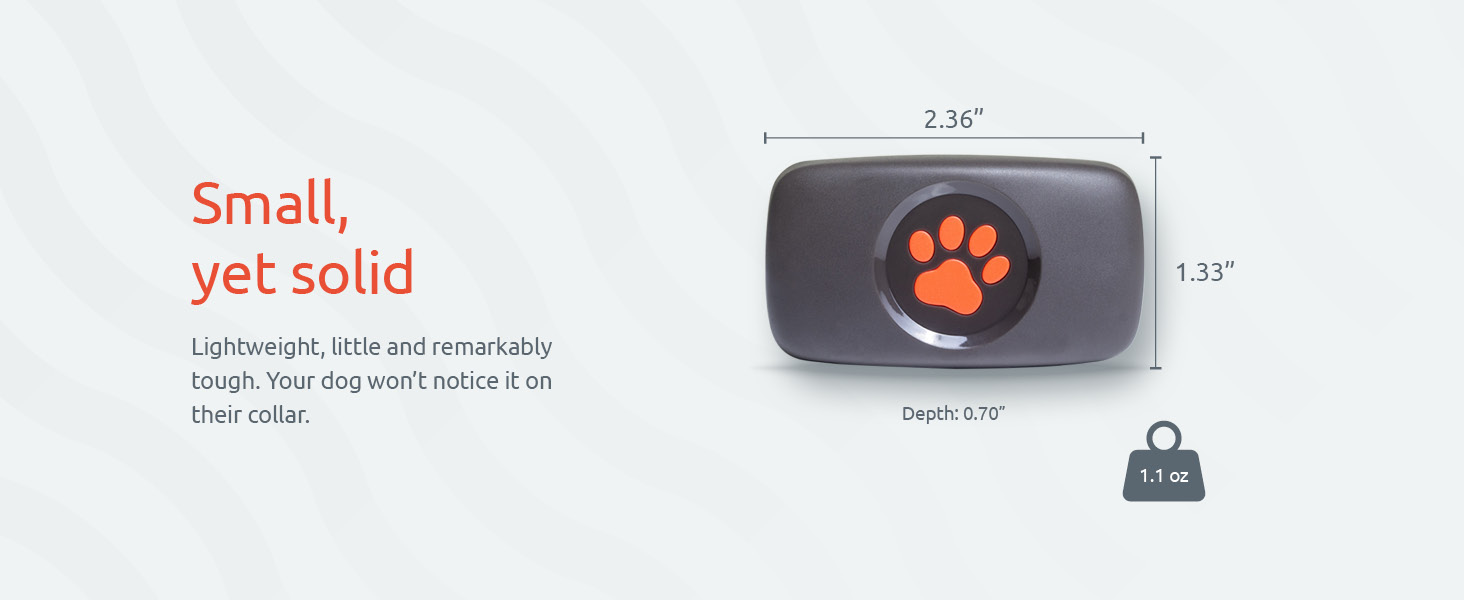
Figure 4: The PitPat app interface displaying a dog's daily activity, including walking, running, and playing, along with total calories burned and distance covered.

Figure 5: The PitPat app's weight management screen, showing current and ideal weight, and tracking progress over time.

Figure 6: The PitPat app's calorie tracking feature, providing insights into calories burned and recommended daily food portions.
Maintenance
Proper care ensures the longevity and accuracy of your PitPat monitor:
- Cleaning: The PitPat monitor is waterproof. To clean, wipe the device with a damp cloth and allow it to air dry. Avoid drying the device near direct heat sources to prevent damage.
- Battery Replacement: The PitPat monitor uses a user-replaceable CR2032 coin cell battery. When the battery needs replacement, the app will notify you. Carefully open the device casing (refer to the app or manufacturer's website for specific instructions) and replace the old battery with a new CR2032 battery. Ensure the casing is securely closed to maintain its waterproof seal.
- Waterproof & Adventure-Proof: The device is 100% waterproof and designed to withstand various outdoor conditions, including swimming and rough play.

Figure 7: The PitPat monitor demonstrating its 100% waterproof capability, suitable for all water activities.

Figure 8: The PitPat monitor's robust construction, designed to be adventure-proof and withstand various outdoor environments.
Troubleshooting
If you encounter issues with your PitPat monitor, consider the following common solutions:
| Problem | Possible Cause / Solution |
|---|---|
| Device not connecting/syncing with app | Ensure Bluetooth is enabled on your phone. Make sure the device is within range. Press the button on the PitPat monitor to initiate data transfer. Check if the battery is low or dead; replace if necessary. Try restarting your phone and the app. |
| Inaccurate activity/distance data | Recalibrate the device using the "Tune Distance Estimate" feature in the app. Ensure the device is securely attached to the collar and not swinging excessively. Note that activities like digging might be misinterpreted as movement. |
| Battery drains quickly | Ensure you are using a fresh, high-quality CR2032 battery. Verify the device casing is properly sealed after battery replacement. If the issue persists, contact customer support. |
| App features not working as expected (e.g., online features) | Some online features or specific functionalities may be region-locked (e.g., primarily for Europe). Ensure your app is updated to the latest version. If a specific feature is critical, contact PitPat support for clarification on regional availability. |
| Difficulty with initial pairing | Ensure the device is in pairing mode (usually indicated by a light pattern after pressing the button). Follow the app's specific pairing instructions carefully. If issues persist, try reinstalling the app. |
For persistent issues not covered here, please refer to the PitPat website for detailed FAQs or contact their customer support.
Specifications
| Feature | Detail |
|---|---|
| Model Number | PP02 |
| Dimensions (LxWxH) | 1.34 x 1.26 x 0.59 inches (34 x 32 x 15 mm) |
| Weight | 0.56 ounces (16 Grams) |
| Battery Type | 1 x CR2032 Lithium Metal (included) |
| Battery Life | 1+ years (user-replaceable) |
| Waterproof Rating | 100% Waterproof |
| Material | Nylon |
| Color | Black, Orange |
| Target Audience | Dogs (All Breed Sizes) |
| Connectivity | Bluetooth |
| Manufacturer | PitPat |
| First Available Date | April 24, 2018 |

Figure 9: Detailed dimensions and weight of the PitPat monitor, illustrating its compact and lightweight design.
Warranty Information
For detailed information regarding the warranty coverage for your PitPat Dog Activity Monitor, please refer to the official PitPat website or the warranty card included with your product packaging. Warranty terms and conditions may vary by region.
Customer Support
If you require further assistance, have questions, or need to report an issue, please visit the official PitPat support page on their website. You can typically find FAQs, troubleshooting guides, and contact options (such as email support) there. Customer service is available to help with product inquiries and technical support.
Related documentsPP02


Ask a question about this manual
Ask about setup, troubleshooting, compatibility, parts, safety, or missing instructions. Manuals+ will review the question and use this page’s manual context to help answer it.