
Mcbazel MT-av-040021
Mcbazel Arcade Game Video Output Converter Board User Manual
Model: MT-av-040021
Introduction
The Mcbazel Arcade Game VGA RBGS RGBSHV to HDMI Game Video Output Converter Board is designed to convert various arcade game video signals to a standard HDMI output. This device ensures high-quality video conversion with excellent color restoration and minimal noise, making it ideal for connecting older arcade systems to modern HDMI displays.

Figure 1: Mcbazel Arcade Game Video Output Converter Board with included cable.
Key Features:
- Equipped with a 24-bit professional video processing chip for superior signal processing, ensuring well-restored colors and an image free from noise and aliasing.
- Automatic scanning and identification of 15K, 24K, and 31K game signals for ease of operation.
- Automatic identification of various color difference signal games, eliminating the need for manual adjustments.
- On-screen display (OSD) menu for convenient operation. Input RGB can be adjusted via a 500ohm potentiometer.
- Supports both English and Chinese menu display.
Setup
This section provides instructions for setting up your Mcbazel Video Output Converter Board. Please ensure all power is disconnected from your arcade system and display before beginning installation.
Package Contents:
- 1 x Mcbazel Arcade Game Video Output Converter Board
- 1 x Connection Cable
Connection Steps:
- Power Supply: Connect a DC 5V/2A power supply to the designated input port on the converter board. Ensure the power supply is stable and provides the correct voltage and current.
- Input Signal Connection: Identify the video output from your arcade game system. Connect the appropriate cable (VGA, RGBS, RGBHV, or YPbPr) from your arcade system to the corresponding input port on the converter board. The board automatically scans and identifies 15K, 24K, and 31K horizontal frequency signals for RGBS, and 31K for RGBHV.
- HDMI Output Connection: Connect an HDMI cable from the HDMI output port on the converter board to an HDMI input port on your display (monitor, TV, etc.).
- Optional RGB Adjustment: If needed, the input RGB can be adjusted using the 500ohm potentiometer on the board.

Figure 2: Detailed view of the converter board, highlighting input and output ports.
Note: An installation guide is NOT included with the product. Refer to this manual for setup and operation instructions.
Operating Instructions
Once the converter board is properly connected, power on your arcade system and the display. The converter board will automatically detect the input signal.
Automatic Signal Identification:
- The board automatically scans and identifies 15K, 24K, and 31K horizontal frequency signals for RGBS input.
- For RGBHV input, it identifies 31K horizontal frequency signals.
- For YPbPr input, it automatically identifies resolutions such as 480i-60, 576i-50, 1080i-50, 1080i-60, 480p-60, 576p-60, 720p-50, 720p-60, 1080p-50, and 1080p-60.
On-Screen Display (OSD) Menu:
The converter features an OSD menu for convenient adjustments. Use the buttons on the board (UP, DOWN, MENU, AUTO) to navigate and make selections. The menu supports both English and Chinese display languages.
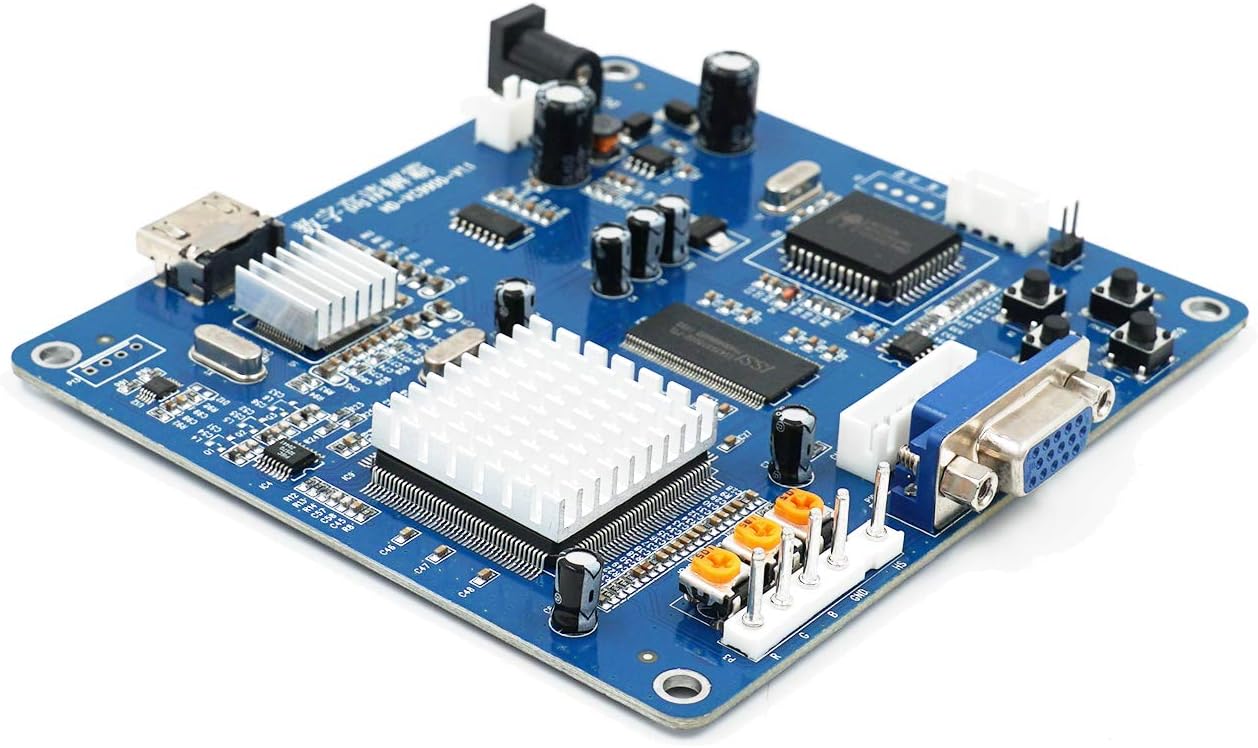
Figure 3: Control buttons for OSD menu navigation.
Output Resolution:
The output HDMI standard format signal resolutions supported are: 640x480, 800x600, 1024x768, and 1360x768.
WARNING: You cannot use the image alignment function when the input signal format is RGBHV (VGB).
Maintenance
To ensure the longevity and optimal performance of your converter board, follow these general maintenance guidelines:
- Keep the board in a dry, dust-free environment.
- Avoid exposing the board to extreme temperatures or humidity.
- Do not attempt to disassemble the board or modify its components, as this may void any potential warranty and cause damage.
- Clean the board gently with a soft, dry cloth if necessary. Do not use liquid cleaners.
Troubleshooting
This section addresses common issues you might encounter with the converter board.
Common Issues and Solutions:
- No Signal on Display:
- Ensure the DC 5V/2A power supply is correctly connected and providing power.
- Verify that the input video cable (VGA, RGBS, RGBHV, YPbPr) is securely connected to both the arcade system and the converter board.
- Check the HDMI cable connection between the converter board and your display.
- Confirm your display is set to the correct HDMI input source.
- Image Distortion, Noise, or Aliasing:
- While the board is designed to minimize these issues, ensure all connections are secure and free from interference.
- If using RGB input, try adjusting the 500ohm potentiometer on the board.
- Ensure the input signal format is within the supported specifications (15K, 24K, 31K for RGBS; 31K for RGBHV; various YPbPr resolutions).
- Cannot Use Image Alignment Function:
- As noted in the operating instructions, the image alignment function is not available when the input signal format is RGBHV (VGB). This is a design limitation of the product.
- Menu Language Issue:
- Access the OSD menu and navigate to the language settings to switch between English and Chinese.
Specifications
| Feature | Specification |
|---|---|
| Power Supply Input | DC 5V/2A |
| Interface | VGA/RGBS/RGBSHV to HDMI |
| Input Signal Format | VGA, RGBS, RGBHV, YPbPr |
| Input RGBS Format | 15kHz, 24kHz, 31kHz horizontal frequency signal automatic scanning |
| Input RGBHV Format | 31k horizontal frequency signal |
| Input YPbPr Format | 480i-60, 576i-50, 1080i-50, 1080i-60, 480p-60, 576p-60, 720p-50, 720p-60, 1080p-50, 1080p-60 automatic identification |
| Output HDMI Standard Format Resolution | 640x480, 800x600, 1024x768, 1360x768 |
| Item Model Number | MT-av-040021 |
| Item Weight | 3.81 ounces |
| Package Dimensions | 6.5 x 4.92 x 0.98 inches |
| Manufacturer | Mcbazel |
Warranty and Support
Mcbazel products are designed for reliability and performance. For specific warranty information, please refer to the terms and conditions provided at the point of purchase or contact Mcbazel customer support directly.
Customer Support: For technical assistance or inquiries, please visit the official Mcbazel website or contact their customer service department. Please note that this product does not include a separate installation guide beyond the information provided in this manual.
You can find more information about Mcbazel and their products by visiting the Mcbazel Store on Amazon.
Ask a question about this manual
Ask about setup, troubleshooting, compatibility, parts, safety, or missing instructions. Manuals+ will review the question and use this page’s manual context to help answer it.