
Introduction
The Moxa EDS-205A is a robust, unmanaged 5-port Ethernet switch designed for industrial applications. It features 10/100BaseT(X) ports with RJ45 connectors, redundant dual 12/24/48 VDC power inputs, and an IP30 aluminum housing, making it suitable for hazardous locations, transportation, and maritime environments.
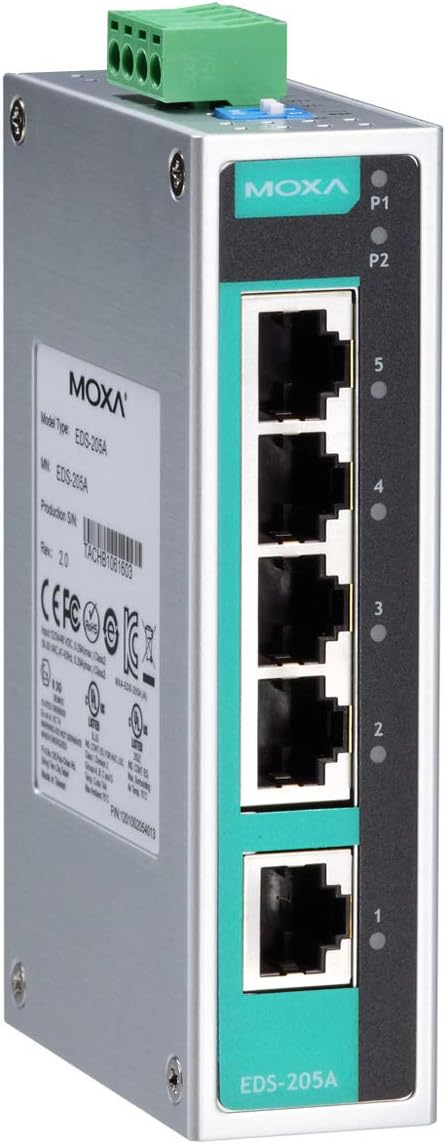
Figure 1: Moxa EDS-205A Unmanaged Ethernet Switch, showing the five RJ45 Ethernet ports, power input terminal, and LED indicators.
Safety Information
Please read this manual carefully before operating the device. Adhere to all safety warnings and precautions to prevent damage to the device or injury to personnel.
- Ensure proper grounding of the device.
- Use only the specified power input voltage range (12/24/48 VDC).
- Do not expose the device to moisture or extreme temperatures outside its operating range.
- Disconnect power before performing any maintenance or installation procedures.
- Installation should be performed by qualified personnel.
Package Contents
Verify that your package contains the following items:
- Moxa EDS-205A Ethernet Switch
Product Overview
Key Features
- 10/100BaseT(X) (RJ45 connector)
- Redundant dual 12/24/48 VDC power inputs
- IP30 aluminum housing
- Rugged hardware design well suited for hazardous locations (Class I Div. 2/ATEX Zone 2), transportation (NEMA TS2/EN 50121-4), and maritime environments (DNV/LR/ABS/NK)
- Compliant with PROFINET Conformance Class A (Only for models with hardware version 3.0.0 or later)
Physical Layout and Indicators
The EDS-205A features five 10/100BaseT(X) RJ45 ports, power input terminals, and LED indicators for status monitoring.
| Component | Description |
|---|---|
| RJ45 Ports (1-5) | 10/100 Mbps Ethernet ports for network connections. |
| P1/P2 LEDs | Power input indicators. Lit when power input P1/P2 is active. |
| Port LEDs (1-5) | Indicate link status and activity for each corresponding Ethernet port. |
| Power Input Terminal | Terminal block for connecting redundant 12/24/48 VDC power sources. |
Setup
Mounting the Switch
The EDS-205A is designed for DIN-rail or wall mounting. Ensure a stable and secure mounting surface.
DIN-Rail Mounting
- Attach the DIN-rail mounting kit (if not pre-installed) to the rear of the switch.
- Hook the top edge of the switch onto the DIN-rail.
- Push the bottom of the switch towards the DIN-rail until it clicks into place.
Wall Mounting
- Secure the wall-mount plates (if provided) to the sides of the switch using screws.
- Mark the desired mounting points on the wall using the plates as a template.
- Drill pilot holes and insert appropriate wall anchors if necessary.
- Mount the switch to the wall using screws through the wall-mount plates.
Power Connection
The EDS-205A supports redundant dual 12/24/48 VDC power inputs.
- Identify the power input terminal block on the top of the switch.
- Connect the positive (+) and negative (-) wires from your DC power supply to the corresponding terminals (V+ and V-) on the terminal block.
- For redundant power, connect a second DC power supply to the P2 terminals.
- Ensure proper polarity to avoid damage.
- Tighten the terminal screws securely.
Network Connection
Connect your network devices (e.g., computers, servers, other switches) to the RJ45 Ethernet ports (1-5) on the front panel of the EDS-205A using standard Ethernet cables.
- Use Cat5e or better Ethernet cables for optimal performance.
- The switch supports auto MDI/MDI-X, so straight-through or crossover cables can be used.
Operating the Switch
Basic Operation
Once powered on, the EDS-205A operates automatically as an unmanaged switch. It requires no software configuration.
- The switch automatically detects the speed (10/100 Mbps) and duplex mode (half/full) of connected devices.
- Data packets are forwarded between connected devices based on MAC addresses.
LED Indicators
Monitor the status of the switch using the front panel LEDs:
| LED | Status | Description |
|---|---|---|
| P1/P2 | On | Corresponding power input (P1 or P2) is active. |
| P1/P2 | Off | Corresponding power input is not active. |
| Port (1-5) | On (Solid) | A valid network link is established at 10/100 Mbps. |
| Port (1-5) | Flashing | Data activity (transmitting or receiving) on the port. |
| Port (1-5) | Off | No link detected or port is inactive. |
Maintenance
The Moxa EDS-205A is designed for minimal maintenance. However, regular checks can ensure optimal performance and longevity.
- Cleaning: Periodically clean the exterior of the switch with a soft, dry cloth. Do not use liquid or aerosol cleaners.
- Environmental Check: Ensure the operating environment remains within the specified temperature and humidity ranges.
- Cable Integrity: Inspect network and power cables for any signs of damage or wear. Replace damaged cables immediately.
- Firmware: As an unmanaged switch, firmware updates are typically not required or available for user installation. Refer to Moxa's official website for any specific advisories.
Troubleshooting
This section provides solutions to common issues you might encounter with the EDS-205A switch.
| Problem | Possible Cause | Solution |
|---|---|---|
| Switch does not power on (P1/P2 LEDs off) | No power input or incorrect voltage. | Verify power supply connection and voltage (12/24/48 VDC). Check power cables and terminal block connections. |
| No link on an Ethernet port (Port LED off) | Cable issue, device off, or incorrect connection. | Check the Ethernet cable connection at both ends. Ensure the connected device is powered on and functioning correctly. Try a different port or cable. |
| Slow network performance | Cable quality, network congestion, or duplex mismatch. | Ensure Cat5e or better cables are used. Check for excessive network traffic. While the switch auto-negotiates, ensure connected devices are also set to auto-negotiate or match the switch's 10/100 Mbps full-duplex. |
| Intermittent connectivity | Loose connections, faulty cable, or power fluctuations. | Check all cable connections. Inspect cables for damage. Ensure stable power supply. |
If the problem persists after attempting these solutions, please contact Moxa technical support.
Specifications
| Attribute | Value |
|---|---|
| Model | EDS-205A |
| Number of Ports | 5 |
| Interface Type | RJ45 |
| Ethernet Standard | 10/100BaseT(X) |
| Power Input | Redundant dual 12/24/48 VDC |
| Operating Temperature | -10 to 60°C |
| Housing Material | IP30 Aluminum |
| Dimensions | 7.32 x 6.93 x 1.97 inches |
| Weight | 9.8 ounces |
| Manufacturer | Moxa |
| UPC | 613739924341 |
| ASIN | B078YDXVGH |
| First Available Date | January 11, 2018 |
Warranty and Support
For detailed warranty information, please refer to the official Moxa website or contact your local distributor. Technical support is available through Moxa's official channels for assistance with product installation, configuration, and troubleshooting.
Visit www.moxa.com for more information.


