
Fytoo 3.7V 600mAh Lithium Battery with 5-in-1 Balance Charger Kit
Fytoo 3.7V 600mAh Lithium Battery with 5-in-1 Balance Charger User Manual
Model: 3.7V 600mAh Battery & 5-in-1 Charger Kit
Introduction
This manual provides essential information for the safe and effective use of your Fytoo 3.7V 600mAh Lithium Batteries and 5-in-1 Balance Charger. Please read this manual thoroughly before use to ensure proper operation and longevity of your product.
Package Contents
Upon opening the package, verify that all components are present and undamaged:
- 5 x Fytoo 3.7V 600mAh Lithium Batteries
- 1 x Fytoo 5-in-1 Balance Charger
- 1 x USB Charging Cable

Image: The complete package contents, including the 5-in-1 charger, USB cable, and five individual 3.7V 600mAh lithium batteries.
Specifications
| Battery Type | Lithium Polymer (LiPo) |
| Voltage | 3.7V |
| Capacity | 600mAh |
| Battery Configuration | 1S |
| Discharge Rate | 25C |
| Battery Dimensions (L x W x T) | 40mm x 25mm x 8mm (1.65in x 0.99in x 0.32in) |
| Battery Weight | 17g per piece |
| Discharge Connector | 51005-2P plug |
| Charging Interface | 51005-2P plug |
| Charger Input | USB (5V) |
| Compatible Models | EACHINE E32HW, MJX X708, X708W, X709, UDI U45, U45W, U42, U42W, SYMA X5C, X5SW, X5SC, S5, S5C, S5W, SS40, FQ36, T32, T5W, H42, CW4 RC Helicopters/Quadcopter |

Image: Visual representation of battery dimensions and key specifications.
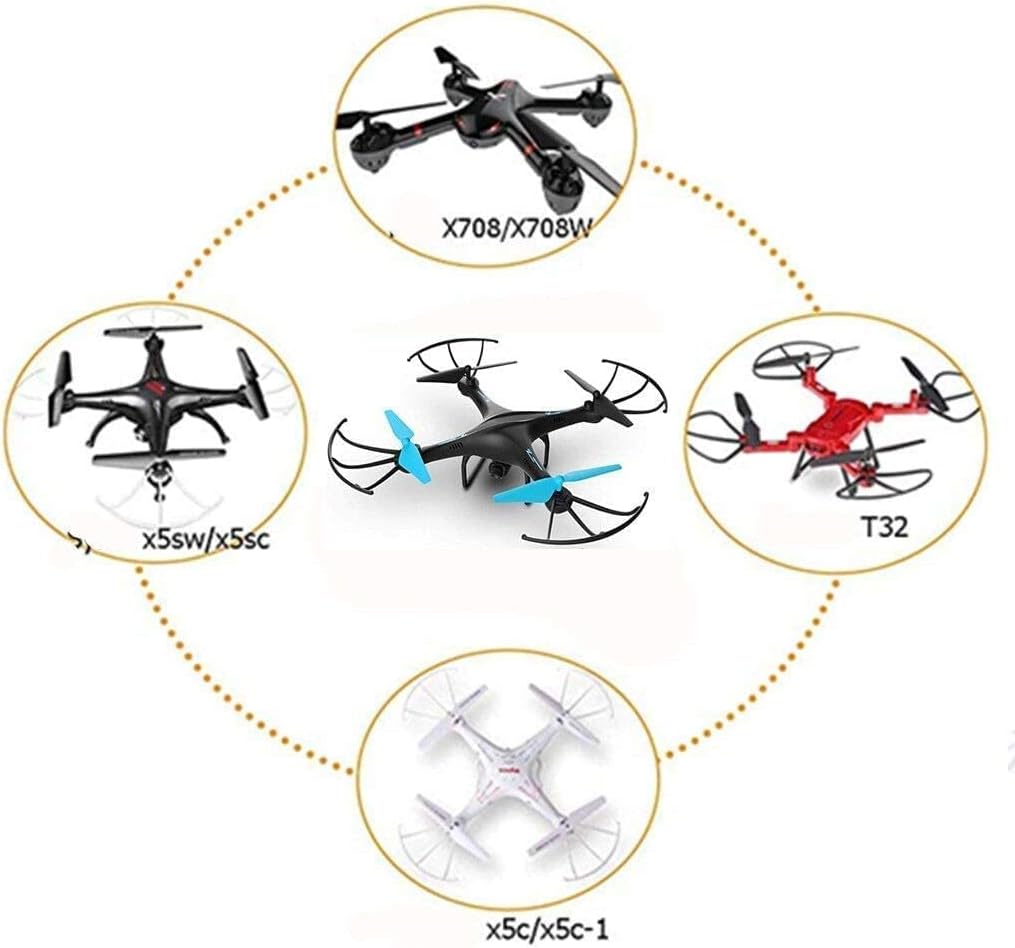
Image: Examples of compatible drone models for these batteries.
Safety Information
Lithium Polymer (LiPo) batteries require careful handling. Adhere to the following safety guidelines:
- Do not overcharge or over-discharge batteries.
- Do not short-circuit the battery terminals.
- Do not expose batteries to extreme temperatures (hot or cold) or direct sunlight.
- Do not puncture, drop, or disassemble batteries.
- Always charge batteries on a non-flammable surface and away from flammable materials.
- Supervise batteries during charging.
- If a battery swells, leaks, or shows any signs of damage, discontinue use immediately and dispose of it properly.
- Keep batteries out of reach of children and pets.
- The internal battery protection device is installed for user safety; however, proper handling is still crucial.
Setup: Charging the Batteries
Before first use, or when batteries are low, they must be charged using the provided 5-in-1 balance charger.
- Connect the Charger: Plug the USB end of the charging cable into a standard USB power source (e.g., computer USB port, USB wall adapter, power bank). The charger's indicator lights may briefly illuminate.
- Connect Batteries: Carefully insert the battery connectors into the charging ports on the 5-in-1 balance charger. Ensure the connectors are oriented correctly to avoid damage. You can charge one to five batteries simultaneously.
- Monitor Charging: Each charging port on the charger has a corresponding indicator light.
- A red light indicates that the battery is currently charging.
- The light will turn off when the battery is fully charged.
- Disconnect Batteries: Once all indicator lights are off, the batteries are fully charged. Disconnect the batteries from the charger, then disconnect the charger from the USB power source.
Note: It is recommended to allow batteries to cool down for 15-20 minutes after use before recharging them to prolong their lifespan.

Image: The 5-in-1 charger with multiple batteries connected for simultaneous charging.
Operation: Installing Batteries
These batteries are designed for various RC models. Refer to your specific RC model's instruction manual for detailed battery installation steps. General guidelines are provided below:
- Identify Battery Compartment: Locate the battery compartment on your RC drone or helicopter. This is typically on the underside or rear of the device.
- Open Compartment: Open the battery compartment cover.
- Insert Battery: Carefully insert a fully charged Fytoo 3.7V 600mAh battery into the compartment, ensuring the correct orientation.
- Connect Plug: Connect the battery's 51005-2P plug to the corresponding port inside the RC model's battery compartment. Ensure a secure connection.
- Close Compartment: Close the battery compartment cover securely.
Your RC model is now ready for operation. Always ensure the battery is securely installed before use.
Maintenance
Proper maintenance extends the life of your batteries and charger:
- Storage: Store batteries in a cool, dry place, away from direct sunlight and extreme temperatures. For long-term storage, it is recommended to store LiPo batteries at a "storage charge" (around 3.8V per cell), not fully charged or fully discharged.
- Cleaning: Use a soft, dry cloth to clean the batteries and charger. Do not use liquids or solvents.
- Inspection: Regularly inspect batteries for any signs of swelling, damage, or leaks. Inspect the charger and cables for fraying or damage. Discontinue use of any damaged components.
- Disposal: Dispose of damaged or end-of-life LiPo batteries responsibly at a designated battery recycling facility. Do not dispose of them in household waste.
Troubleshooting
| Problem | Possible Cause | Solution |
|---|---|---|
| Battery not charging. |
|
|
| Short flight time. |
|
|
| Battery swells or gets hot during use/charging. |
|
|
Warranty and Support
Fytoo products are manufactured with quality and reliability in mind. While specific warranty details are not provided in this manual, if you encounter any issues or have questions regarding your Fytoo 3.7V 600mAh Lithium Batteries or 5-in-1 Balance Charger, please do not hesitate to contact Fytoo customer support.
For assistance, please refer to the contact information provided with your purchase or visit the official Fytoo store on Amazon:
Ask a question about this manual
Ask about setup, troubleshooting, compatibility, parts, safety, or missing instructions. Manuals+ will review the question and use this page’s manual context to help answer it.